
Hike update: October 2017
What’s new in Hike: October update
New features
Sync with multiple eCommerce platforms at once!
We’re excited to announce that Hike now lets users connect each individual outlet that they have, with separate eCommerce stores. In fact, we’re amongst the first of the cloud POS software systems to introduce this neat feature!
Easily manage your online inventory, and sell by outlet. Just like those enterprise online mega stores, get your site visitors to select, browser and place an order by location. Hike will sync each individual outlet to its relevant online store separately.
Multi-outlet vendors. Account it right with Hike!
With all your outlets synced to the one accounting file, it might make it a bit difficult to precisely track all your revenues and expenses by each outlet. That’s why we’ve introduced a ‘Sync by outlet’ feature, to help you easily navigate your data. With this, you’ll be able to sync each outlet to a different accounting file on Xero or QuickBooks Online. This is an optional feature with no extra cost!
Easily add/remove items to/from a product type
From now on, whenever you create a new product type, you can allocate multiple products right from the product type detail view window. Simply create a new type, click to allocate products and check the boxes for the items that you wish to associate with it. Up until now, you have been associating items with their product types from the product details view. While very easy to use for new products, it was a bit of stretch, when trying to introduce a new product type for existing products.
‘Supplier code’ data field for products
Now included is an additional data field, ‘Supplier Code’, in the products page. This is useful for when your supplier is using a different product code from your SKU, making the Supplier Code field a handy addition.
‘Custom info’ an extra data field for products
An additional ‘Custom’ data field is added for products, in the instance where you want to track any additional miscellaneous information, that you wish to track separately.
New barcode label: Dymo jewellery/butterfly label
We’ve just released a new barcode label compatibility. You can now print Dymo Jewellery/Butterfly labels right from the Hike barcode printing widget. The Dymo label code is 30299.
Please Note: As of now, these labels are compatible with Dymo Label Printer 450, US version only.
Hike is now also available in Traditional Chinese
We now have complete language compatibility in Traditional Chinese!
Our international linguists are working hard to release Hike in more languages, with 4 new translations already planned to be added by December of this year. Stay tuned to our blogs and we’ll let you know as soon as they become available!
Sell composite products, reborn!
Retailers can now go bigger with better, and more robust composite products, now available. Simply select from your existing products (or parts) that you require to create a new composite product. Hike will also ask you to select the quantity for each of the items included in this new combo, so that whenever you make a sale, your inventory will get adjusted for all your items, in real-time.
To create a new combo offer, go to Products > Offers > Composite Product. You can build an endless range of combo/bundle offers, for example:
- Food Combo (Fish & Chips with a can of Coke)
- Computer CPU (A fully built computer using existing items, like RAM, hard disk etc.)
- Bicycle (Made of parts that you can also sell separately, i.e. seat, handle, frame, wheels)
- Hamper (A festive season hamper made of various items).
New discount offer type: Buy X, Get Y
Just like a buy one, get one free promotion, Hike now offers retailers the same type of discount offer, without the limitation. Where the buy one, get one free discount usually refers to the same item as being free, Hike’s buy X, get Y discount lets you offer everything as free with anything.
To put simply, any item you are offering as free, does not have to be related to the product you are selling. Find new and different combinations to sell with your products. Buy a t-shirt, get a free donut…or something a little more logical.
New offer type: Bin discount
Hike now lets you upsell products just like those large super-store chains! Bin discounts makes it easier for you to create temporary price adjustments and apply it for multiple products. Simply create a new ‘Bin discount’, select the products that you wish to add to the bid, and set a price.
For example, create a bin discount like: Buy any item from the bin, for only $10! Obviously, any items that you have placed in the bin will be sold for $10.
When items from the bin are added to the card, price adjustments are automatically applied. Items return to their normal price as soon as when the offer is expired, or manually cancelled by you.
You can now change your store’s cloud (web) address
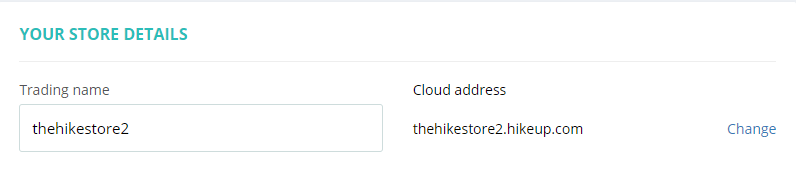
The cloud address is the URL or web address that you use to login to your store. E.g.: Your-Store.hikeup.com
Fancy a new cloud address for your store? Now you can. Simply go to Store Setup > General and click on ‘Change’ next to the cloud address. It’s right there on very first row next to your store name.
- When you click on change, the system will show a warning message that the change will take effect for all your users.
- Should you decide to change, please keep in mind that all your staff will need to use the new cloud address for their next login. So, it is important that you advise all your team before making the change.
Scan barcodes to create & receive PO
Creating and receiving Purchase Orders, just got even easier with Hike. Simply click to create a new PO, scan items to it using your barcode scanner and save. When you receive items from your supplier, simply open the PO and scan it, to mark it as received.
‘+ Add new’ shortcut on all pages
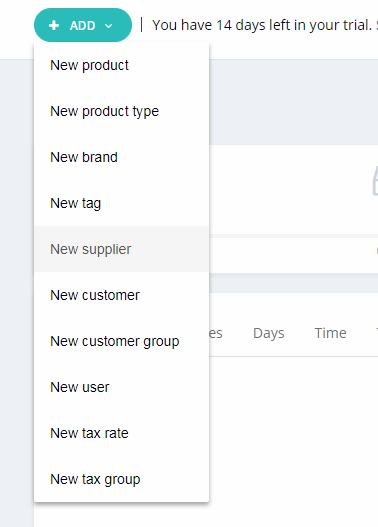
Need to add a new product or customer on the fly? Well with our new +ADD NEW shortcut you can! Located at the top of every page, select what you want to create from the +ADD NEW list and you’ll instantly be taken to that page.
Bulk edit, modify, delete products
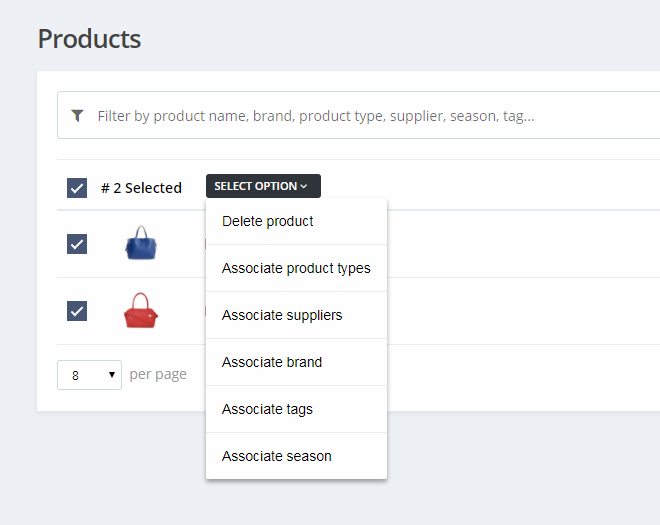
Now, if you want to bulk modify your products, simply select the items from the product list view screen to bulk delete or modify. A much simpler, and faster way to bulk modify.
Importing from Vend?
Migrating your POS solution from Vend to Hike? With our new ‘Import from Vend’ feature, you can easily import all your Vend data – including products, customers & suppliers – via a CSV file. Just import your file, and relax! Hike will do the rest.
Auto generate Purchase Orders (POs) for backorders
You can now auto-generate supplier purchase orders for items in backorders. Once a backorder is created, on the backorder line items within your sales history, you’ll have an option called ‘Create PO’. By clicking on the button, Hike will auto-generate purchase orders for all the items included in that backorder.
Option to associate outlet products right from the word go!
So, you’re opening a new outlet but with limited products, not a problem. When you add a new outlet, Hike will let you choose products available at your newly created outlet!
Create & receive stock transfer items with barcode scan
Barcode scanning enabled for creating stock transfer and marking items as received.
New Report: Credit balance report
Hike now has a build-in reporting feature for ‘Credit balances’. Navigate to your reporting section to check out all the latest information surrounding your credit balance.
New Report: ‘On account’ sales report
We’ve also included a reporting feature for ‘On Account’ Sales. You can also find this in Hike’s reporting section.
Existing features improvement
Reports by outlet for all reports
Wherever applicable, we have added the outlet selection dropdown for reports. You’ll also be able to view consolidated reports by selecting ‘All outlets’. If a user has access to specific outlets only, the ‘All outlets’ will still only show data relating to approved outlets only.
Products are locked during stocktake
If an item is a part of current stock take, Hike will automatically lock the items from being sold. The products will automatically be available for sale once the stocktake is complete. This is to prevent any discrepancies that may arise from sales transactions that take places, while a stocktake is underway.
Of course, you will be able to override this feature if you prefer, however we strongly suggest leaving it on.
Add notes when you park a sale
To make it easy to track parked sales, Hike will prompt you to add notes whenever you are parking a sale. Enter details such as customer name, reference numbers etc. to help you when you come back to complete the sale.
Any dimension logo for receipts
Hike now lets you upload your logo in any size and shape. Enhance your business’s brand with stunning logos!
Print layout in A4 size improvement
Fancy bigger receipts for your customers? We’ve just released improvement for A4 receipt printing. You won’t need to do anything, Hike will automatically set the suitable template for your receipt when you choose to print it in A4.
Chat icon moved to top left
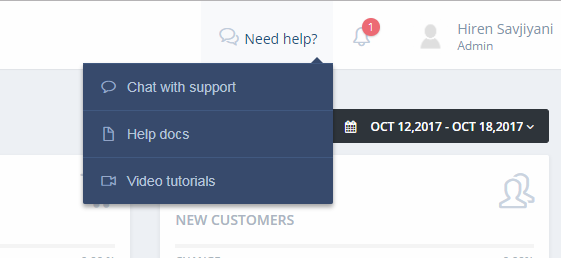
Hike listens to your feedback, and one of things reported by some users was that when using Hike on smaller size screen, the chat support icon was overlapping other features. As such, we’ve now moved the icon to the header, for optimal navigation.
User interface (UI) improvement for cart on sales screen
We’ve upgraded our visual user interface as well so that now, whenever you add a new item to the card, it will appear with a slide-in animation and colour highlight. This is to visually associate items, when they are added to the cart and make things just a little bit easier for your staff.
UI improvement for user advanced permission screen
There are also some minor UI improvements, for the User Advanced Permission screen. The process is now streamlines to view and apply permissions with less clicks.
Company name added to the customer search result list
On the sale page, whenever you search for an existing customer, the company name will also be displayed, along with the customer name and phone number.
Option to print excluding tax price on barcodes
We’ve now added an option whereby users can choose to print the excluding tax price on barcode labels.
Multiple product images for product detail view on sale screen
Until now product detail view on sale screen was showing the main product image only. Now it will also include all the variant images (if they have been uploaded!).