
Hike Update: September 2025
Hey there!
Hope you are well.
Hike POS is proud to announce a significant expansion of our platform capabilities, directly addressing the evolving needs of modern retailers and restaurateurs. Today, we introduce three major innovations set to redefine the point-of-sale experience:
1. Hike Tap to Pay powered by Tyro
2. Complete Restaurant POS system, Table layout, and Kitchen display for unparalleled dine-in management
3. New Features: AI-assisted features and many more
Hike Tap to Pay powered by Tyro
(Available in Australia only)
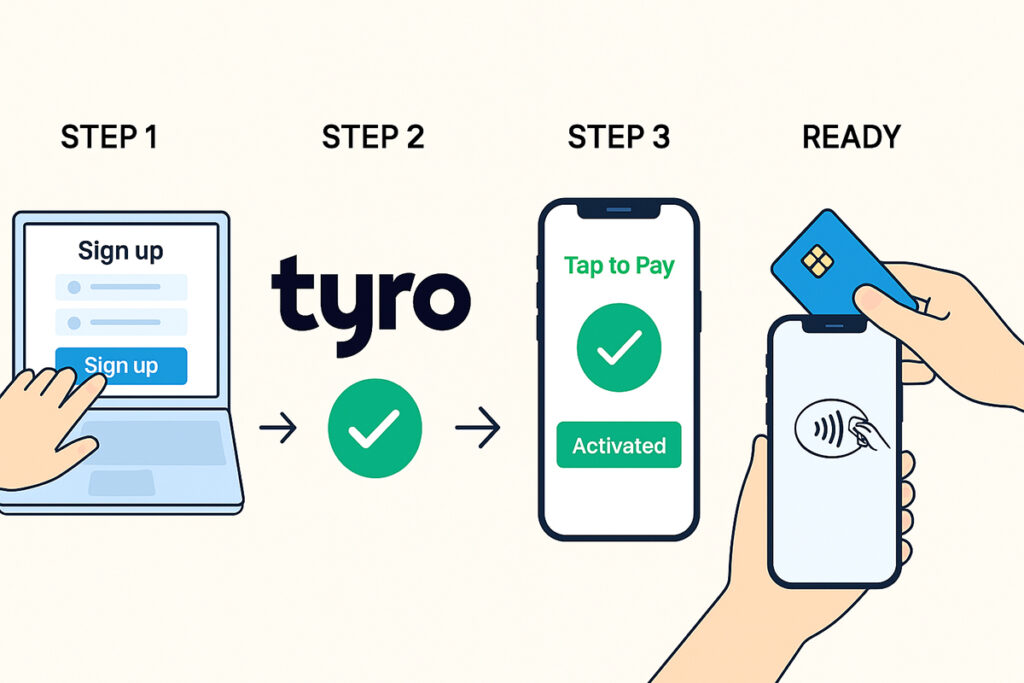
Hike POS is thrilled to announce our powerful new integration with Tyro Tap to Pay, transforming your smartphone or tablet into a powerful, secure all-in-one payment terminal.
What does it mean for your countertop? – No additional payment terminals are required – use the same tablet for both sales and receiving payments. This isn’t just an upgrade – it’s a revolution in how you accept payments.
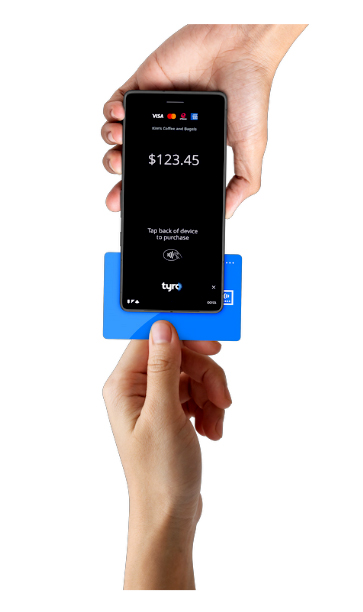
Simply use your NFC-enabled iPhone or Android device – the one you have your Hike installed – to seamlessly process card payments.
The best part? It’s built into Hike, so getting started is incredibly easy for existing Tyro and Hike users. This is the perfect solution for retailers who hustle beyond the storefront.
Whether your goals – save counter space or empower your team to accept payments on the go, Hike Tap to Pay has you covered!
Hike tap to pay powered by Tyro on iPhone requires:
iPhone XS or above
iOS 17.0 or later
Hike tap to pay powered by Tyro on Android requires an Android device with:
NFC capability
Android 11.0 or above
Please check this article for more details.
https://help.hikeup.com/portal/en/kb/articles/how-to-integrate-hike-pos-with-tyro-tap-and-pay
Restaurant Pos/table And Order Management Layout
(Free Add-on with Hike Plus plan)
We’re excited to introduce powerful new Restaurant POS Table Management tools, giving you unparalleled control over your restaurant and bar’s layout.
This isn’t just an update; it’s a quantum leap for restaurant management.
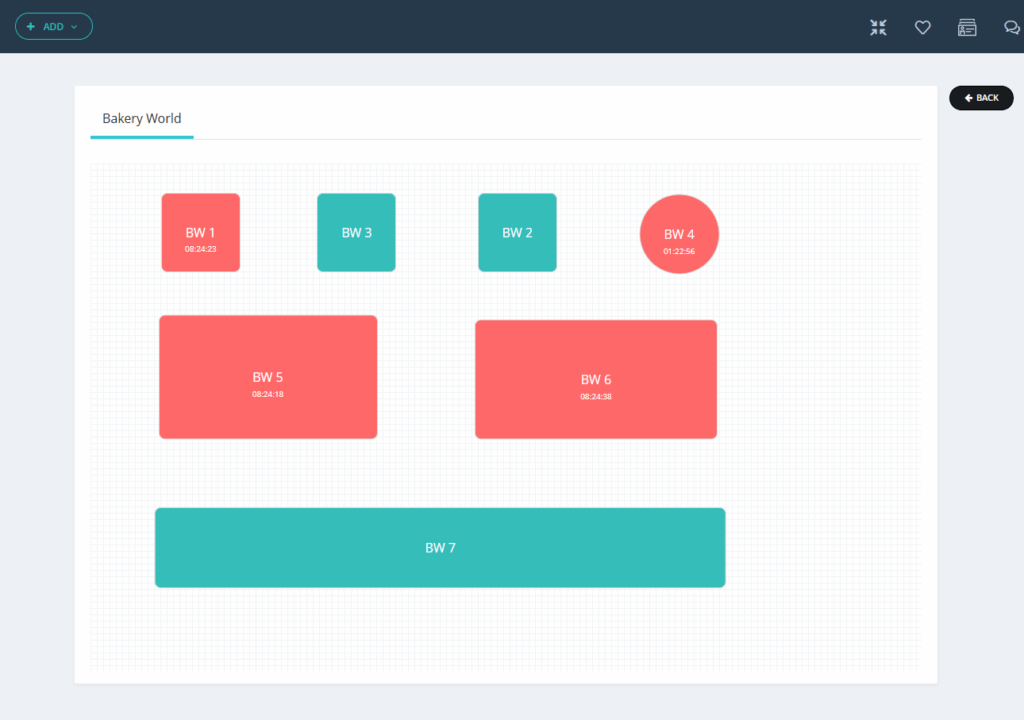
Now you can create multiple floors per outlet and assign tables to organize your floor logically. Our intuitive drag-and-drop editor allows you to fully customize your floor plan by adjusting table shapes and sizes to perfectly match your real-world setup.
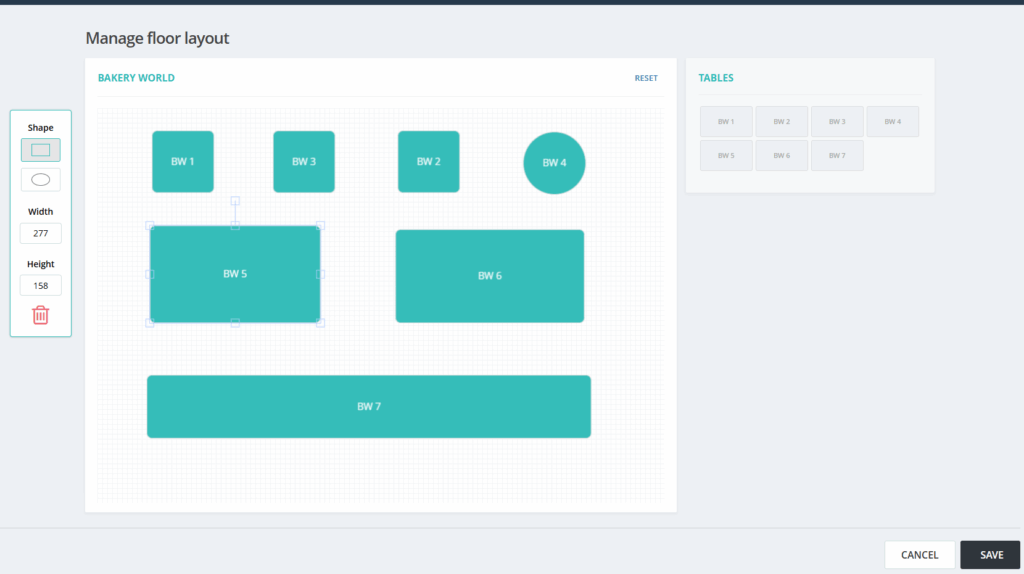
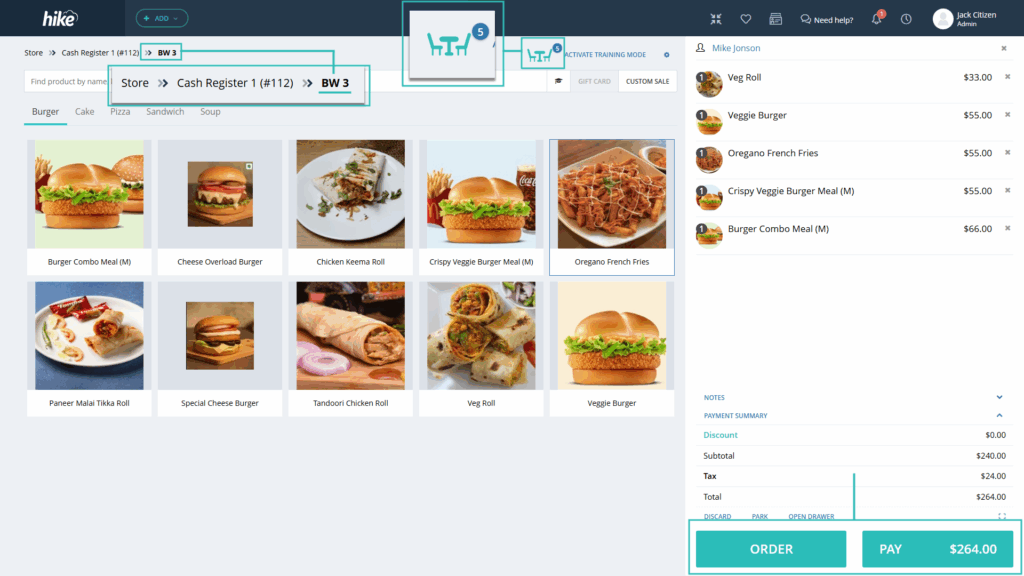
Once the Table/Bar flow is created, simply add products to the table and use the same Hike sales flow. You can open the sale again and add or remove the product from the sale/table.
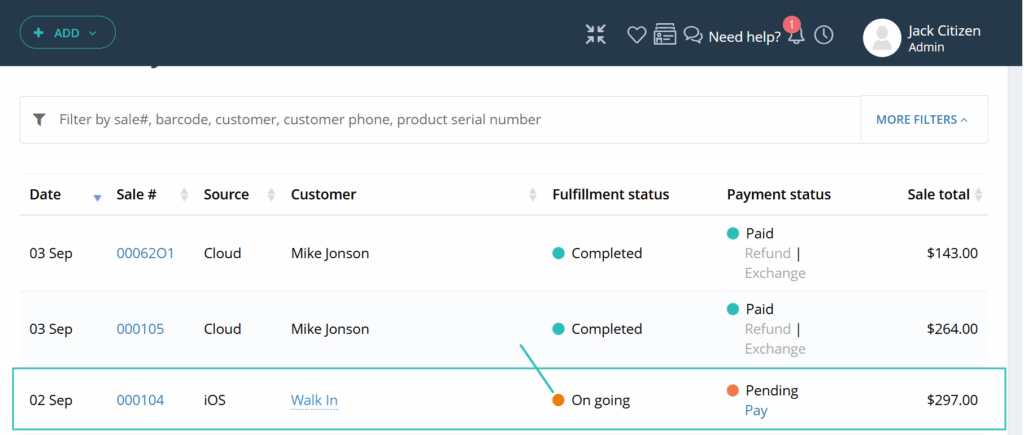
We’ve also introduced a new sales status: Ongoing, for open table sales. This allows your team to modify orders seamlessly before completion.
New Kitchen Display System
A new Kitchen display has been introduced with this feature. The primary purpose of this screen is to communicate order information from the POS system directly to the kitchen or Bar station. It organizes orders by their status (To Cook, Ready, Completed, and Done) and by their originating table, ensuring kitchen staff can prioritize and prepare items efficiently.
The Kitchen Display System is a vital component for modern restaurants using Hike POS, turning the chaotic process of order fulfillment into a streamlined, digital, and efficient workflow.
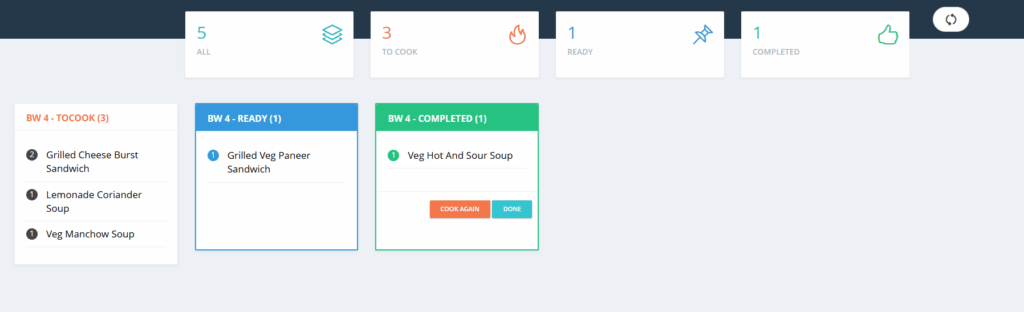
We have created new apps for the Kitchen Display for your iPad and Android tablets.
IOS: https://apps.apple.com/app/id6751876051
Android: https://play.google.com/store/apps/details?id=com.hike.kds
Hike’s revolutionary Kitchen Display System solves bottlenecks and errors by allowing you to create multiple screens dedicated to specific product categories, like food or drinks. This ensures each kitchen station—such as the grill or bar—only sees the orders relevant to them.
Moreover, we have added a special permission for the Owner/Master admin, allowing them to grant refunds for ongoing sales.
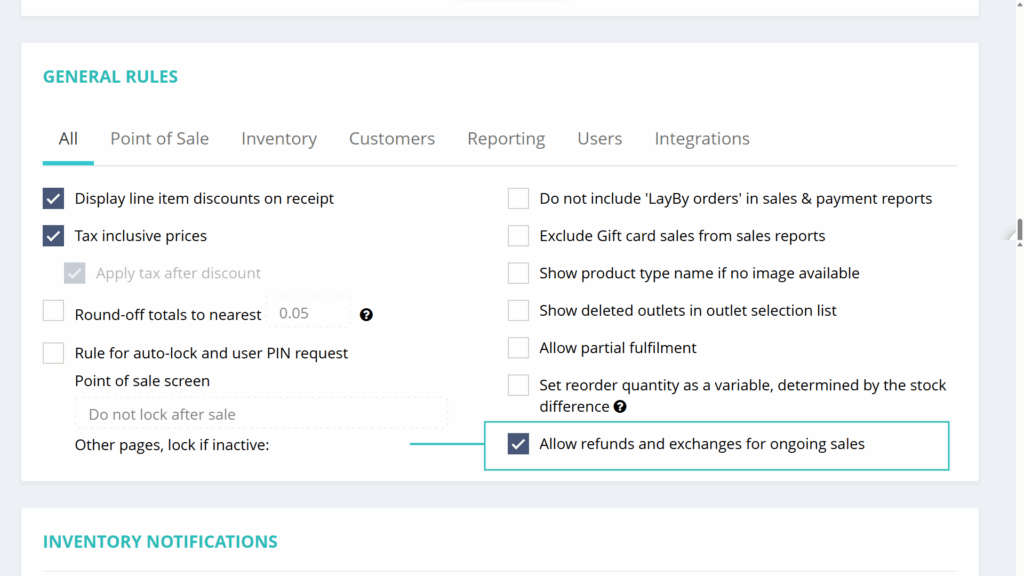
This powerful new feature is available as an exclusive free add-on for our Plus Plan subscribers, and is accessible on Web, iPad, and Android apps simultaneously.
AI-assisted Features and much more
We’re harnessing the power of predictive AI and machine learning to give you back your most valuable asset: time.
From automatically mapping data during imports to generating stunning product descriptions in seconds, adding colours to your payment screens, and Xero integration enhancements. We are introducing a unique set of features as always.
1. AI-assisted Data Import
(Hike Plan: Add on)
Tired of the tedious work of mapping columns when uploading files? Our new AI assistant does the heavy lifting for you!
This intelligent feature automatically analyses the structure of your uploaded files and accurately maps each column to the correct field in the Hike Point of Sale system. The AI will check each column heading for any typo errors, synonyms, and similar words for import. The result? Significantly fewer errors, and a truly effortless, streamlined setup.
Best of all, this powerful innovation works seamlessly behind the scenes. There are no changes to our familiar import interface. You continue with the same import process, but now with the confidence that an AI is ensuring your column mapping is always correct and seamless.
Experience this smart, time-saving innovation, available now as part of our exclusive Addon plan.
2. AI Product Description
(Hike Plan: Add on)
Introducing AI-powered product descriptions in Hike POS! Now you can generate compelling, professional descriptions for your products in seconds.
An option to generate an AI description has been added to the Product page, where you can type in your product’s highlights, and the AI will generate a swanky product description for that product. You can change, edit, and upload this description based on your own requirements.
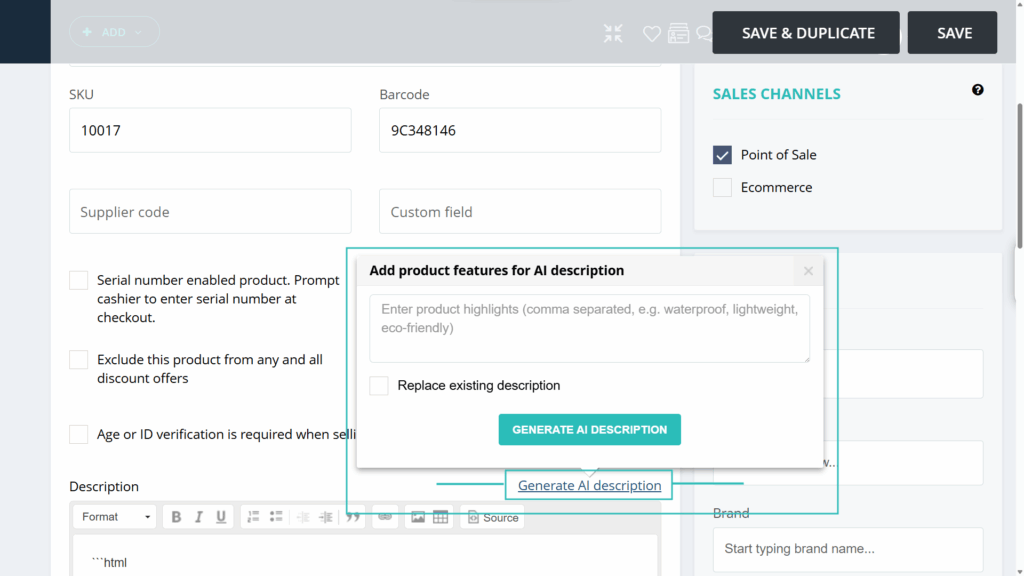
Add this feature now to instantly upgrade your product listings.
3. Xero Syncing With Automated Product Name Handling
(Hike Plan: All Plans)
We’ve implemented a new enhancement to ensure your product synchronization with Xero is seamless and error-free.
To comply with Xero’s 50-character limit for inventory item names, Hike POS will now automatically handle long product names. If a product name in Hike exceeds 50 characters, it will be intelligently truncated to 47 characters, and an ellipsis (“…”) will be added before syncing to Xero. This prevents the “Inventory Item Name must not be more than 50 characters” error.
Please note: Your original, full product name remains unchanged and fully visible within your Hike POS system.This truncation is a one-way process for the sync; the shortened name will not overwrite the full name in Hike.
This update ensures your financial records stay in sync without interruption, letting you focus on your business.
4. A Splash Of Colour For Fewer Payment Errors!
(Hike Plan: Plus)
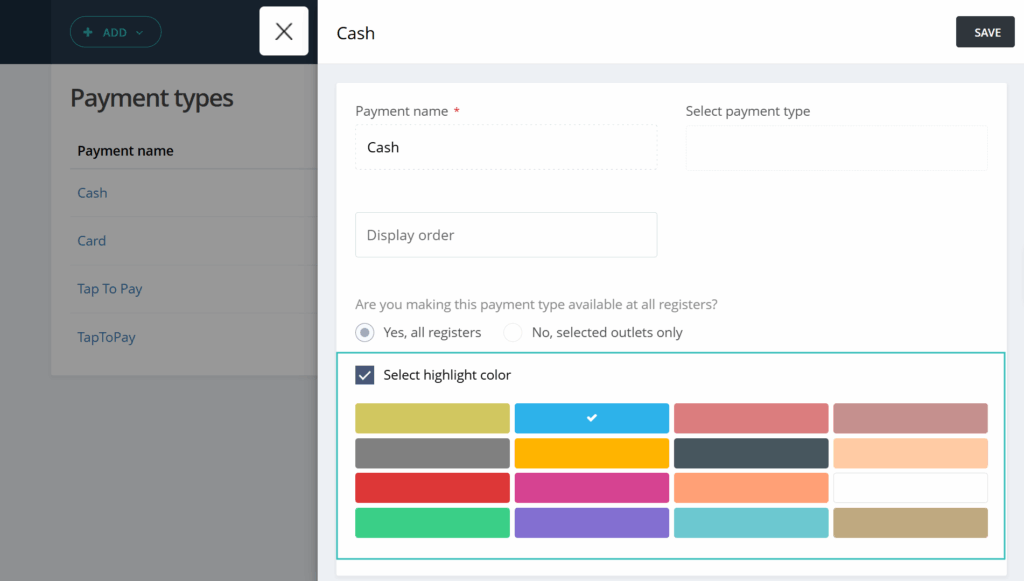
We’ve given our payment screen a vibrant upgrade to make closing out transactions faster and more accurate.
To help your users quickly identify the correct payment type at a glance, each payment button (Cash, Card, Tyro, EFT, etc.) now has its own distinct colour.
Why this matters: During a busy rush, it’s easy to miss-click when buttons look the same. This simple but powerful change uses visual cues to drastically reduce those “wrong payment type” errors, saving you time and ensuring your records are accurate from the first tap.
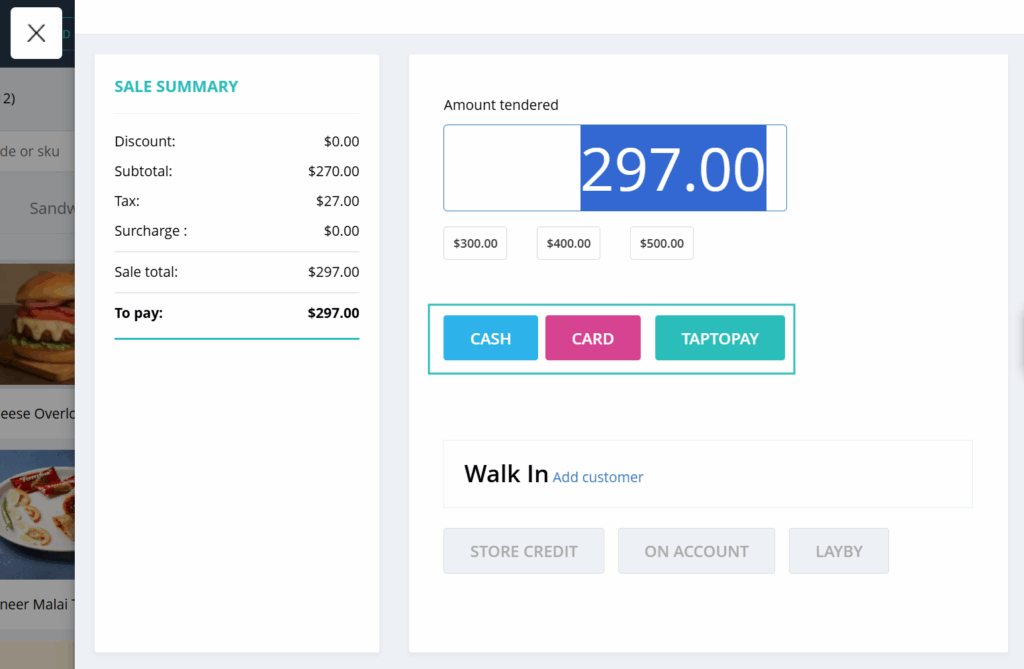
On the payment type page, you will have an option to assign a specific colour of your choice to this payment type.
5. A New Filter On Product Listing Page
(Hike Plan: Plus)
Staying on top of your product information is key to a smooth operation. That’s why we’ve introduced a new filter to help you quickly identify and manage products that are missing crucial details. i.e., Product types, Brands, suppliers.
You can now filter your product list to show items that have:
No Product Type attached
No Brand assigned
No Supplier linked
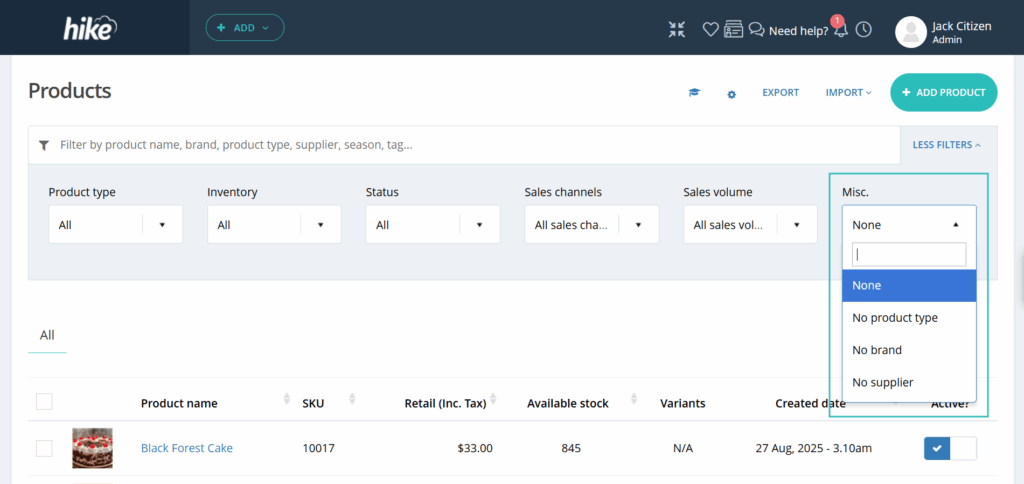
This feature is perfect for quickly cleaning up imported product lists or auditing your inventory for missing data.
We are continuously working to enhance your Hike POS experience with powerful, time-saving tools.
If you want to share your positive experience with Hike with others, please consider leaving us a 5-star review on the platform of your choice. You can use the links below to access the review pages:
[Google]
As always, we’re here to support you. Reach out to us via chat support or contact your account manager with any feedback or questions.
Happy retailing!
The Hike POS Team

Love Hike?
Tell a friend
Now it pays to share the Hike experience. Recommend Hike to a fellow retail owner, and when they join:
- You earn $100 in Hike credits
- Your friend gets a seamless retail upgrade