Hike update: September 2018
Custom price book for customer groups
The price book allows you to set a special pricing for any/all products and avail it to customer group/s. This is like the existing % based tiered pricing you currently apply for customer groups. However, the major advantage of price book is that it allows you to set special pricing for each product. So you can set discounts and special pricing based on product margins rather then applying a flat rate % discount on all products.
For example, you retail a Pink Pen and a Blue pen both at $5 apiece with 100% and 50% profit margins respectively. Now, when you create a price book for your ‘Wholesale’ customer group, because of difference in margins, you may wholesale Pink Pen for $3.50 and Blue Pen for $4.00.
This provides a greater flexibility in terms of pricing your products for different customer groups. In your price book you will specify revised sale amount as required. For some products where margins are thin, you can simply omit that product from a price book and it will be charged at a regular retail price.
This is how it works:
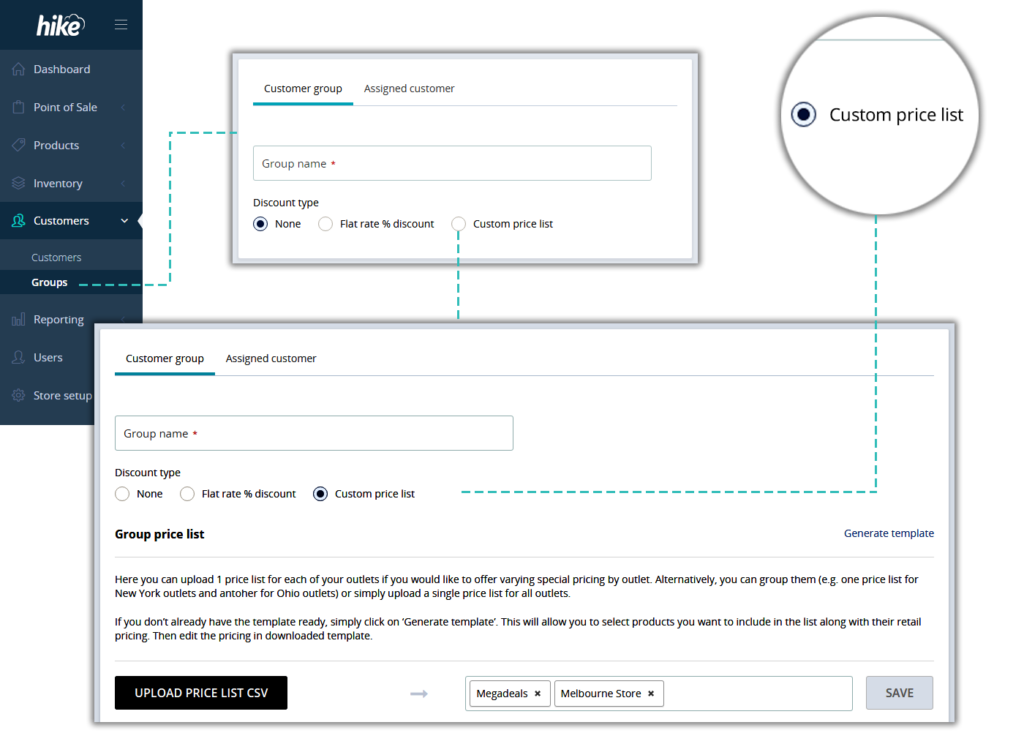
- Go to Customers > Groups
- Click on ‘+ CREATE GROUP’
- Select ‘Custom Price List’
- Hike will prompt you to upload your Price List for the group.
- If you’ve multiple outlets, you can choose to apply one common price book for all outlets or outlet specific separate price book for each outlet – choice is yours.
Useful tip: To quickly create Price list for a group, go to products and export your product list. Only keep those products that you want to offer special pricing on. Make price changes and your price list is ready!
Once your price list is uploaded, any customer in the relevant group will automatically get the group pricing applied at the checkout once their customer profile is associated with a sale.
Add customer backorder items to existing Draft POs
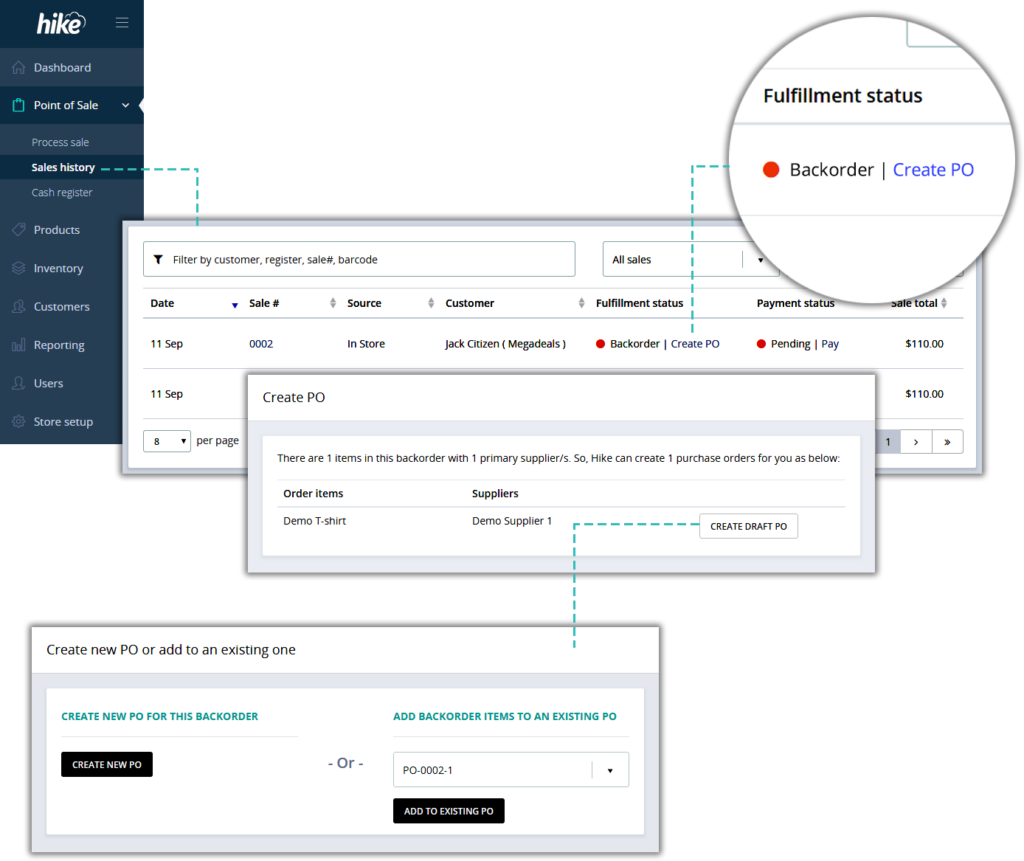
When you create a new backorder, the backorder line on Sales History features a button ‘Create PO’. So that you can create a supplier purchase order for items in your new backorder. However, a separate purchase order for each backorder may not be suitable in all cases. As such, Hike now allows ‘adding to’ an existing draft PO if there is already one created for the same supplier. This will help you improve your purchase order workflow.
How it works:
- When you click on ‘Create PO’ button for your backorder in the Sales History, Hike will check if there is any draft PO available for the supplier of products added in your backorder.
- Hike will then provide you the list of relevant draft purchase orders
- With this information at your hand, you decide whether to create a new PO or ‘add to’ an existing one.
Please note: Only ‘draft’ purchase orders are checked for. Open purchase orders are omitted based on the assumption that those are already have been sent to a supplier.
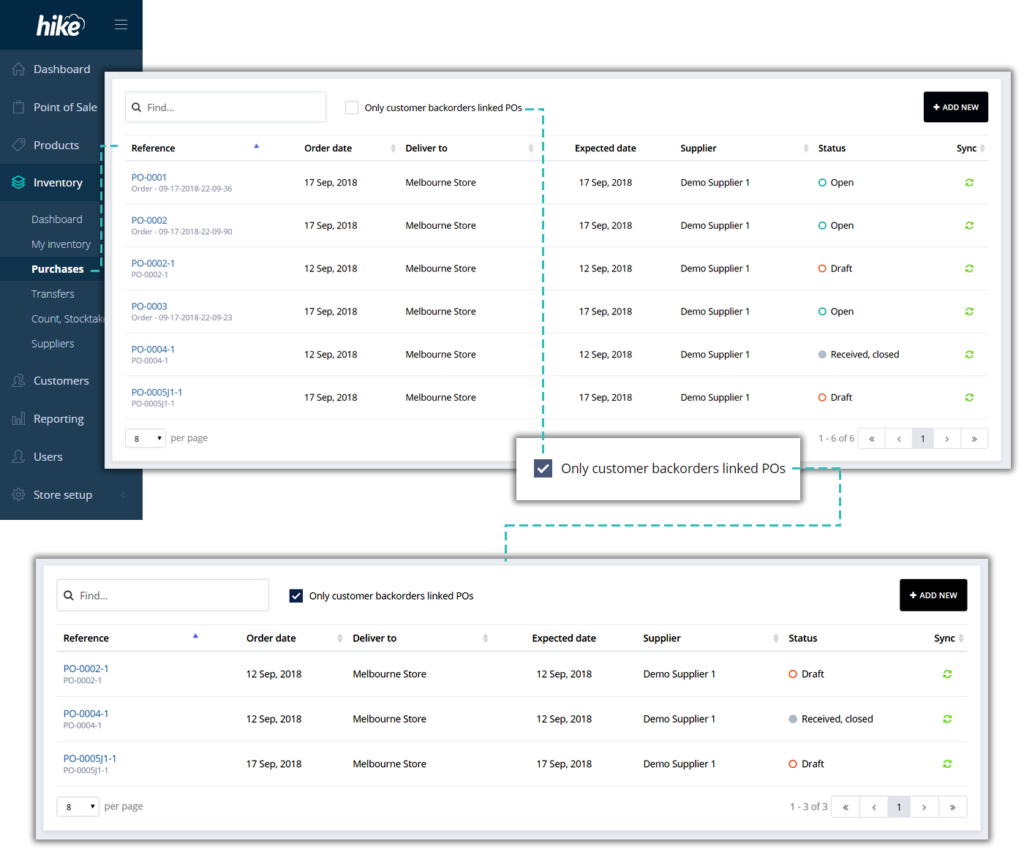
One click list of customers backorders associated with any supplier PO
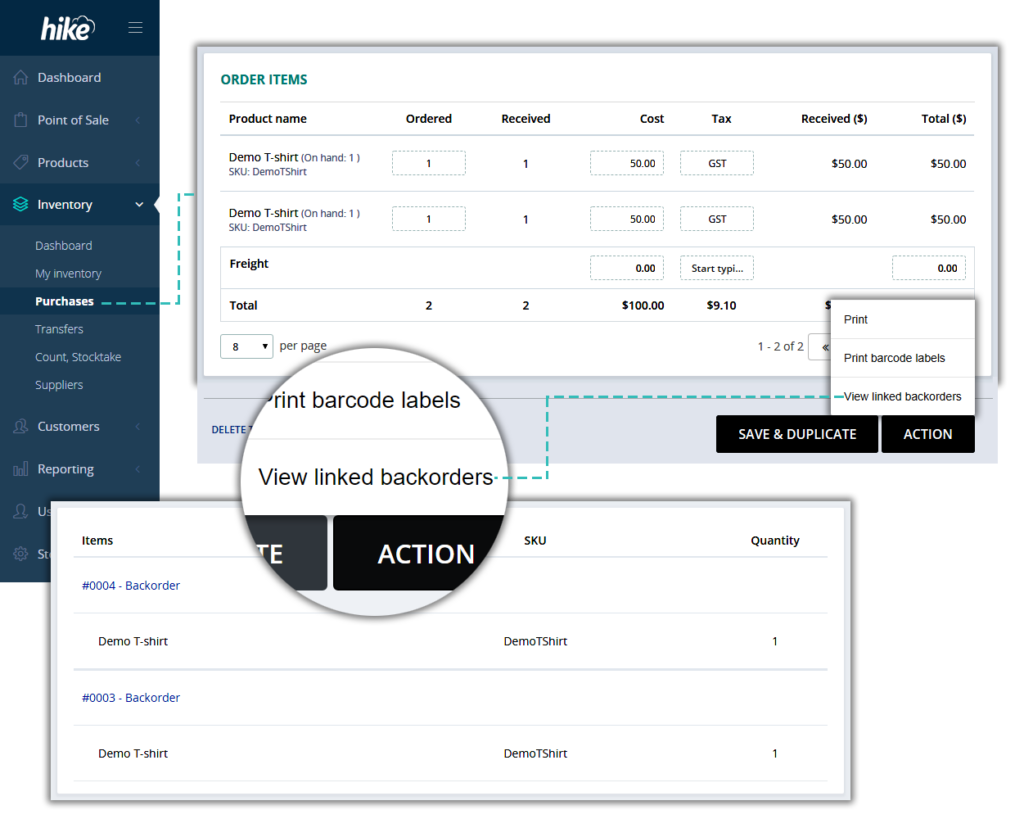
When you receive a PO, easily check who’s been waiting for inventory you just received. With just one click, Hike will generate a list of backorders associated with any purchase order. This will help you pick and pack backordered items as soon as they arrive without having to go through the backorder history or check your PO against each line item in backorders. Reduce both your admin work load and order wait time for your customers.
Easier, fully integrated Dymo label printing with more barcode label sizes
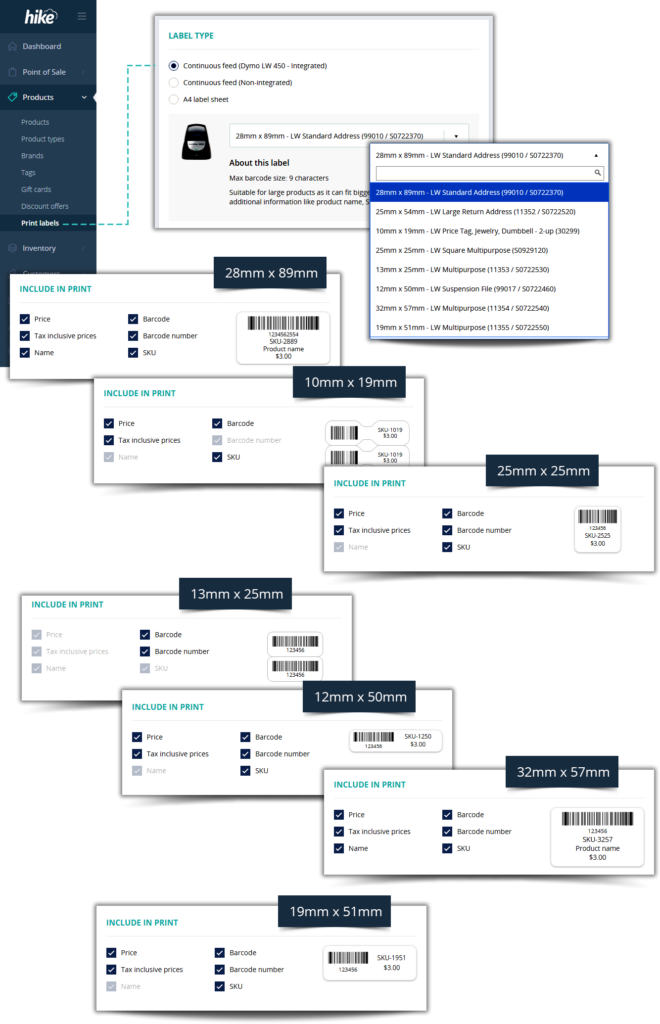
Hike’s Dymo LabelWriter 450 connection to Hike has just got better. Now Hike is fully integrated into Dymo’s LabelWriter software. This means more label sizes and easier process with direct label printing connection to your Dymo printer.
Benefits of fully integrated Dymo LabelWriter:
Easier: Once you have selected from the available label sizes in Hike, your label printing will begin. No need to shuffle through the large list of labels and re-enter it on your computer’s print dialog box. Absence of print dialog box means you only select from the short-list available on Hike screen.
Accurate: Advanced size and margin settings on the print dialog box are no longer required. No more setup errors or trial prints.
More options: Now you have 7 label sizes already available. Because of the full integration, we are now able to add more label styles and sizes faster than ever before. So, if there is a more suitable label size that’s not in the list, let us know and chances are that we may be able to add that to the list in less than a week*.
*If we can procure the labels in such short span, alternatively, if you have already procured the labels and help our team with that testing, it can fast-pace the process.
Fully integrated label styles & sizes:
- 25mm x 25mm – LW Square Multipurpose (S0929120)
- 28mm x 89mm – LW Standard Address (99010 / S0722370)
- 13mm x 25mm – LW Multipurpose (11353 / S0722530)
- 12mm x 50mm – LW Suspension File (99017 / S0722460)
- 32mm x 57mm – LW Multipurpose (11354 / S0722540)
- 19mm x 51mm – LW Multipurpose (11355 / S0722550)
- 25mm x 54mm – LW Large Return Address (11352 / S0722520)
Do not require new label sizes and happy with the way its been working?
Not a problem. The new Dymo LabelWriter integration is an addition to what was already there. To continue using the Dymo printing like before, simply choose ‘Dymo Label Writer 450 (non-integrated).
Create ‘Custom reports’ and schedule auto-delivery
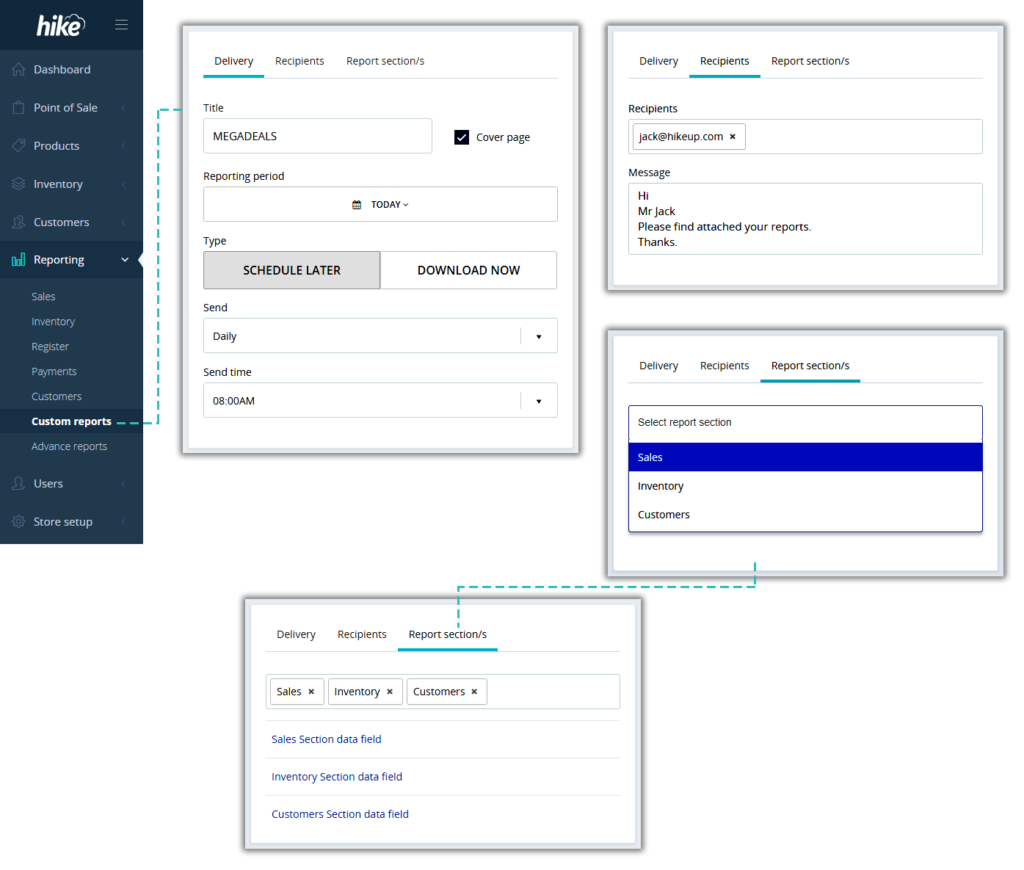
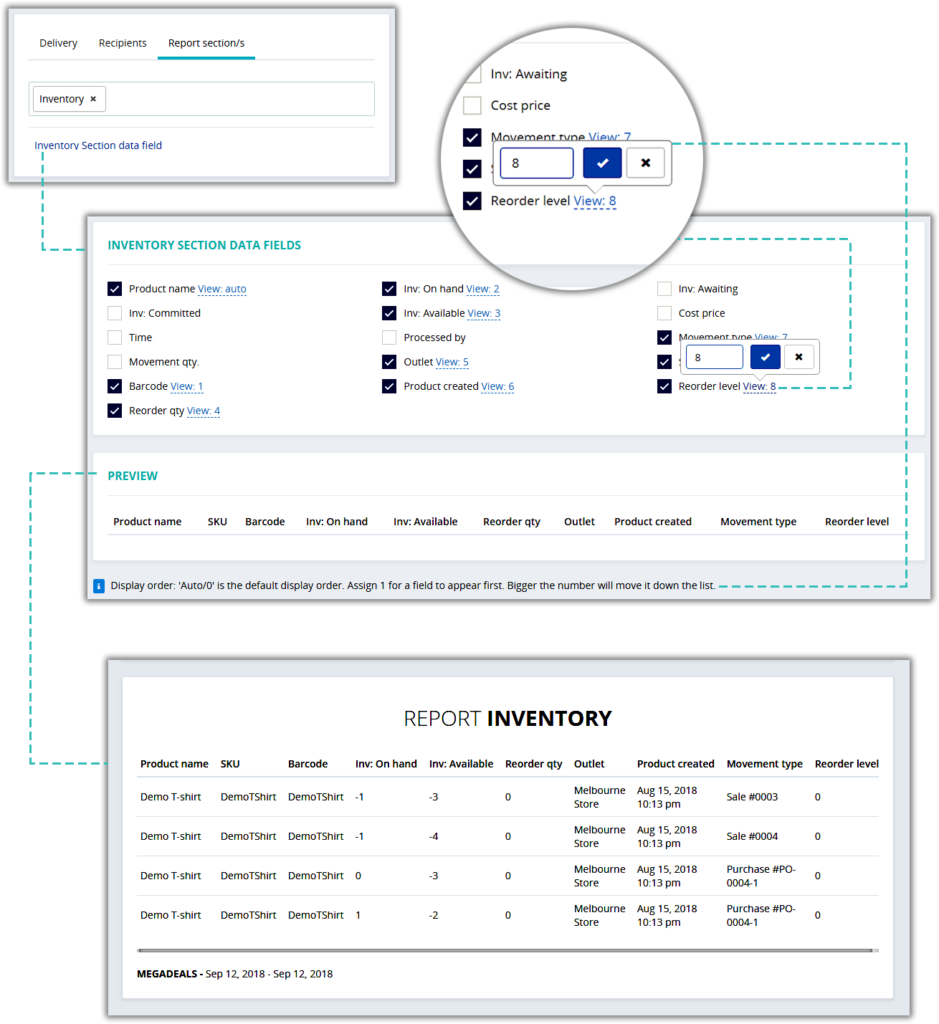
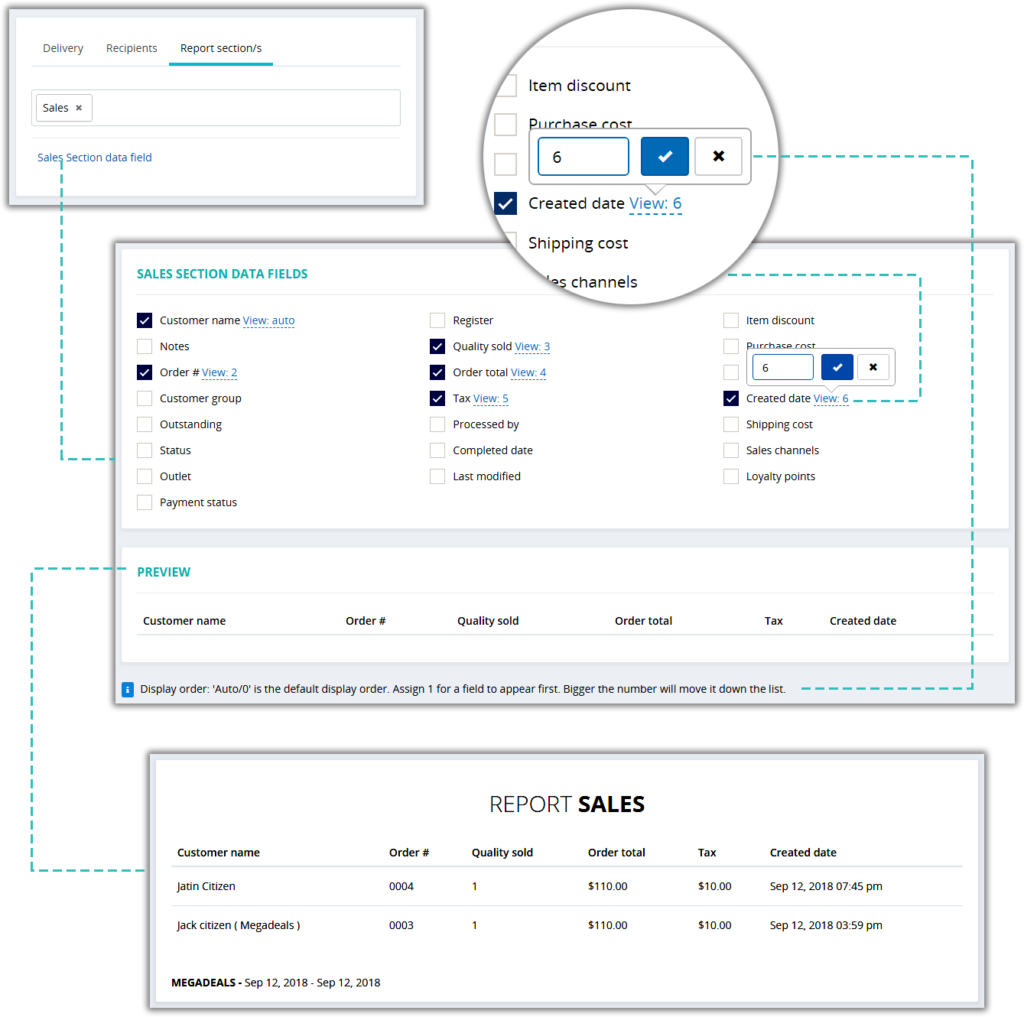
Now you can generate ‘Set & forget’ custom reports.
- Choose which type of report/s you want to include,
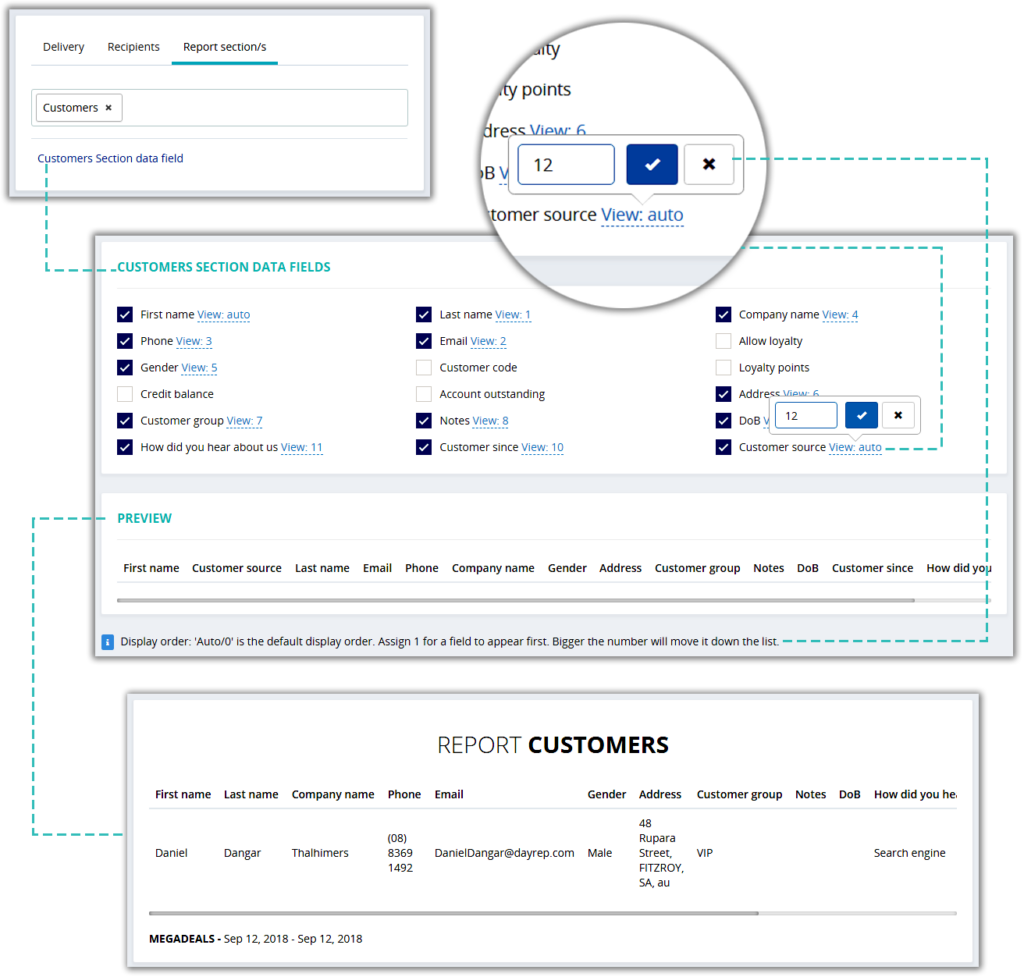
- Decide on reporting data fields that you wish to include
- Set an interval for auto-delivery to your inbox
- You can also:
- Include external email addresses for delivery e.g.: Send monthly report to your accountant
- Send summary report to your head office
- Re-order report columns and save your preference
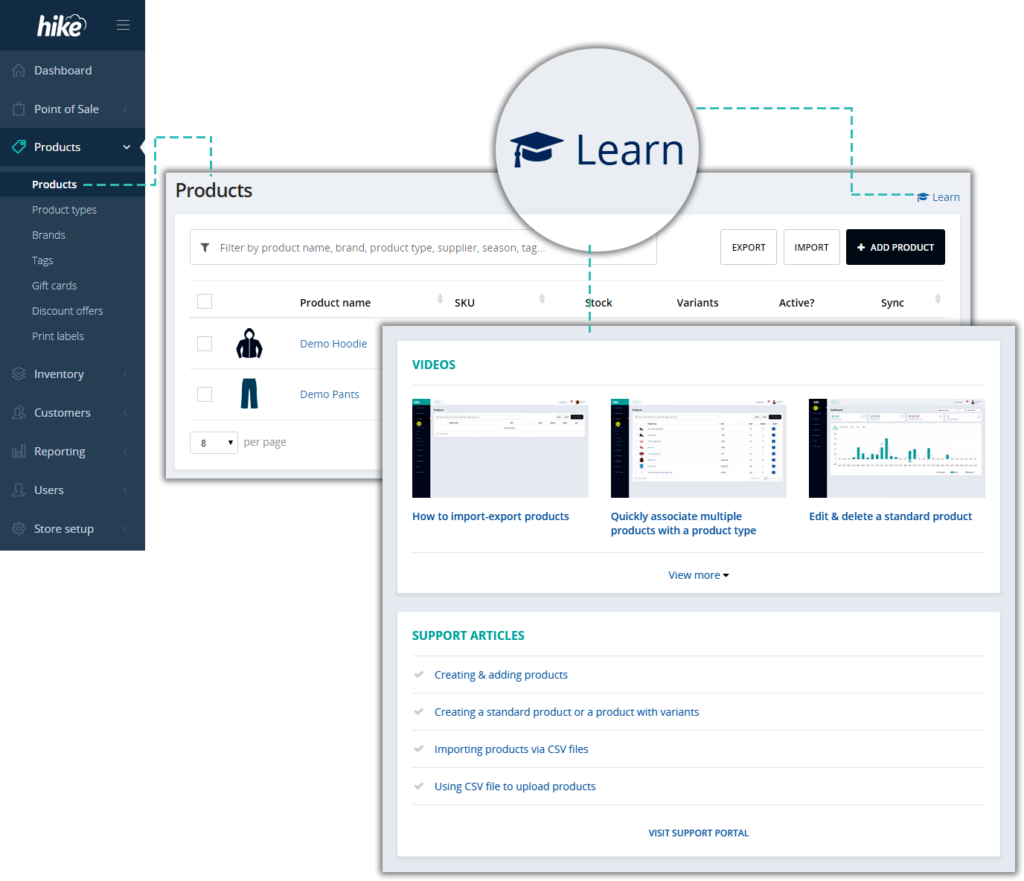
Tailored ‘Learn’ link on every page of your Hike application so your team can easily find relevant ‘how to’ articles and videos
To help your existing and new staff members quickly understand your POS functionality, we’ve activated ‘Learn more’ link on every page of Hike POS software. Clicking on these links will provide the list of articles and videos specific to functionality on that page. This helps streamline learning process for your team by removing the need of visiting our support portal to find relevant resources.
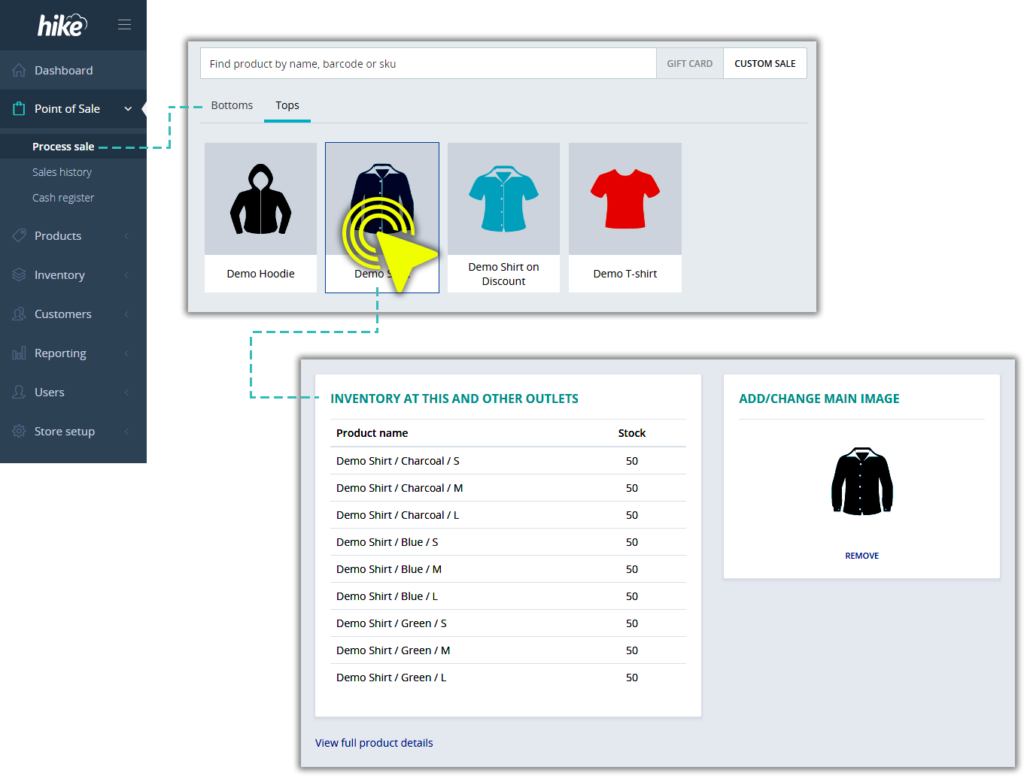
Quicker way to view product details & inventory from the sale screen
Based on popular demand, we’ve added this cool new intuitive feature that allows you to quickly check a product’s detailed information and view inventory at different outlets (if you operate multiple outlets).
This is how it works:
In your POS sale screen, if you click on a product from the list, it adds product to the cart. Instead, click and hold for a second (long press like an iPhone). This will slide out product information screen.
Quick click & view products under each brand, tag and type
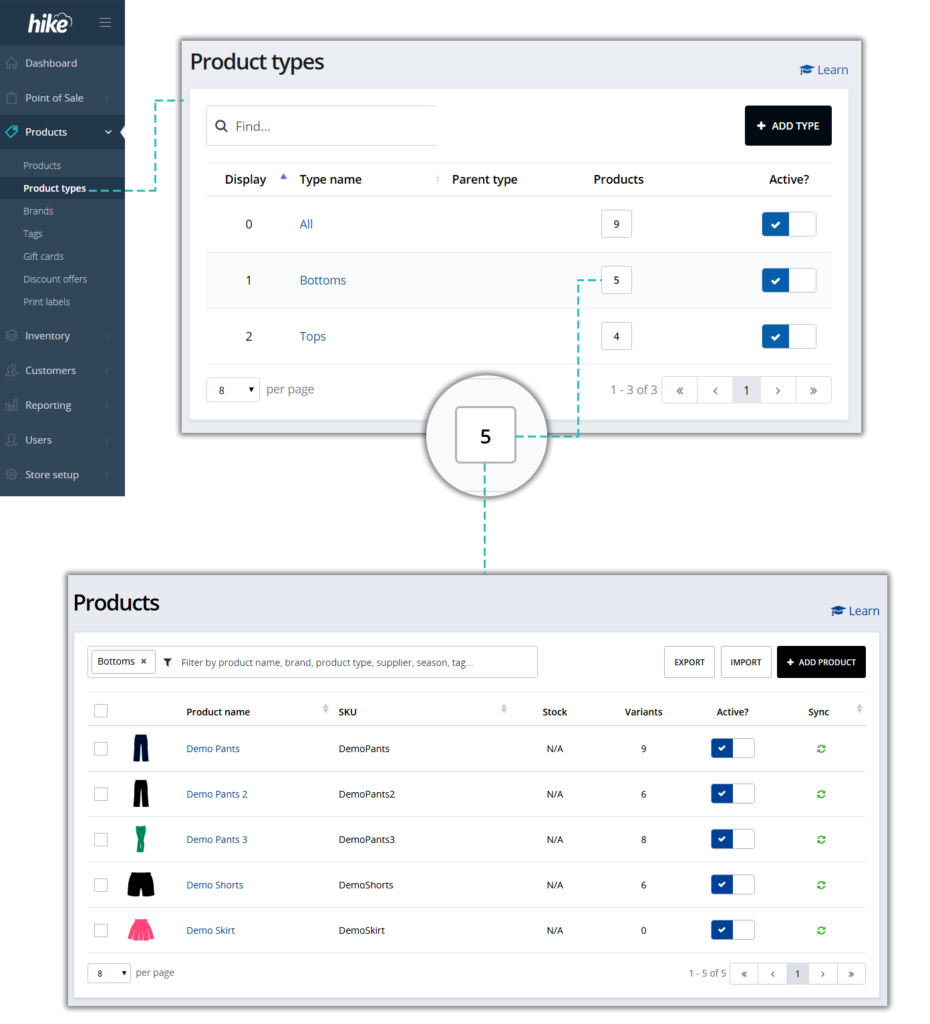
On brand, tag and type list views, it shows the number of products associated with each. Now, you can click on the number to view the associated products list. Hike will automatically filter the list for you.
Auto-sync manually applied customer’s store credit with your accounting software
In our last update we released the new ‘Manual store credit’ feature. With this update, you can auto-sync manually issued customer store credit with your QuickBooks Online or Xero account.
eCommerce integration setup made easier
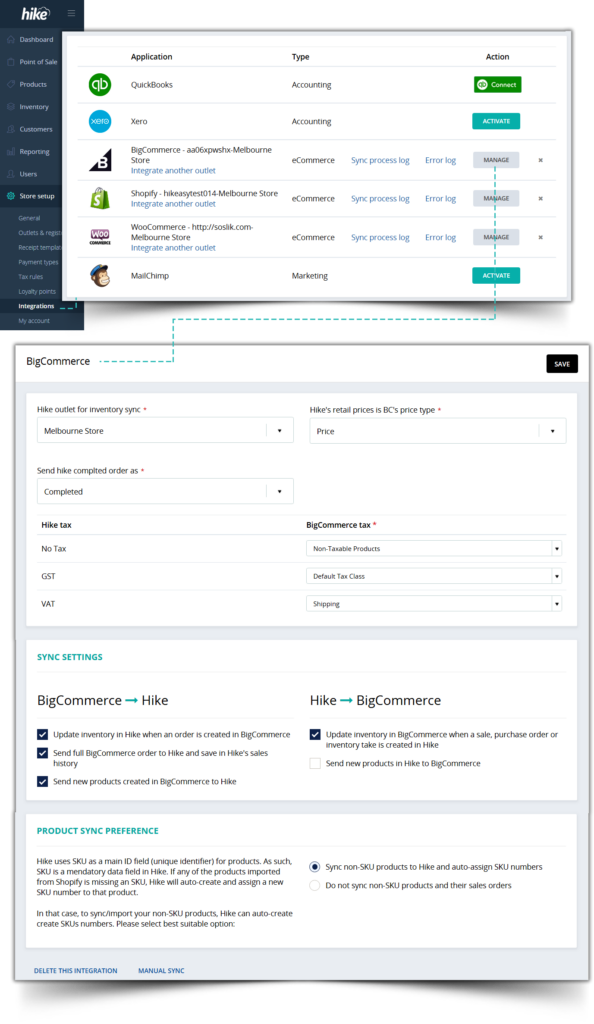
Hike’s eCommerce integration just got better. Hike integration with BigCommerce, Shopify and WooCommerce is already helping you integrate your online and in-store sales, products and inventory. What we’ve done in this update is made that integration easier to activate with better user interfaces and customisation options.
You can now void an existing backorder (if not paid for yet)
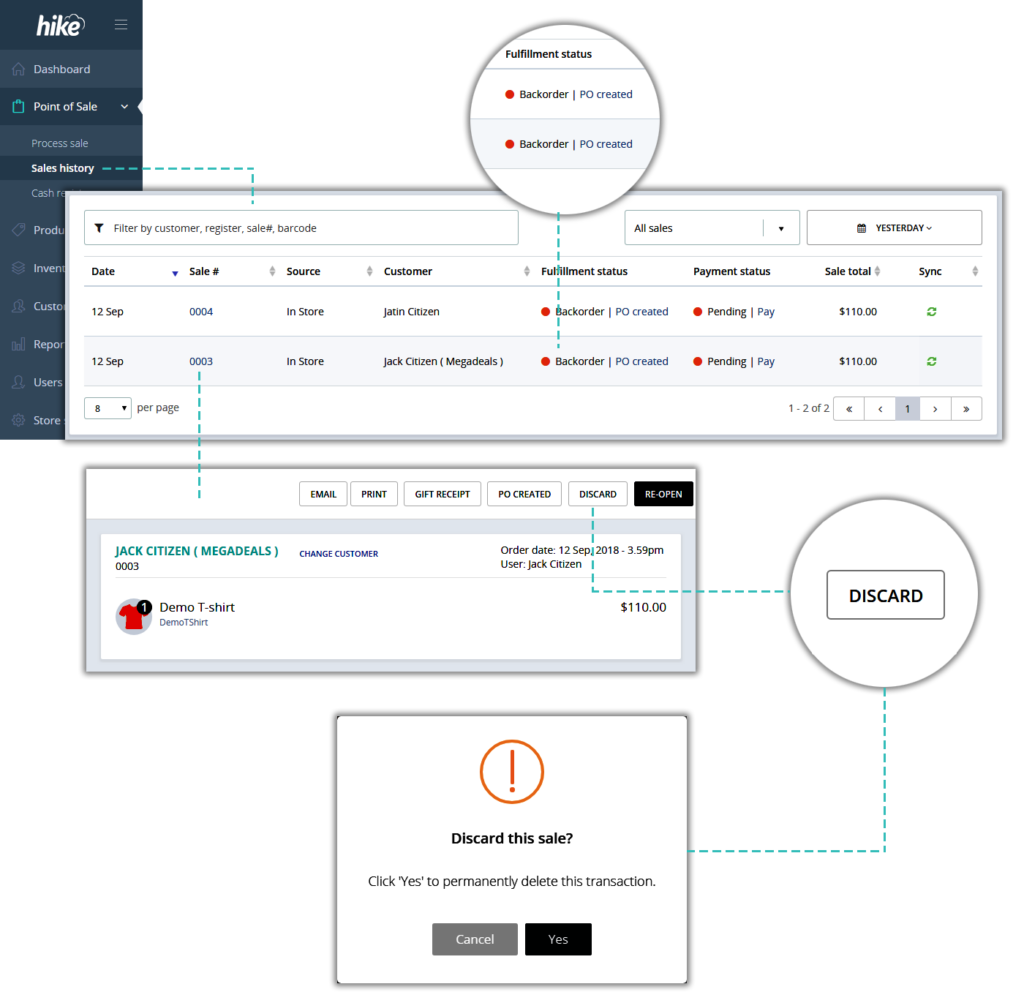
This is a small yet very useful improvement for Backorders functionality. Customer backorders can now be voided, if not yet paid for. Alternatively, if backorder is already paid for, you can still delete the payment as long as register is not closed since payment was applied.
Why Hike does not allow deleting a backorder payment after register closure?
Allowing removal of any payment after register closure will result in change to your past reconciled payment summaries. Change to a past payment does not appear in your current sales summary which makes tracking of such changes even more difficult for store owners. So to protect your data integrity we do not allow deletion of a payment after register closure.
How are we planning to improve this in our next update?
In our next update (October 2018) you can expect to see a major update for this feature. In that, we will allow refunds for partially paid transactions. So that, with refunds, payment removals for backorders and lay-bys have a proper audit trail. With this feature update you will be able to remove a partial transaction payment at any time without any time restrictions.
Checkbox for customer consent to receive marketing communications
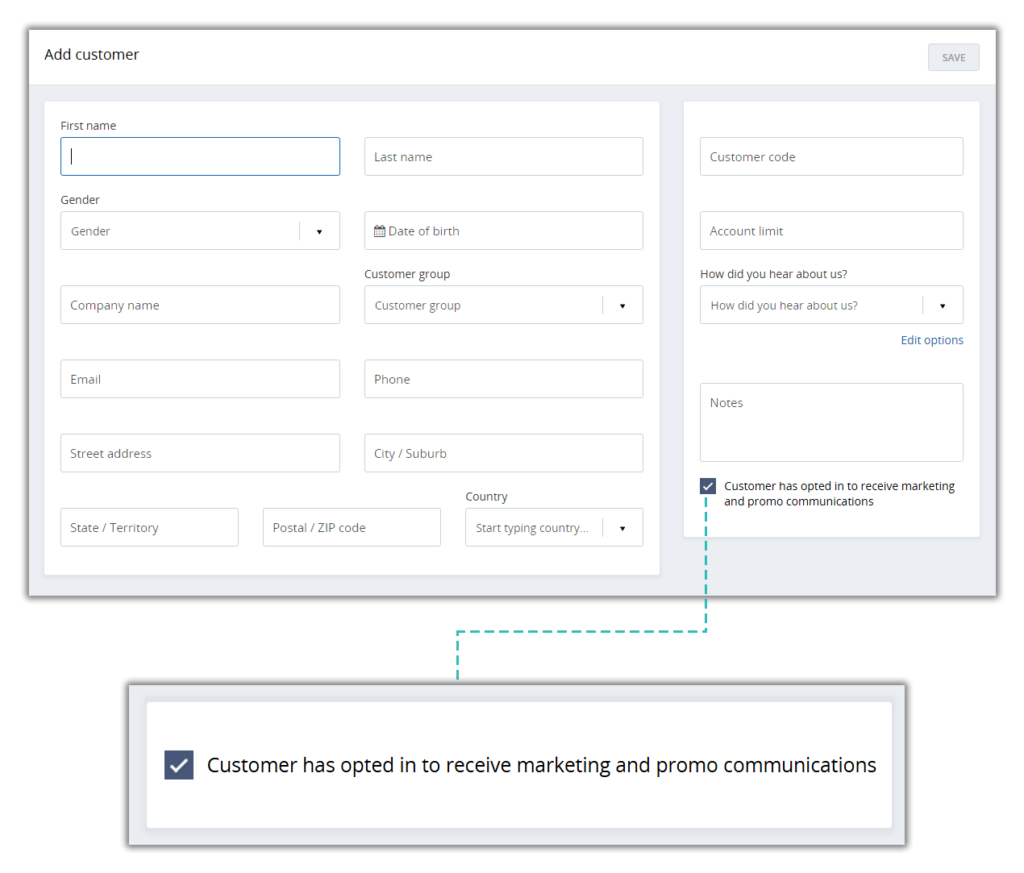
Capture customer consent to receive marketing or promotional materials from you. While adding a customer to your database, there’s a checkbox to opt them in or out of marketing communications based on the preference stated by customer. This will help greatly in terms of outgoing marketing emails, mailouts and calls.
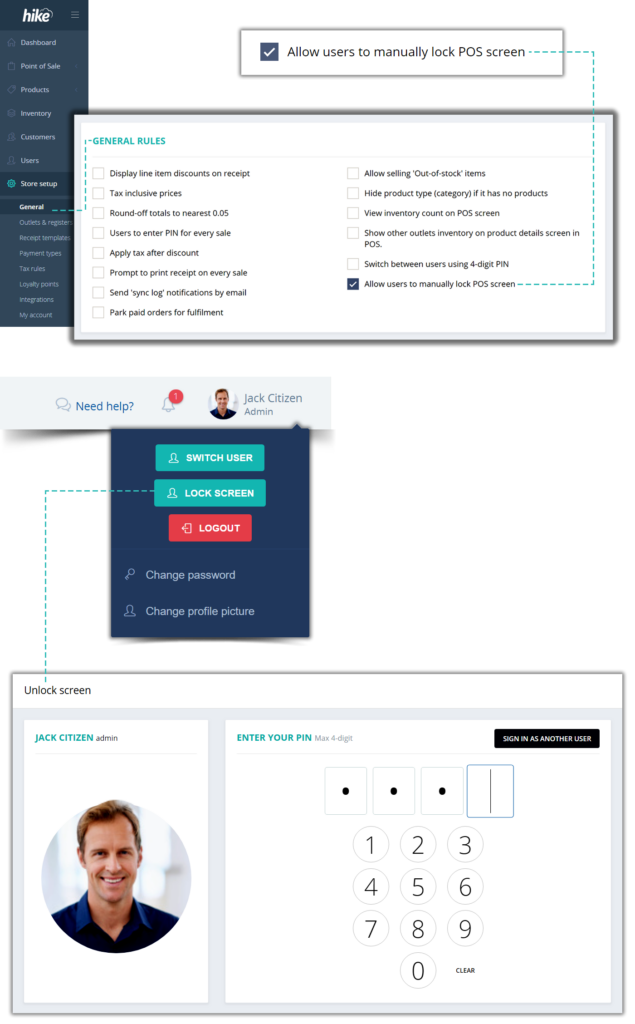
Ability to lock your POS screen (temporary log off)
Now you can temporarily log off and lock the POS terminal. When you return, sign back in with your 4-digit code. If you need to leave the POS terminal unattended for a bit, there is no need to fully sign out and re-login with your email and password when you are back.
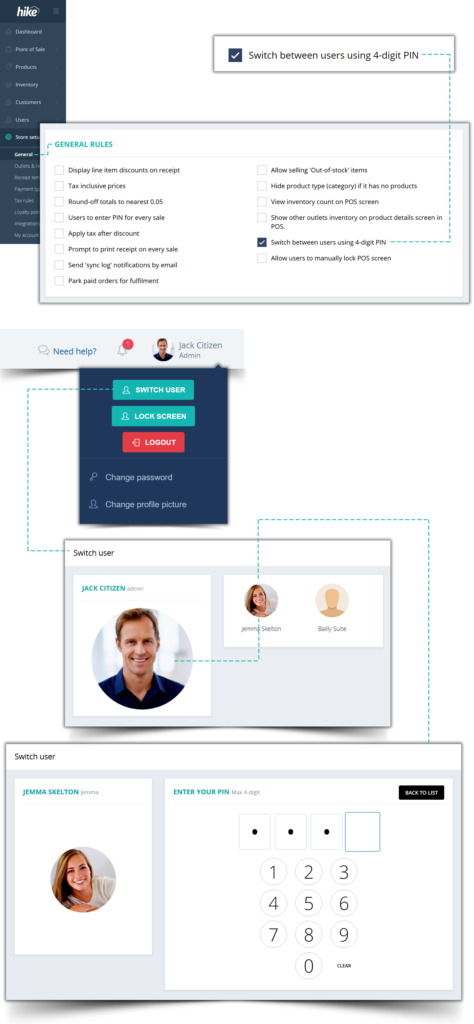
Turn ‘Switch between users using PIN’ on or off
While most of us love being able to switch between staff using a 4-digit PIN, it may not be suitable for every business. Hence, we have introduced a toggle within General Settings section, so you can turn this feature on or off.
(By default it is kept ON so no need to do anything if you are already using it and prefer to keep it active.)
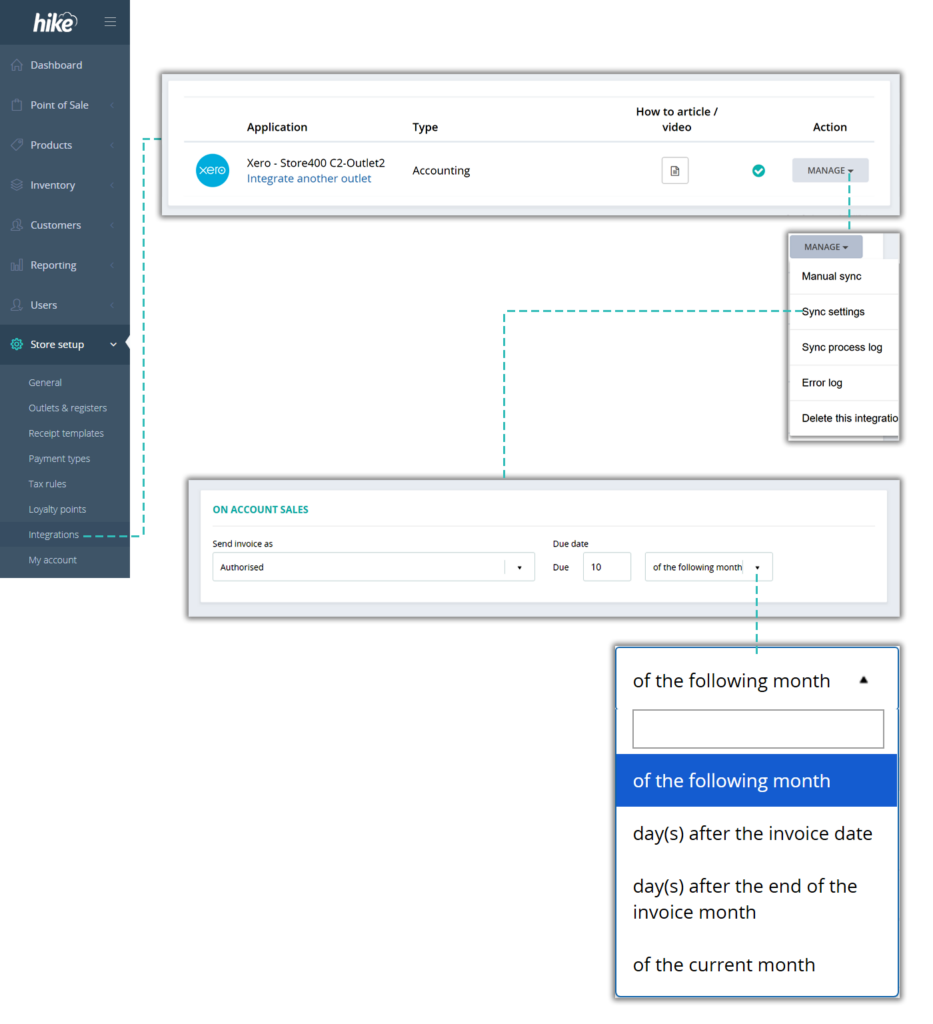
Feature improvement: Xero Accounting Integration > On Account Sales > Due date
Hike seamlessly integrates with Xero accounting software. You can sync both cash and ‘on account’ sales in Hike with Xero. When sending ‘On Account’ sales transactions to Xero, until now you were able to select from 3 ‘payment due date’ options: 0 days, 15 days or 30 days.
We have replaced these options to replicate Due date options in Xero so you can set exactly the same settings on both platforms. Your order due dates will remain consistent no matter where an order was originally generated from.
The new options will offer a way more flexibility then before. Here is what you can choose from:
- Xth day of the following month
- Xth day of the current month
- X days after the invoice date
- X days after the end of the invoice month
Please note: Your current settings for this feature are automatically applied and if you are happy with those settings, you don’t need to change anything for your Xero integration.
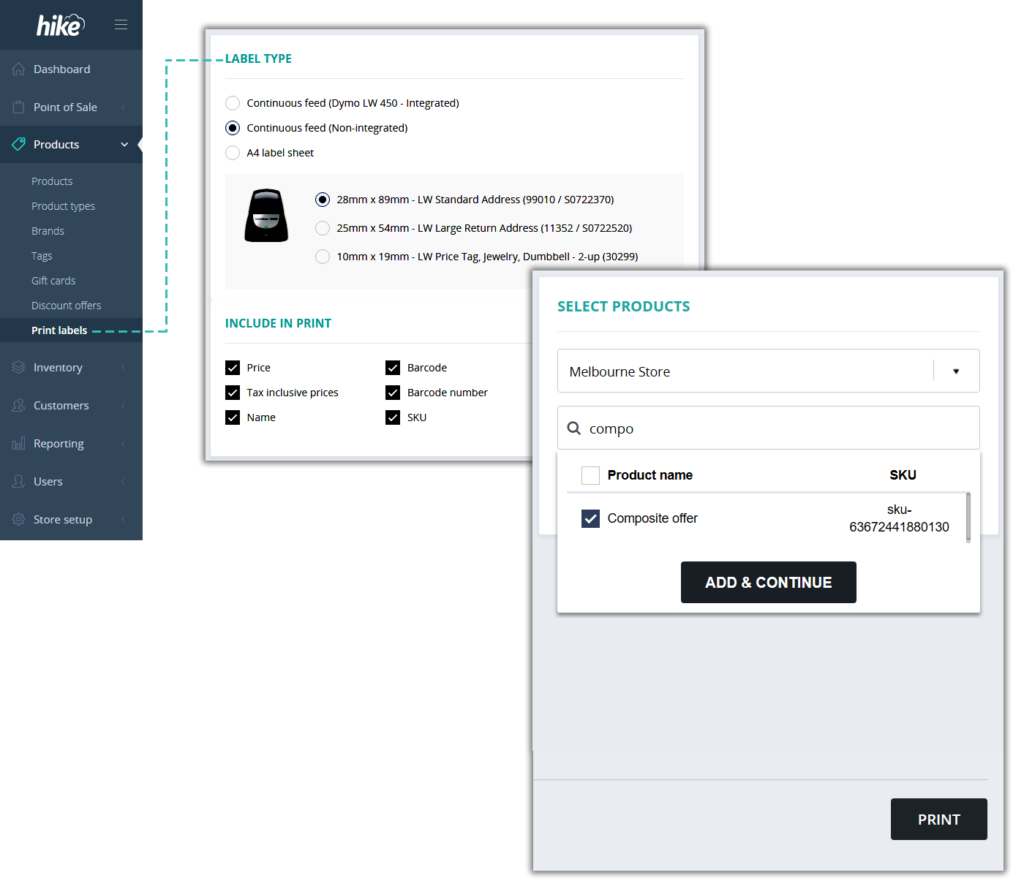
Print barcode labels for composite products
Hike lets you create composite products or in other words, use existing products to easily create hampers and combo deals. You can now also generate and print barcode labels for your composite products. Improve customer experience and reduce queue time by adding barcode scan for your combo deals and hampers.
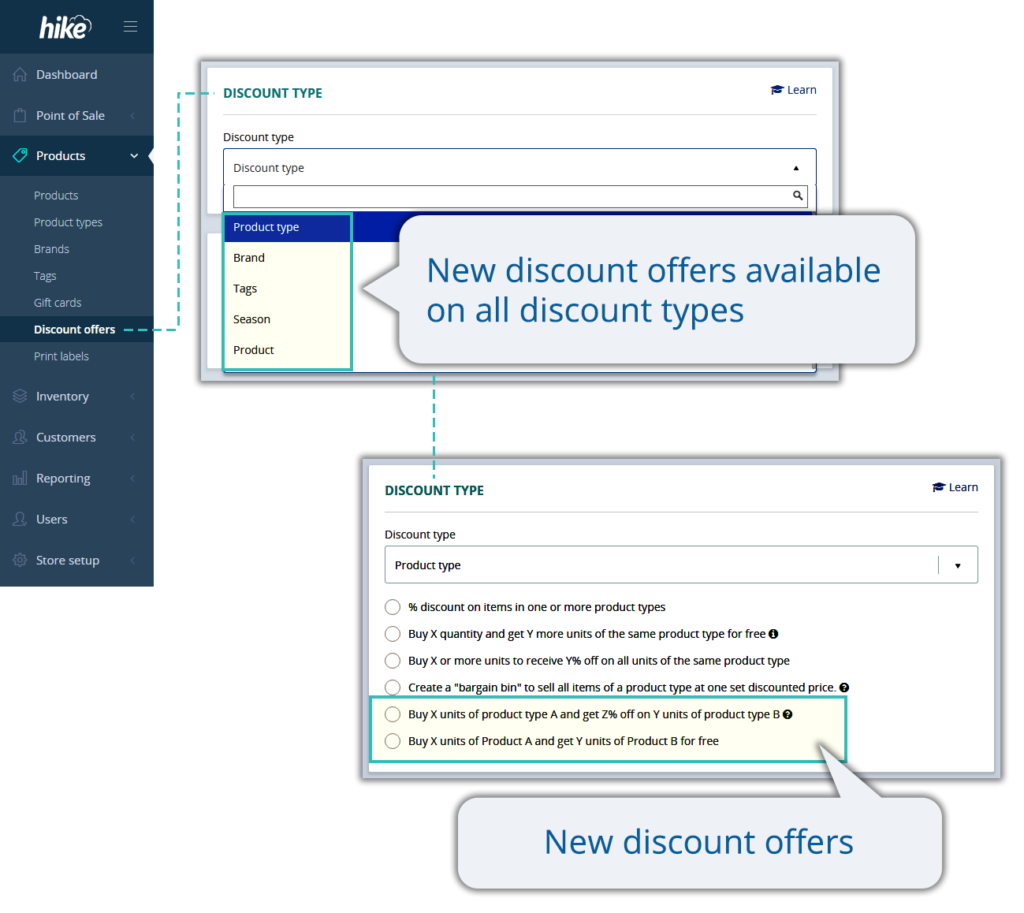
Hike’s list of ‘discount offers’ feature has just got even bigger
Discount offers has always been one of the most successful tools when it comes to attracting new and retaining existing customers. And so we are always in a lookout to provide you with more such tools. Starting with following 2 this month, we are looking to add at least 10 more smart discounting options in coming months:
(Please note: both these offers are available on products, product types, brands and tags.)
- (Please note: both these offers are available on products, product types, brands and tags.)
This offer is very useful for cross selling and upselling. For example, Buy 2 Levi’s Jeans and get 25% off on up to 2 Levi’s t-shirts.
- Buy X units of Product A and get Y units of Product B for free
Get your slow-moving inventory moving with this discount offer
Improved checkout process
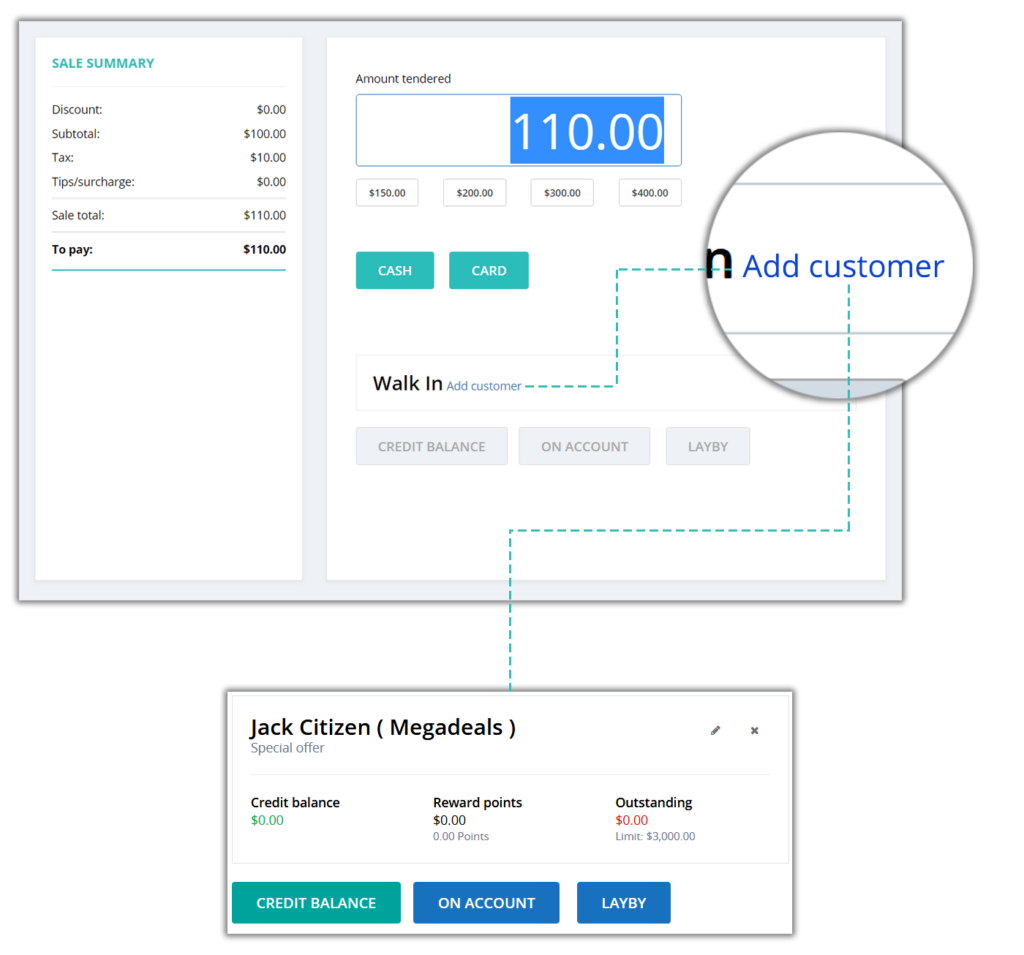
Forgot to link customer to a sale? Now you can link customer to a sale even from checkout screen without getting redirected back to the main sale screen.
Improved demo products list for new 14-day free trial accounts and yes it helps you – the existing Hike users!
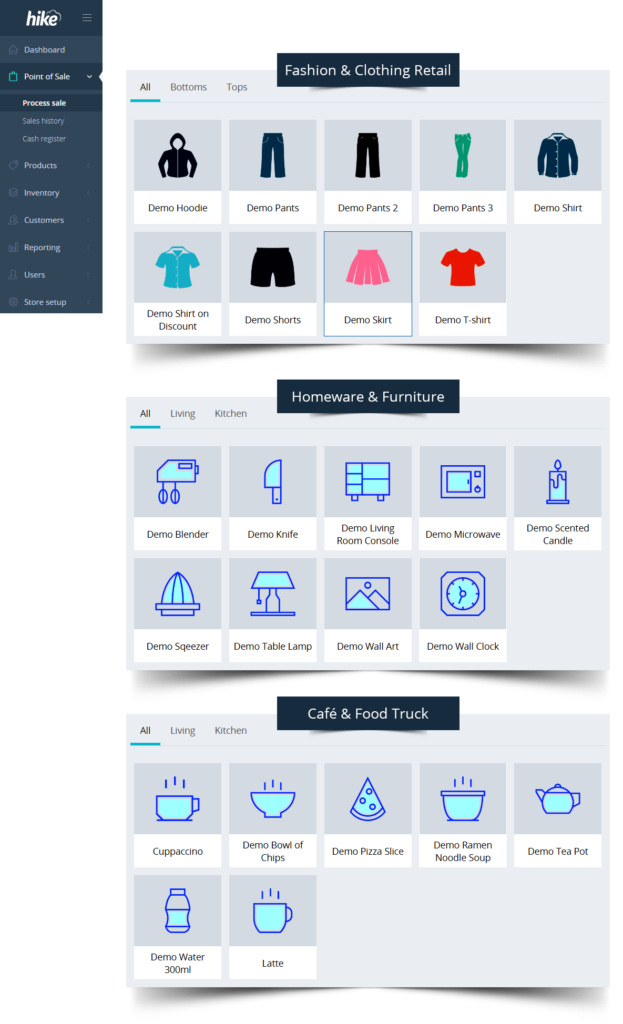
No more generic demo products list on all trial accounts. Trial accounts are now loaded with demo products based on industry type you select.
How does it apply to you, an existing Hike user? You may ask. Well, when you have a new employee joining or existing one changing roles, trial accounts are the best way to get them started. When they do, now they can select demo products to play with, out of the box without spending any time on entering relevant products.
Filter list of purchase orders to view only those with linked backorders
An easier way to monitor backorders linked POs mean knowing what to dispatch as soon as inventory arrives and it surely helps improve backorder to delivery timeframe. We’ve just released the backorder filter for purchase orders so you can achieve just that.
Minor UI improvements
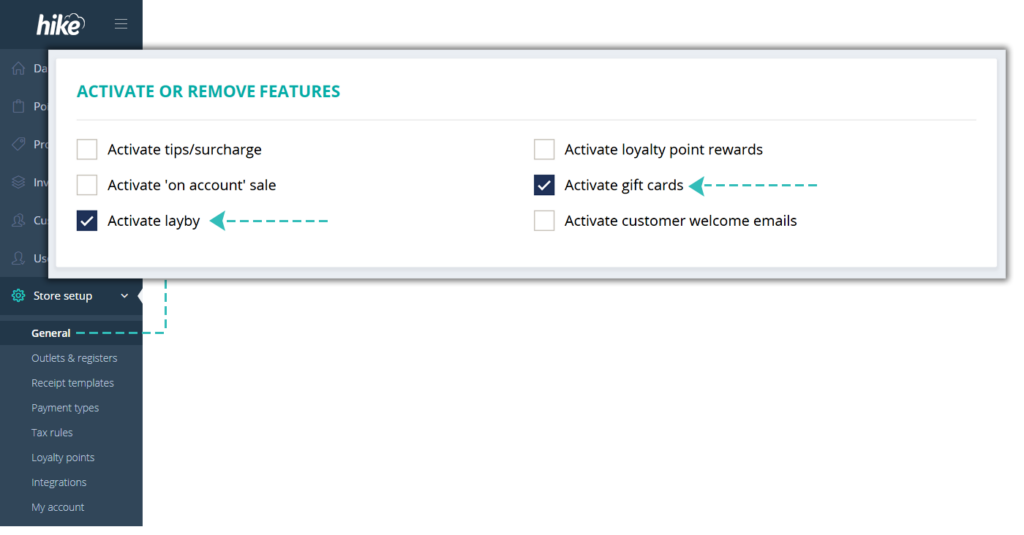
Activate or remove Gift Cards or Laybys from general settings
This is a small UI improvement for features activation. You can now activate Gift Cards or Laybys features right from one location, the general settings page, without requiring to individually visit each of these sections.
Improved UI for user section
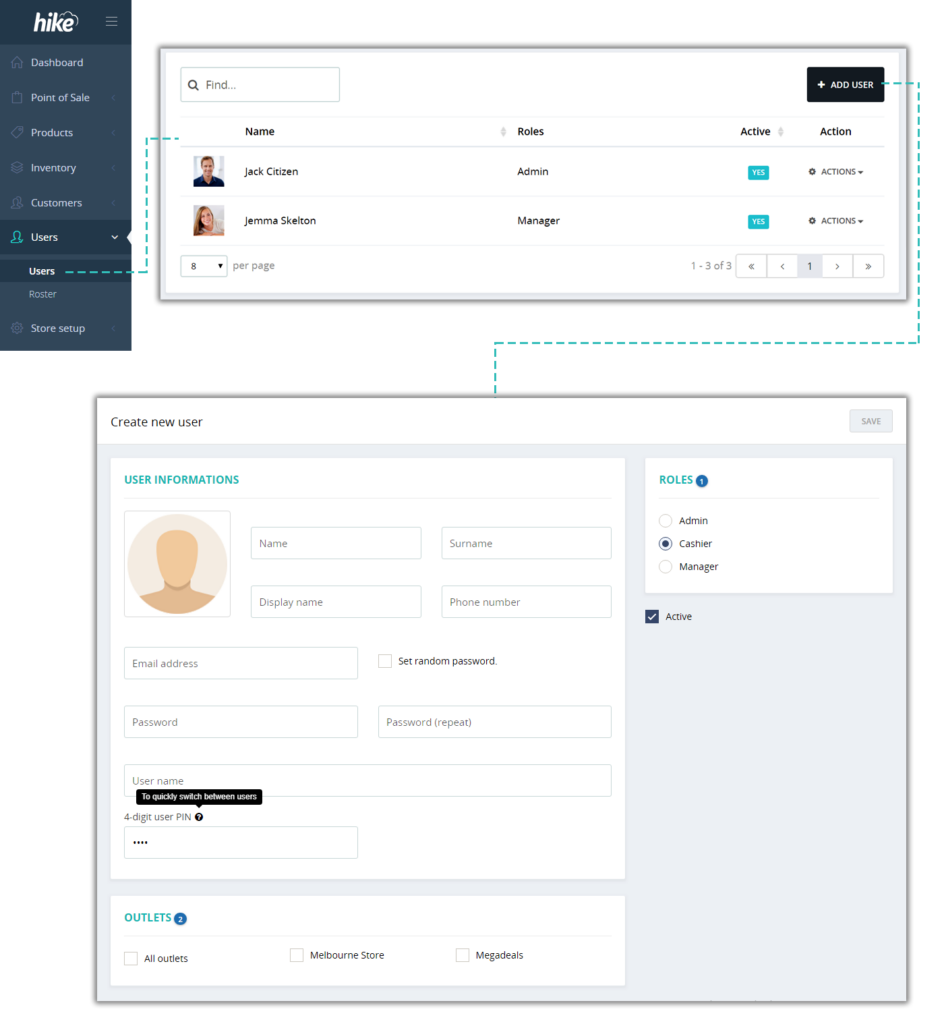
Add/edit user page design is improved with everything from user details to rights allocation on one screen. Less clutter and less clicks so you can do things a bit faster.