
Hike Update – November 2020
Hello everyone! The year 2020 is almost over and holidays are at our doorstep. While everything else is quite different this year, one thing that’s unchanged is our commitment to bring new features for your point-of-sale platform. Let’s dive into it without further ado:
Updates for existing features
We’ve introduced following updates to make existing features bigger and better:
- Ability to edit/change shipping charges while processing refunds
- Purchase order returns to suppliers will sync as credit notes to Xero and QuickBooks.
- Ability to set optional extras for composite products.
- Optimisation of processing integrated payment when the internet is not stable.
- The weighted average cost calculation algorithm has been optimised.
- An additional option to revert inventory while purging data from your Hike store
New eCommerce Integration – Neto

Hike has added another new integration in its eCommerce integrations suite – Neto. Based in Australia, Neto is a leading eCommerce platform which enables retailers and wholesalers to build world-class, fully featured online stores that are scalable, responsive, and secure. Integrating the two will give you management control of your data, including:
- Product details & variants
- Product categories
- Customer profiles
- Sale transactions
- Payment history
- Inventory
You can read more about how to set up the integration in your store in this support article which lays out a detailed step-by-step guide of the integration process. We hope that you will find this new integration useful for your business. In case of any queries, you can simply reach out to us on our 24/7 Live Chat Support. Our support team would love to help you out further.
New Feature – Issue a quote
Hike has released a new feature wherein you can issue a quote to your customers, which makes sales process streamlined especially for big ticket items. Previously many of you were using ‘Parked sale’ feature for this purpose. The major difference here is that the quote will not reserve inventory quantities. Also, there is a dedicated receipt template for quotes which you can customise away to fit the use case.
How to enable the Quote Feature?
In order to issue a quote, you will need to activate the feature in Store setup > General.

Helping you streamline lead to sales
After issuing a quote to the potential buyer, you will find the quote in your sales history. You can use the provided filter to quickly identify the quote and choose either to convert it to a sale or discard it.
To find out more about how exactly the quotation feature works, we have published this handy article on our support portal which will guide you in detail on how to make the most of this new feature. Please give it a read and we hope it helps clarify things further.
New Feature – Notifications of Register Open for Long
Hike has been always recommending users to open and close cash registers on a daily basis in order to reconcile the register summary reports efficiently. However, this might be easily forgotten sometimes. Thus, just as a reminder, we have now implemented a notification prompting you to close the cash register if it’s open for more than 24 hours.
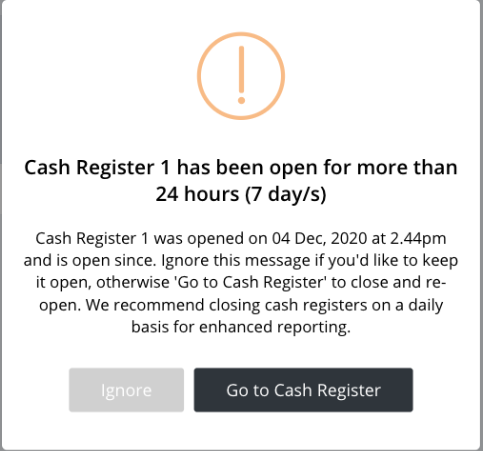
You can either ignore the notification or go to the cash register page to close it.
New feature – You can now import Unit of Measure
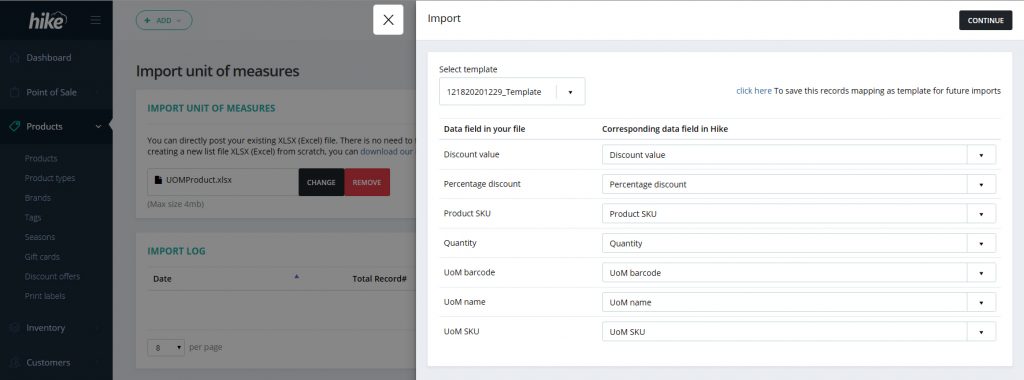
As you may already know, we’ve recently released a new feature in Hike, introduced in our September update, Unit of Measure. For those of you who haven’t had a chance to learn about or try out the new feature, you can check the September newsletter or simply this support article.
To make the work even easier, Hike allows you to bulk import or export these units of measure. The import button on the product page now gives you 2 options, ‘Import Products’ and ‘Import unit of measures’. Similarly, you can export them as well.
Feature Update – Ability to Add Images When Submitting Tickets
Finally, we also have an update on our ticketing system. In case you don’t’ know, if you are facing any difficulties, you can directly raise tickets from your Hike Store by simply navigating to Need Help -> Submit a Ticket as seen below:

To make the conversation in the tickets more productive, you can attach images to your comments, which will help us better understand what you are facing.
Thank you for your time in reading through. We wish you a safe and prosperous holiday season. Looking forward to bringing you many a new feature in January 2021 (for which the work is already in progress).
Happy holidays and happy trading!