Hike Update: January 2025

Hike Update: January 2025

Dear Retail Innovators,

Happy new year and we hope you are well!

As we step into 2025, we hope you are stocked with momentum and your registers are ringing with growth!

A heartfelt thank you for being part of the Hike POS family. Your trust and partnership inspire us to keep reimagining retail tech that works as hard as you do.

We are delighted to announce the launch of several new game-changing features on Hike POS, designed to enhance your business operations and provide even more value to your experience. Here is the list of new features going live this month:

POS Layout. Customization of the POS page.

(Supported plan: Hike Plus)

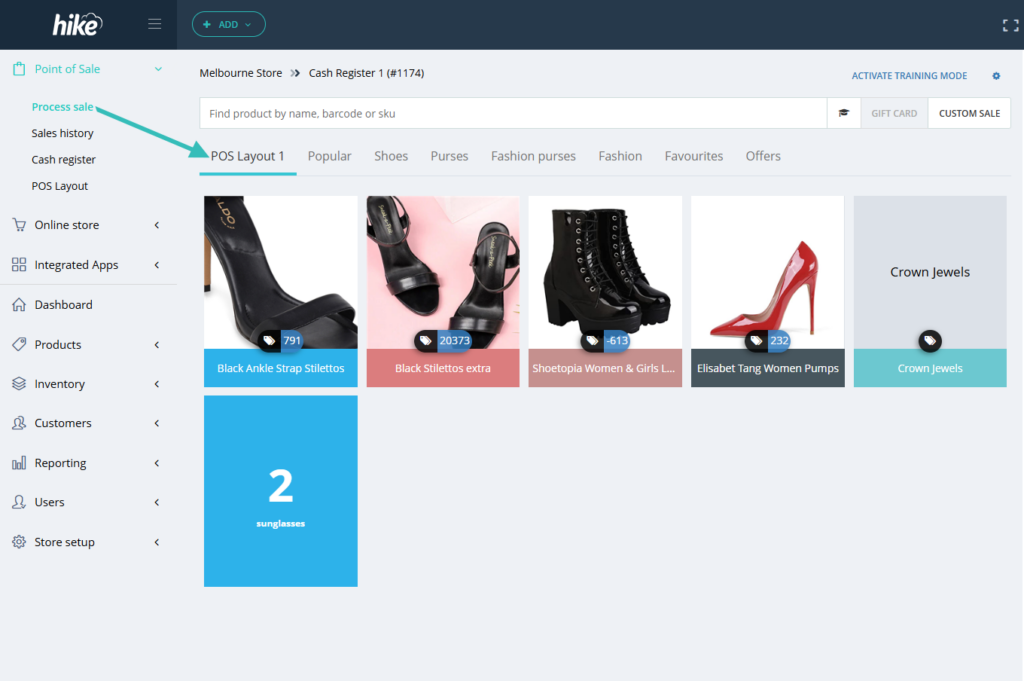
We’re excited to announce our new POS Layout feature, designed to streamline your point of sale (POS) experience. Now, you can easily add your best-selling products to this layout, ensuring they’re readily accessible on the POS screen.

This enhancement will make it easier for your team to find and select items quickly, and speed-up the checkout process for both your staff and customers.

Here is a quick snapshot for reference:

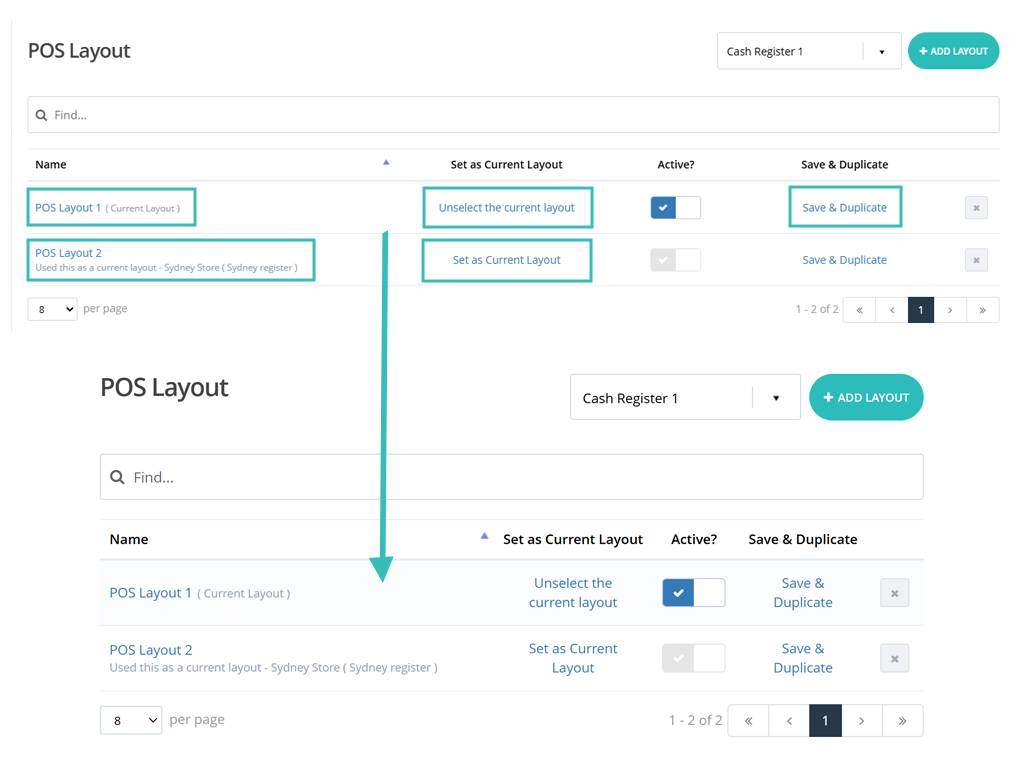
To create your POS Layout, simply navigate to the Layout Sells screen under the Point of Sale section. From there, you can search for and add your most popular products to this layout. Once you’ve made your selections, save and name the layout to see it appear on the POS screen.

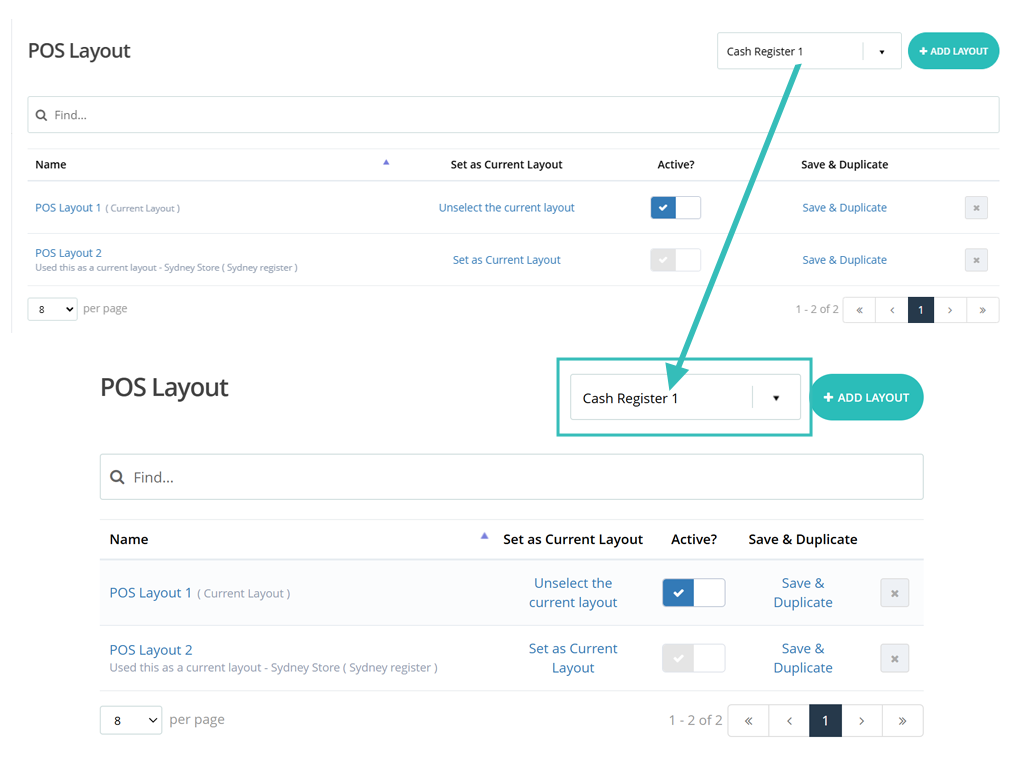
Refer to the snapshots below for reference:

You can set up and manage POS Sale Layout on the computer and use the same layout at any register or outlet. Please note, that one layout can be used in only one register at a time.

Please check the detailed support article to know more about this feature.
https://help.hikeup.com/portal/en/kb/articles/hot-keys-quick-sale-layout

Product serial number tracking on inventory level

(Supported plan: Addon Plan)

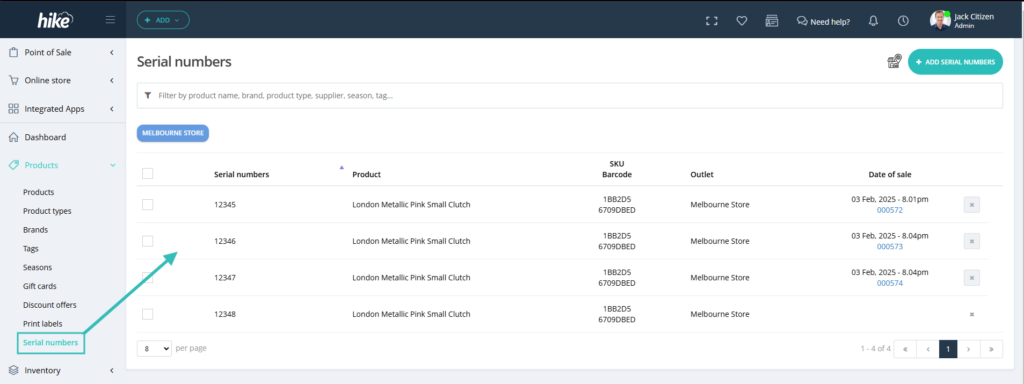
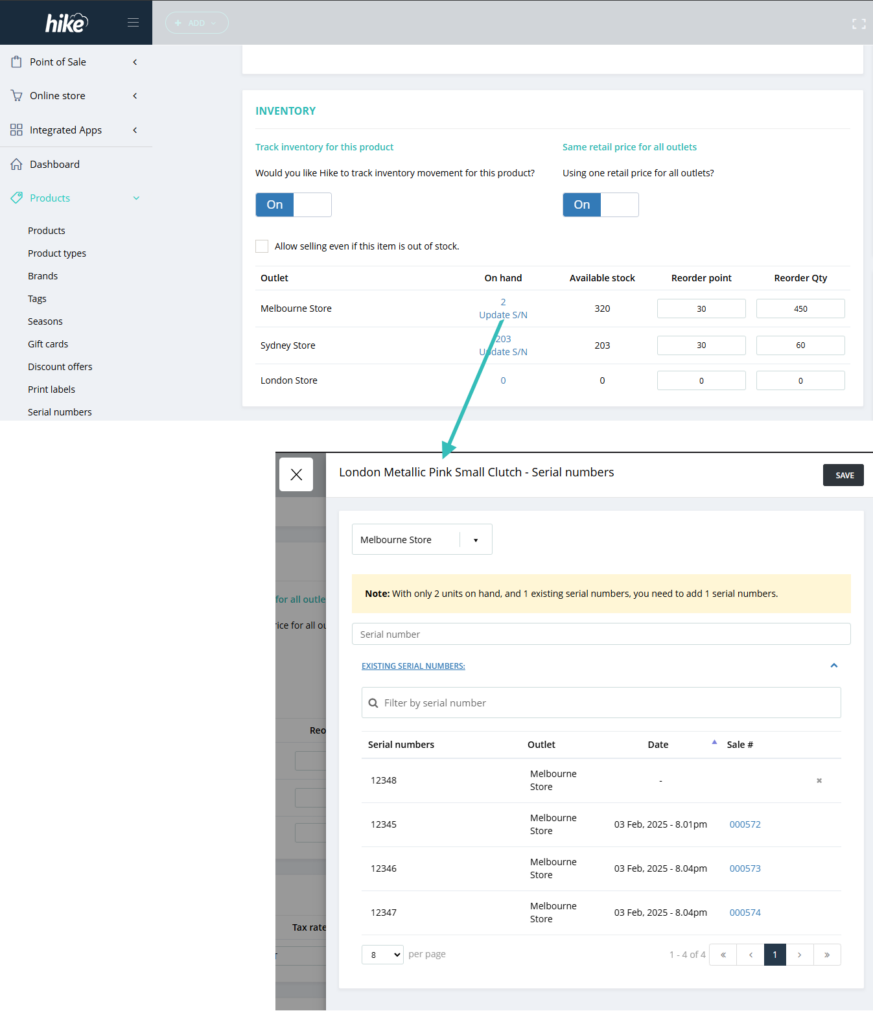
We’ve launched the highly awaited feature viz. Serial Number Tracking! With this new feature, you can effortlessly track serial numbers for specific products and record them at the point of sale.

This feature empowers you to track which unit of a product is sold to each customer, ensuring that returns can be processed seamlessly with the correct unit returned.

But the benefits don’t stop there! You’ll also be able to monitor serial numbers during Purchase Orders, Transfers, and Inventory Counts as well. This tracking feature enhances your ability to manage inventory and streamline operations, making it easier than ever to keep your business running smoothly.

Please check the detailed support article to know more about this feature.
https://help.hikeup.com/portal/en/kb/articles/sell-track-items-with-serial-numbers

Partially received purchase order return option

(Supported plan: Hike Plus)

With this new feature, you will be able to return the partially received purchase order back to your supplier. Earlier, you could only return a completed/received purchase orders.

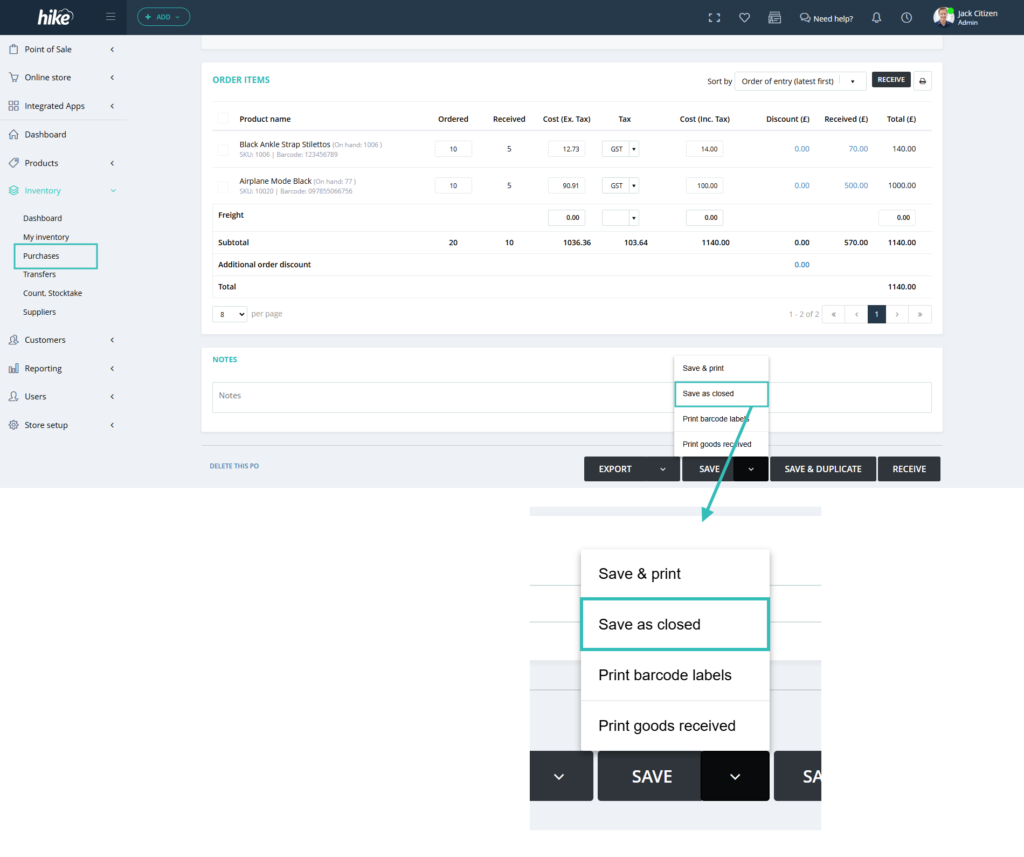
When you partially receive a Purchase order in Hike, there will be an option to Save and Close. Select this option and you will be able to close the PO.

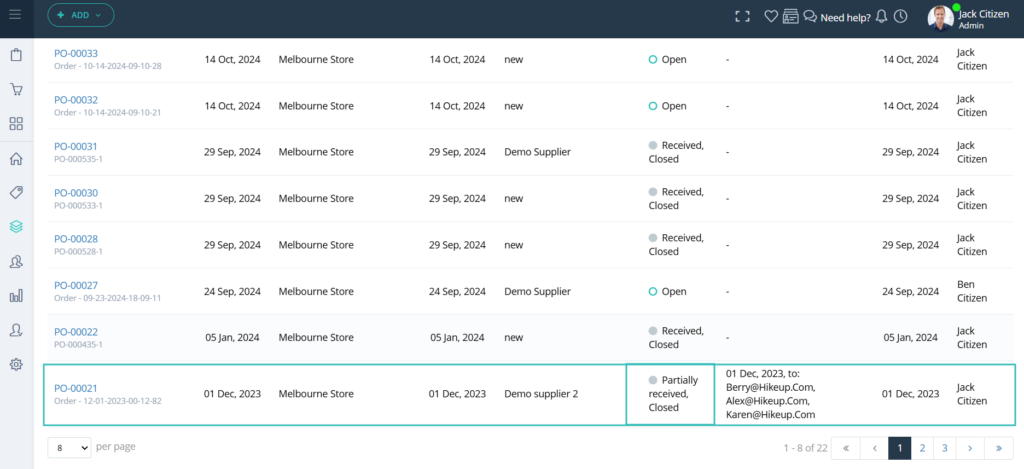
You will be able to return this Partially received/Closed status Purchase orders within Hike.

Please note that only Partially received, closed and Received, Closed status Purchase orders could be returned to the suppliers.

Time specified sales report

(Supported plan: Hike Plus)

With this new feature under Detailed Analytics, you will be able to filter the sales by time. For example, at 12 noon or at 5 pm.

As per feedback from the clients, they cannot export sales within a specific time frame. To fulfill this, we have added this new option within the Detailed Analytics report.

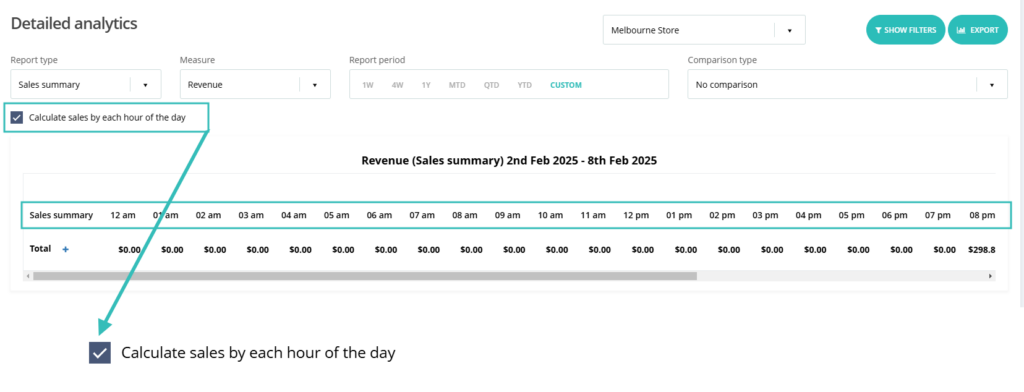
When you select the radio button ‘Calculate sales by each hour of the day’ option on the detailed analytics report, you will see the report based on each hour.

This option is available on every detailed analytics report. You can export this report in excel file and filter it based on your requirement.

10pm column will show the sales processed between 9pm to 10pm and so forth.

Utilize the ‘Calculate Sales by each hour of the day’ report to pinpoint peak transaction times and streamline your workforce allocation. This valuable tool is essential for scheduling staff during busy periods and minimizing labour during quieter hours.

Age or ID verification on POS page.

(Supported plan: Addon Plan)

For some of the businesses, such as liquor stores, hemp stores, and vape, age or ID verification is required. The business needs to check and verify the age of the customer before selling the product.

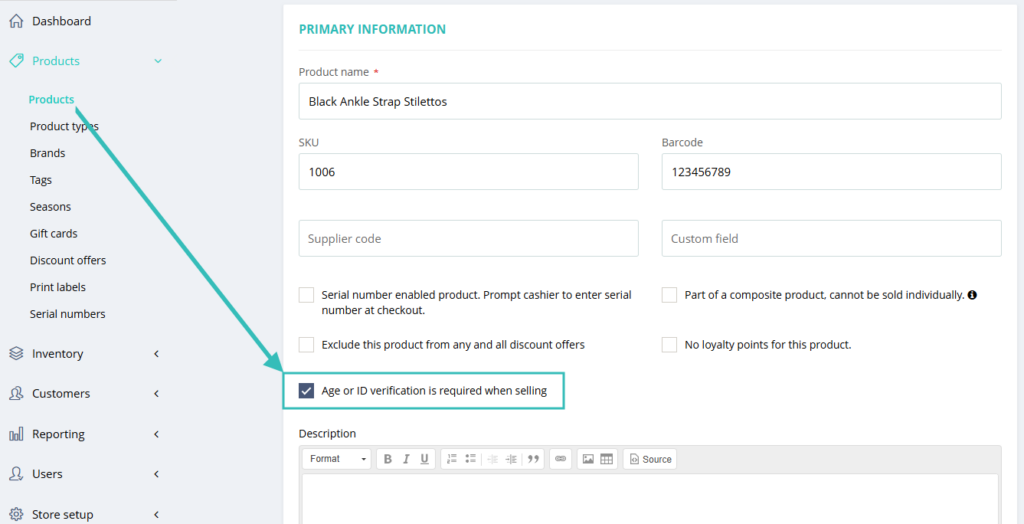
We have added a verification link to the product page.

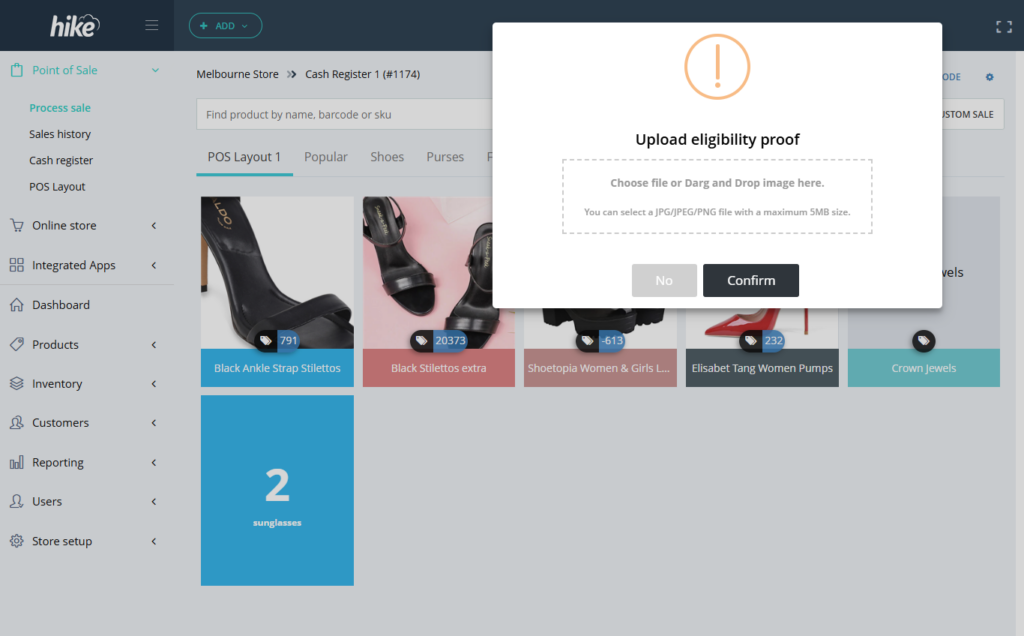
If this option is selected, when this product is sold, the cashier will have a below pop-up reminding them to check the age of the customer.

On this page, you can verify the age by using Confirm or No option and can also attach the verification document copy.

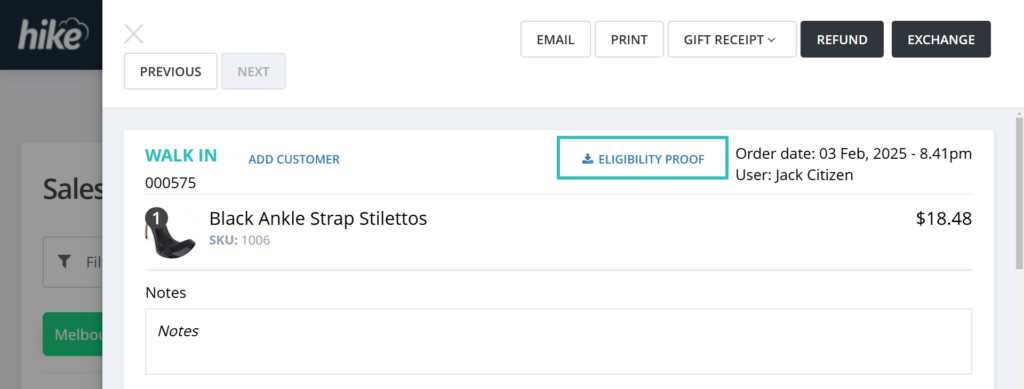
This document will be stored with this sale and can be access from Sales history when required.

Available inventory on the Sales by item report:

(Supported plan: All)

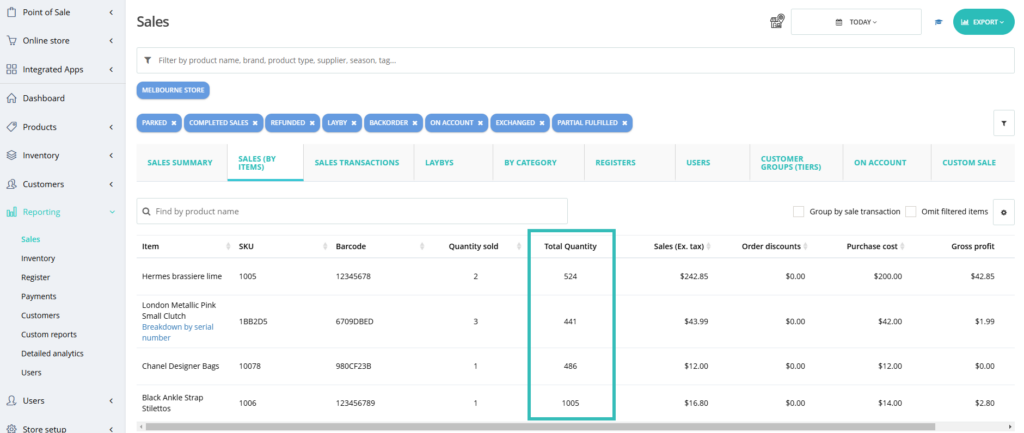
With this new addition on the Sales by Item report, the business will be able to check what products have sold over a period of time and how many they have in stock at current time. The new column will show the current inventory of the product on the Sales by Item report.

This is particularly helpful with businesses that have large sales volumes and the user wishes to order the products based on the sales and current available inventory.

As always, this data will also be available on the excel and PDF import file.

Cost price change report on the Product history page

(Supported plan: Hike Plus)

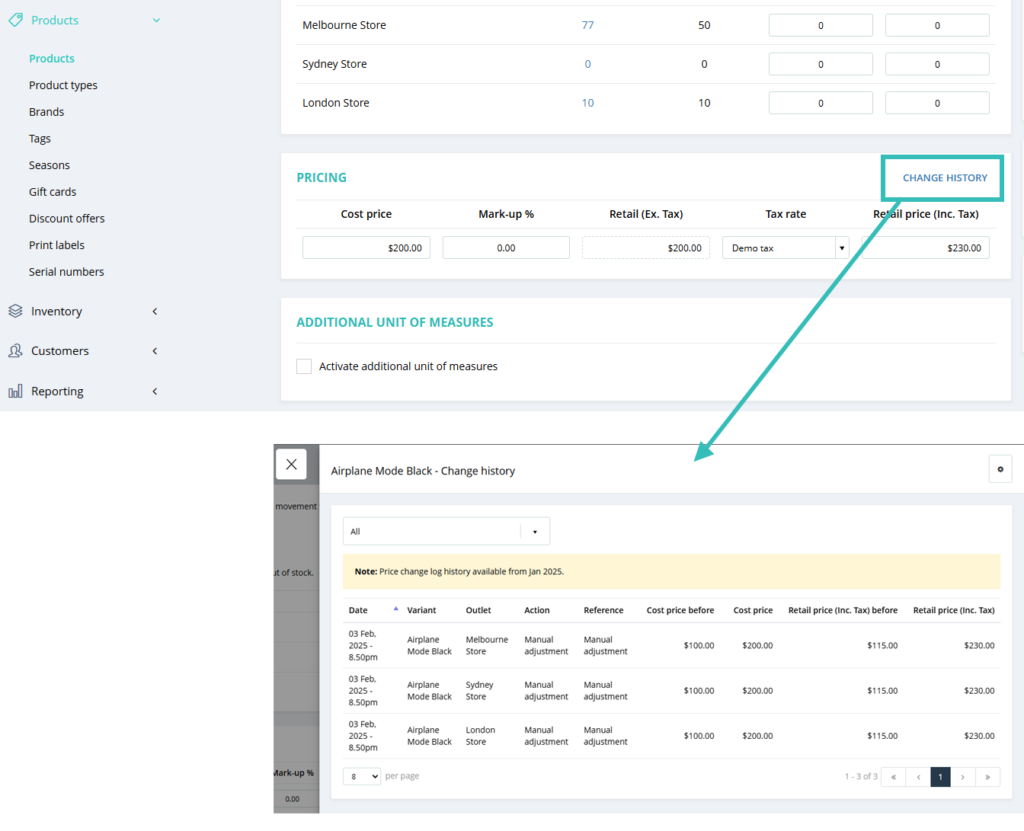
Many customers requested checking the cost price change for products. This feature is now available on the product history page. You can see the current and last cost prices of the product.

In product history system will record entries only when any stock updates. If only price changes, there will not be any changes in product history.

In the cost change report, the system will add records when any price updates (cost/retail) for the product.

New user permission: View Only – Purchase orders, Inventory counts/stock-take, and Transfers:

(Supported plan: Hike Plus)

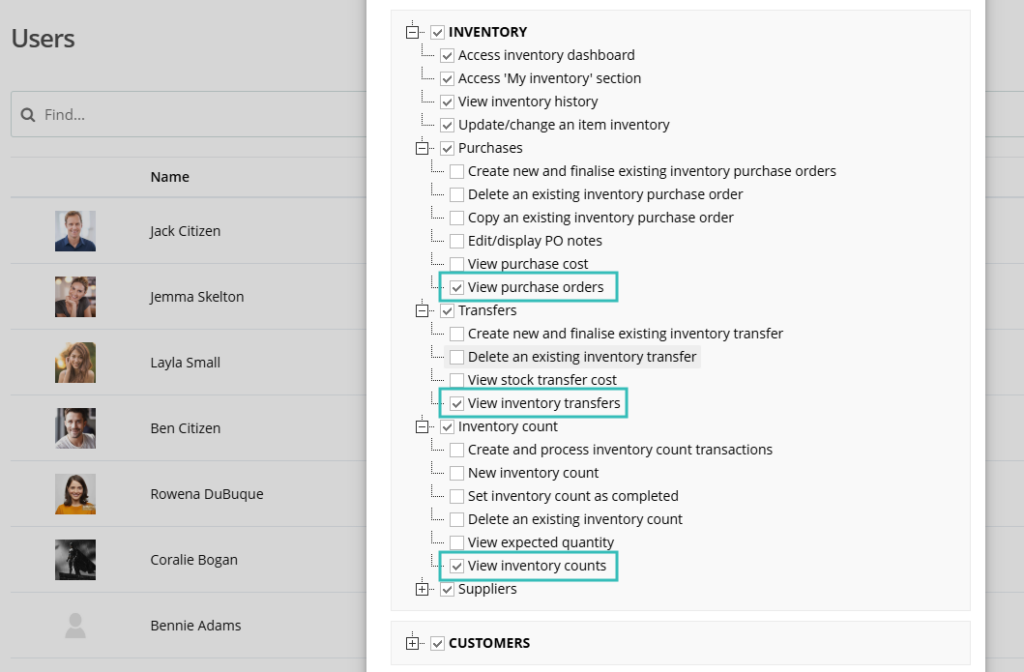
We have introduced new user permission where the user can only view created Purchase orders, stock transfers, and Inventory counts/stock-take within Hike. They cannot edit or make changes to these three sections.

This was requested by many customers to avoid any unwanted changes by the users. These new options are available on the User permission page.

Customer sync option on the eCommerce integration settings.

(Supported plan: Hike Plus)

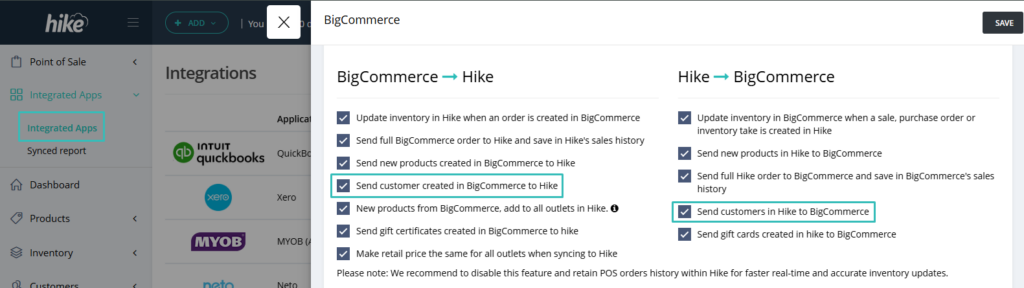
This is a big one!! We are now providing an option for clients to sync customers from Hike to all eCommerce platforms.

It used to be automatic sync and you cannot stop customer sync between Hike and eCommerce platforms. Now, we have provided below option on all eCommerce integration settings page where you can manage customer sync just like sales and products.

As per your choice, manage the customer data between Hike and eCommerce platform.

Product descriptions now available on each variant.

(Supported plan: Hike Plus)

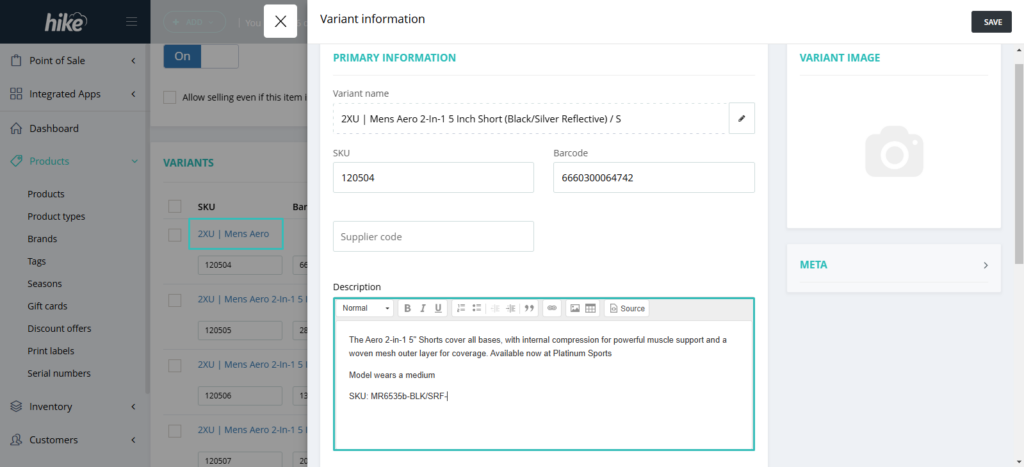
This is another customer suggestion approved! This feature will allow you to add product description on each variant.

This feature will make life easier for business with big variant collections.

Please note that currently only WooCommerce and Magento supports product description sync. You will not be able to sync product description to any other platforms.

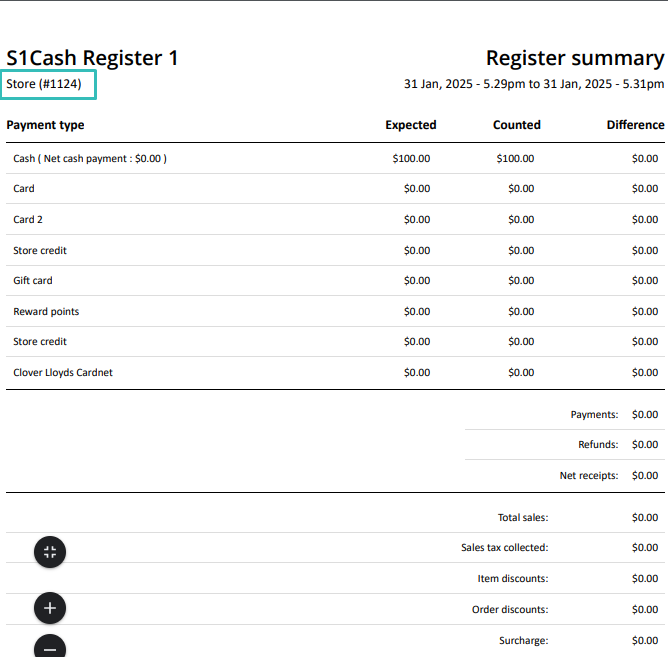
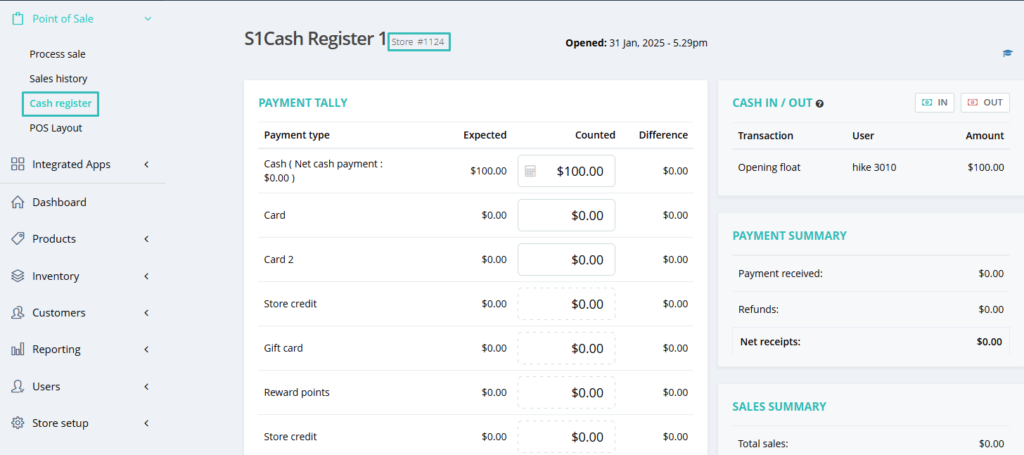
Register number batch number available on the Register and print.

(Supported plan: All)

As per customer’s request, they want to show the open register batch number on the register and the register closure reports.

You will not have to go to the reports to check the registers and this will help you track daily paperwork.

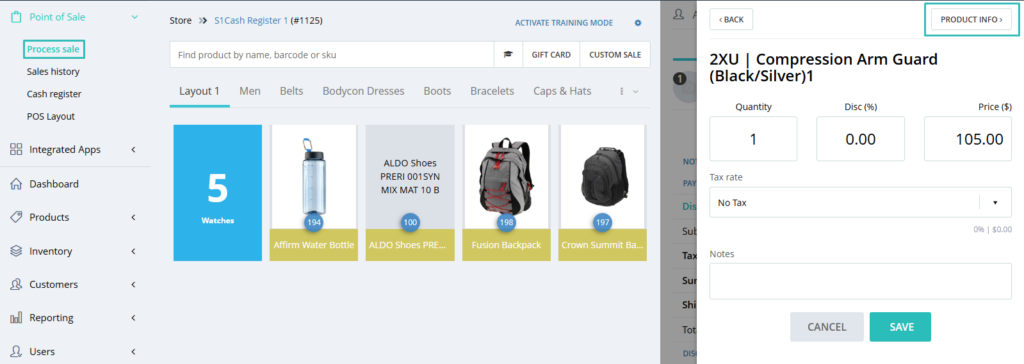
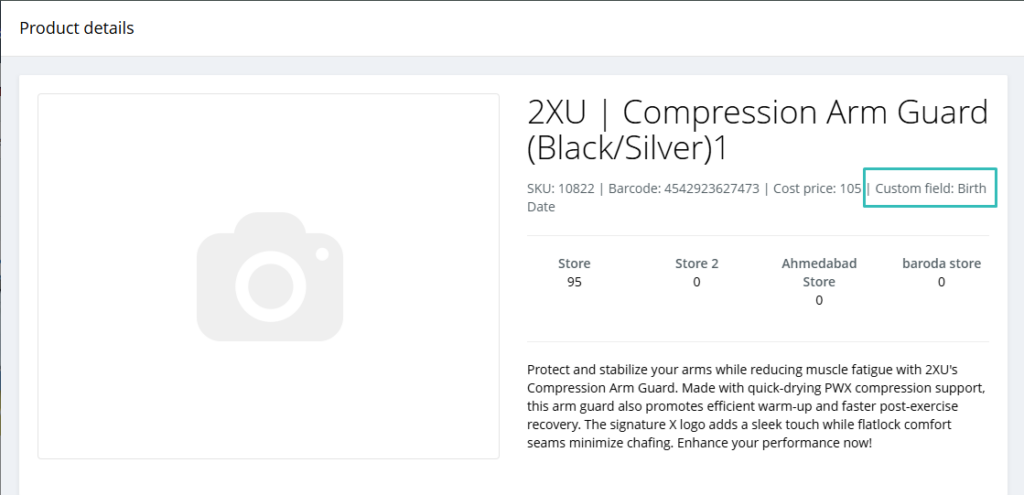
Custom field now available on the POS product description page.

(Supported plan: All)

Custom field will now be available on the product description section on the POS page. This will help cashiers to check additional details about the product such as location, expiry date, handling request etc.

For example, with the location of the product added to the custom field, the cashier can identify and retrieve the product easily.

Payment reference ID/Cheque number record option on the payment.

(Supported plan: Hike Plus)

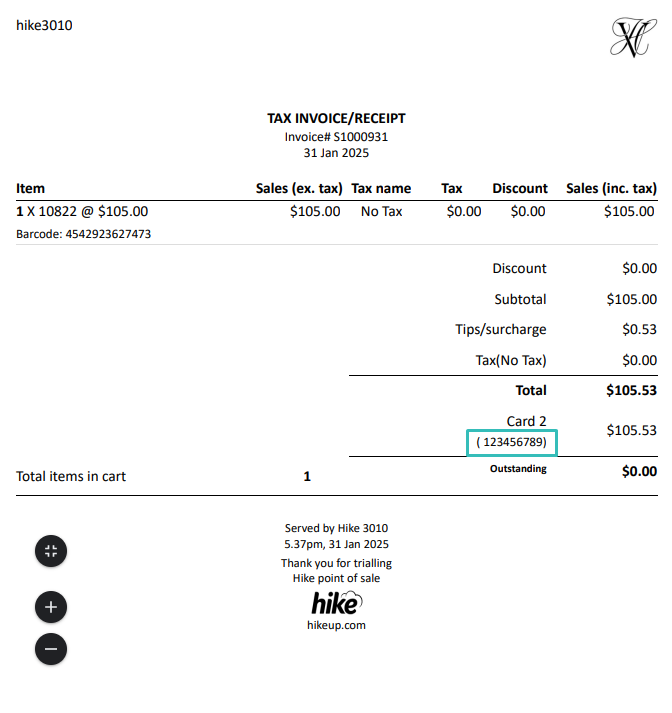
For the customers who are using cheque or other payments within Hike, they wanted to record the payment ID/document reference number on the sale when making the payment.

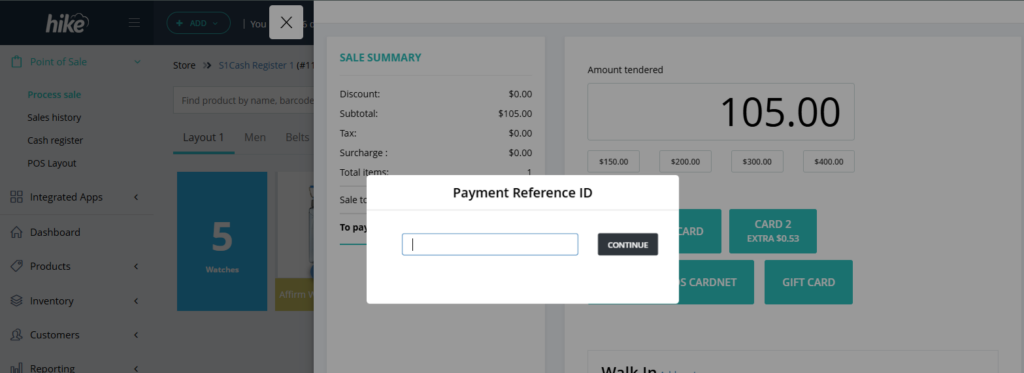
To facilitate this, we have introduced a feature on the POS page where a pop-up will show to record the cheque number/Payment ID for the sale.

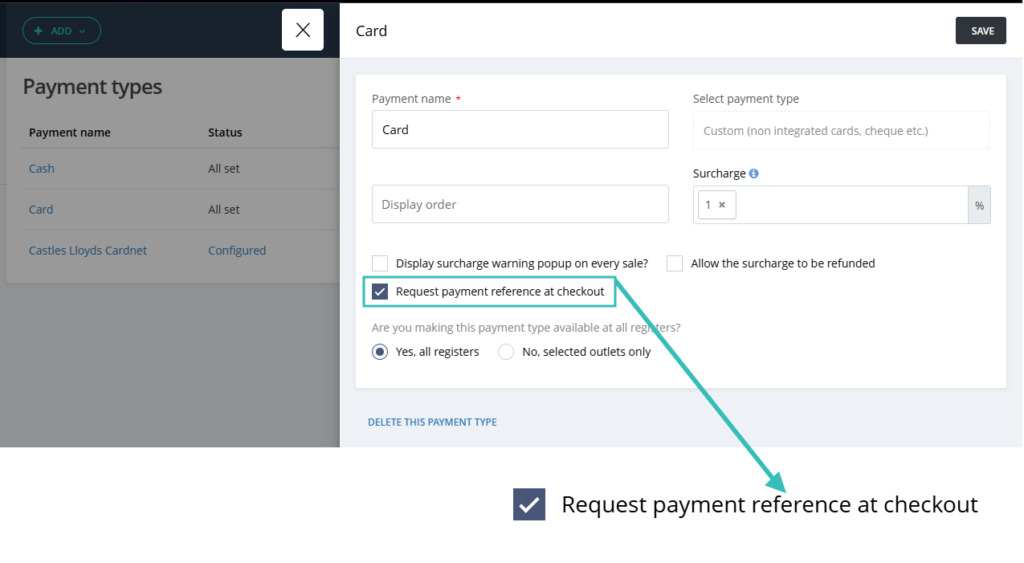
To activate this feature, you will need to select following option while creating the custom/non-integrated payment option.

Reports now has the option to select multiple locations/Outlets.

(Supported plan: Hike Plus)

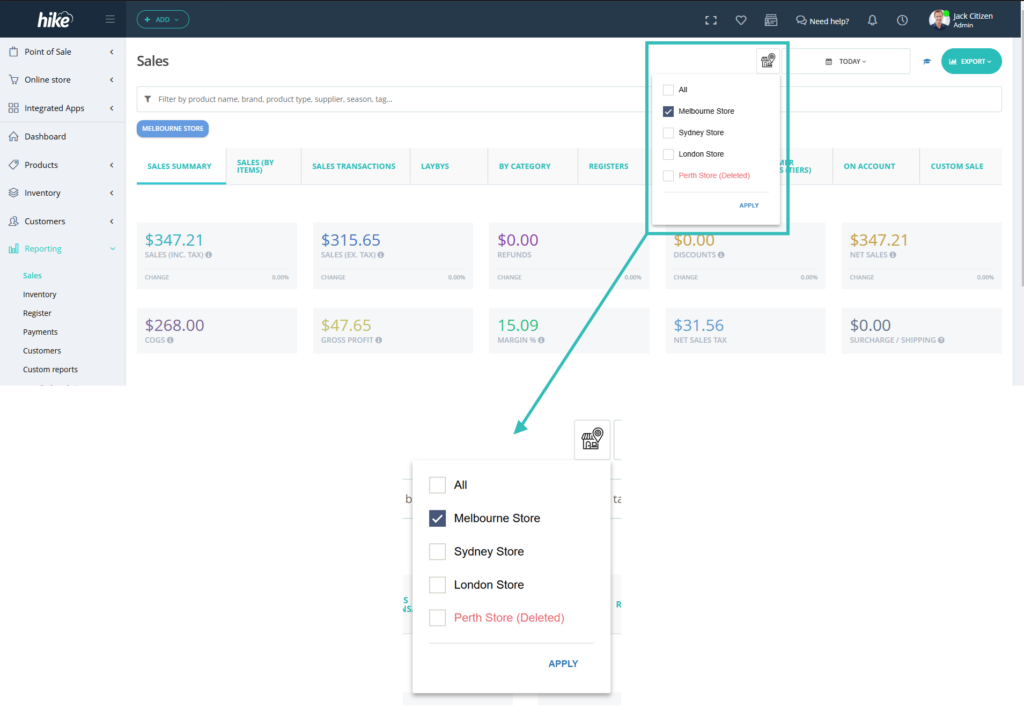
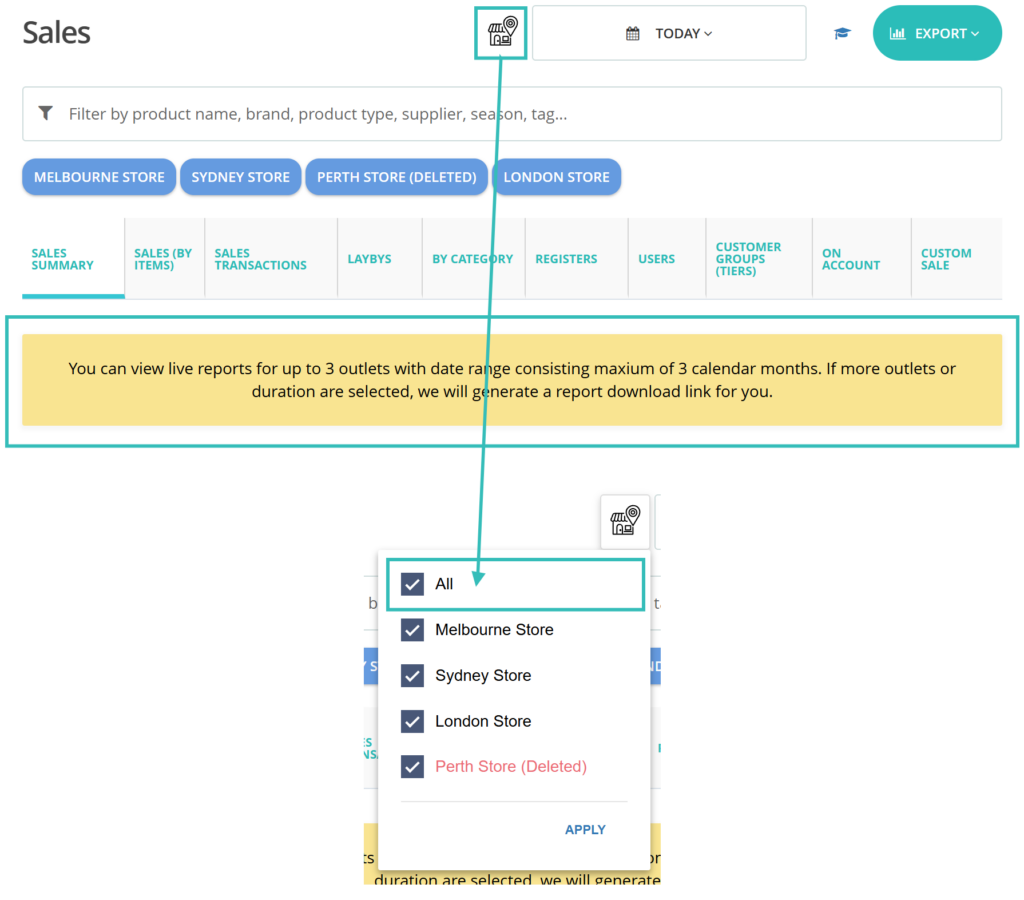
As per customer requests, we have introduced this new feature. In this feature, clients can select multiple outlets at the same time within the reports.

For example, they can check data for just two outlets out of 5 outlets if they wish. The selective option was not available earlier. This will be available on all reports for multiple outlet stores.

On the strip below the search bar, you can see selected Outlets for the report.
This option is now available for all Hike reports.

Create new supplier and new product directly from Purchase Order.

(Supported plan: All)

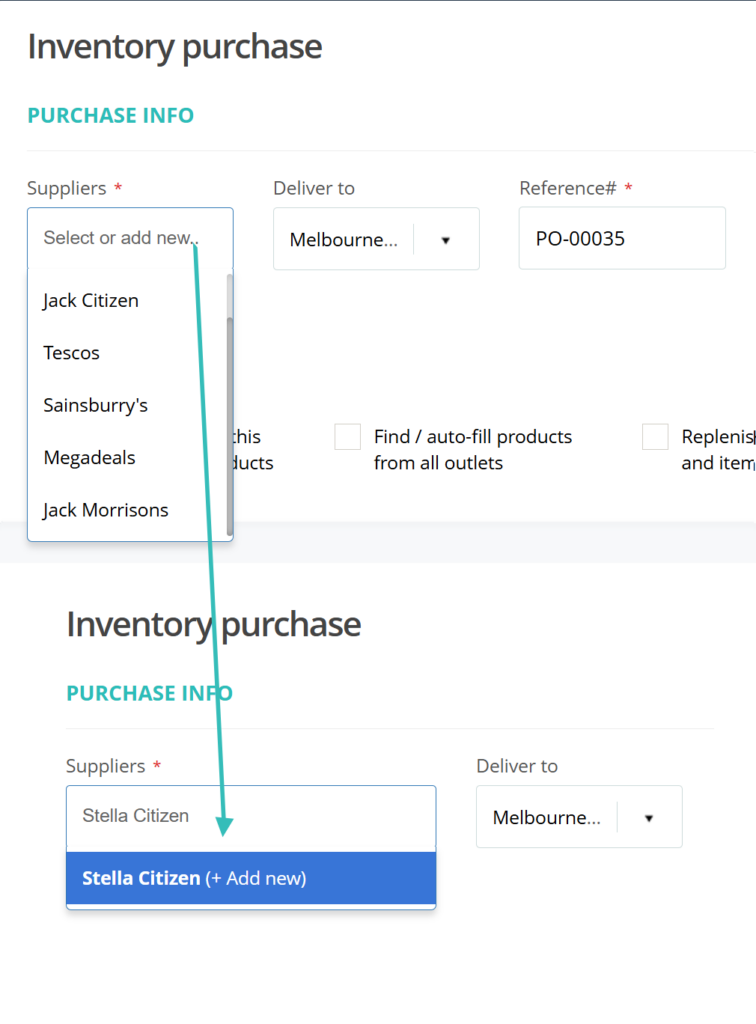
When you create a purchase from a new supplier you will now add the new supplier and new product directly from the new Purchase order page. You do not have to create supplier and products beforehand separately. 

To add new supplier, you have the option to Add new under the Supplier drop-down.

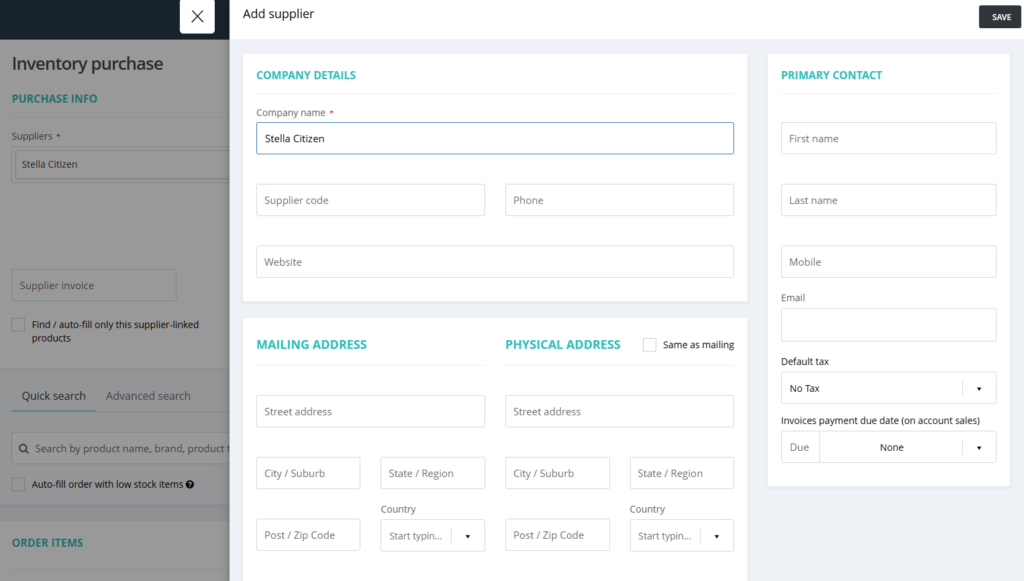
Once you select Add new, a new page will open which will let you add details for the supplier. Add the details and click on Save.

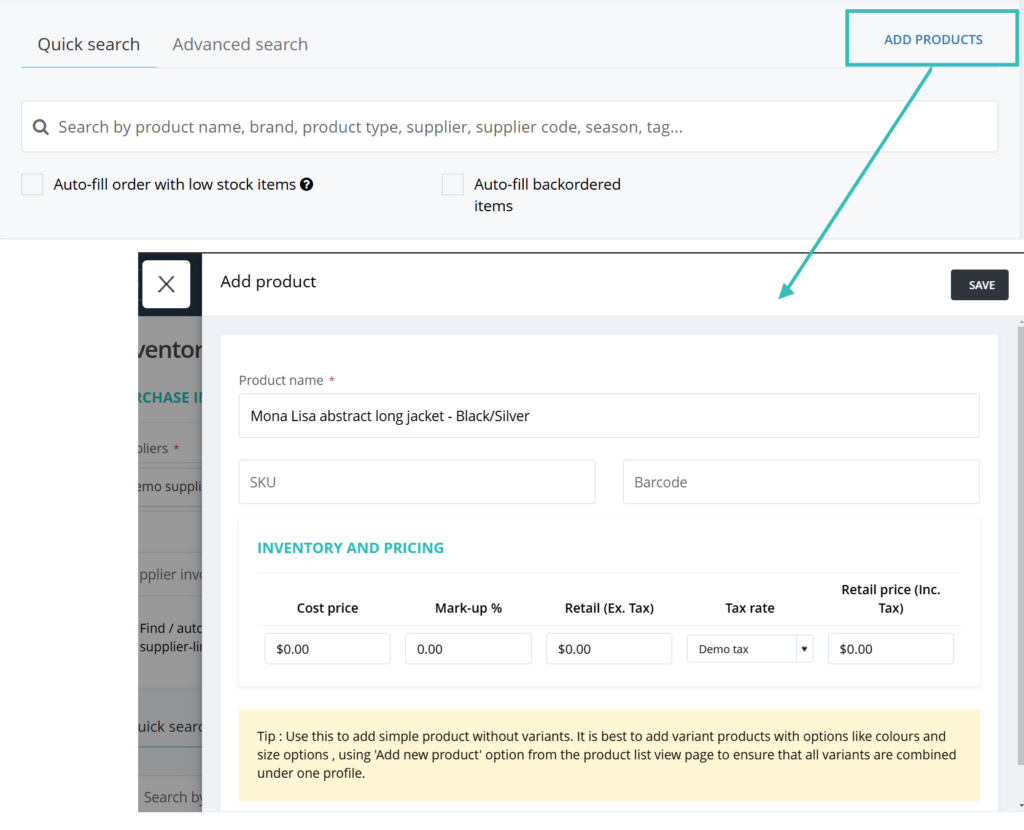
Similarly, you can add new products directly from the PO page. Earlier, this was only available via scanning the new product on this page via scanner.

When you click on Add Products, a new window will open which will allow you to add product details and save.

Please note that you can only add simple products using this option.

Replace the product name with SKU on the sales receipt

(Supported plan: Hike Plus)

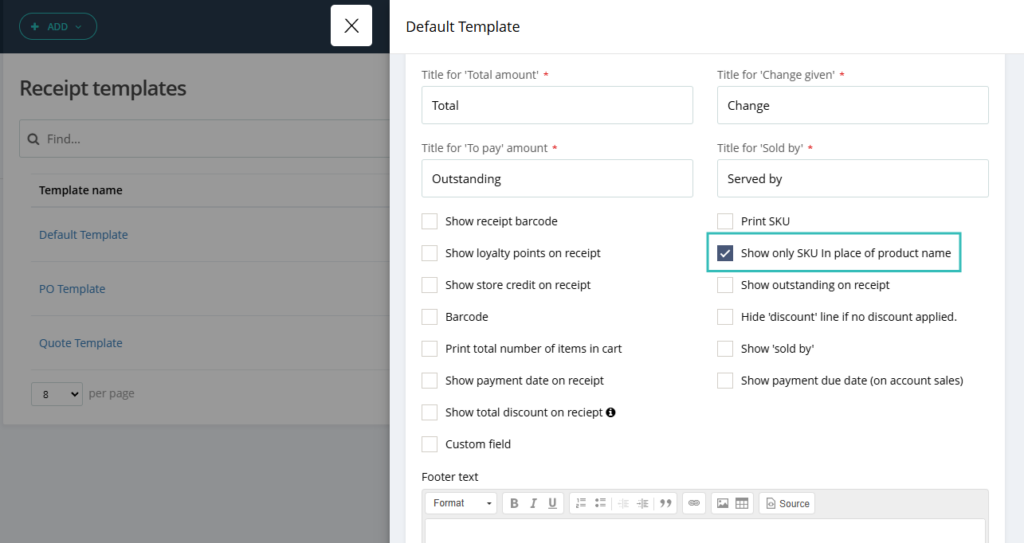
Hike clients who have very long product names, requested that they do not prefer showing entire product names on the receipt. Instead, they would like to have SKU printed on the receipt with no product name.

To achieve this, we have introduced a new option on the receipt print template where you can replace the product name with the SKU.

This option is available on both thermal and A4 receipts within Hike. Once selected, your receipt will display product SKU instead of names.

Gift card expiry date.

(Supported plan: Hike Plus)

The gift card expiry is requested by some of our users who are in business for a long time. They want the Gift card to expire at a certain date so it could not be used after that day.

We have now introduced this future to Hike. You can now set a expiry date for the Gift card in Hike.

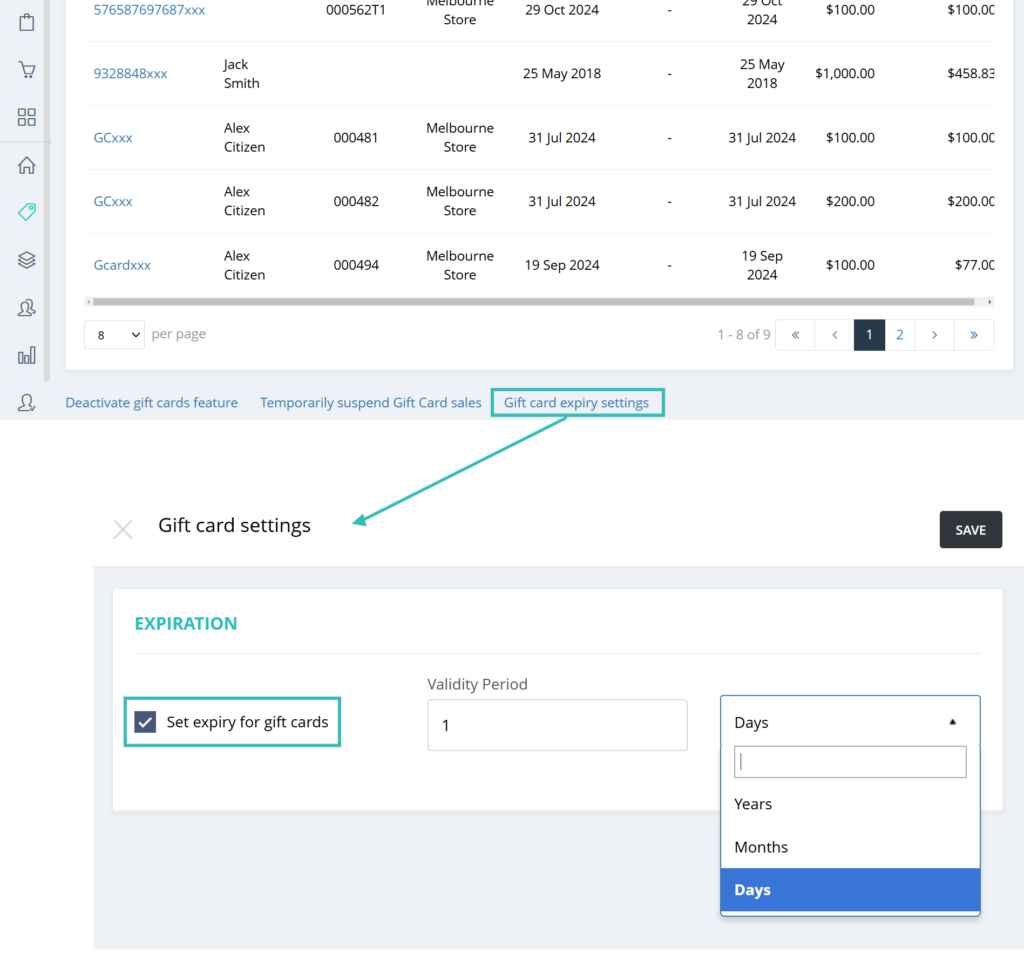
The setting is provided on the Gift card page. The option is called ‘Gift card expiry settings’

When selecting this option, you have option to select Validity Period in days, month and years.

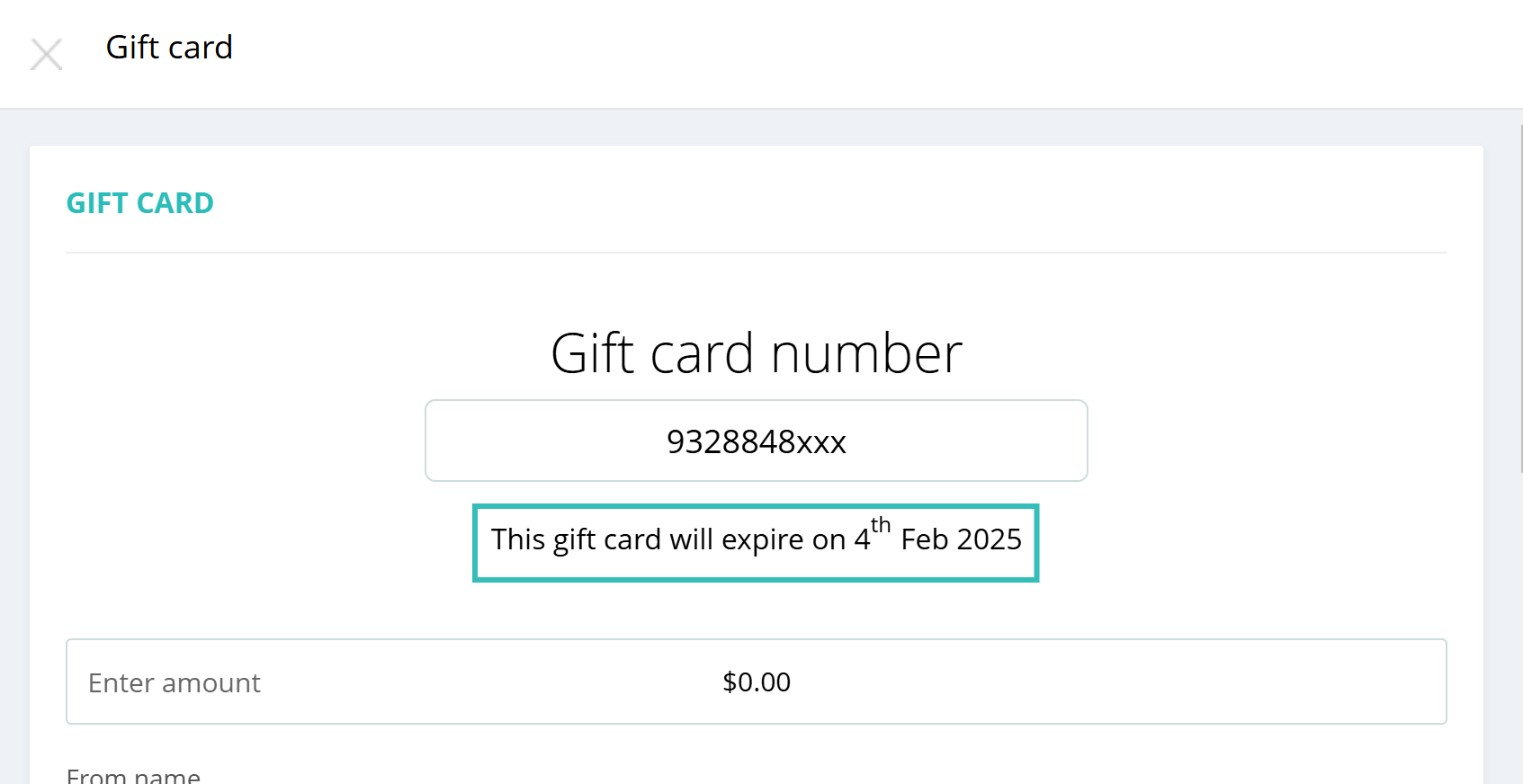
So when creating a new Gift card, you can see expiry date of the Gift card.

The gift card will expire from the selected date at the selected time (day, month or year). In above example, we have selected 1 day so the gift card will expire the next day.

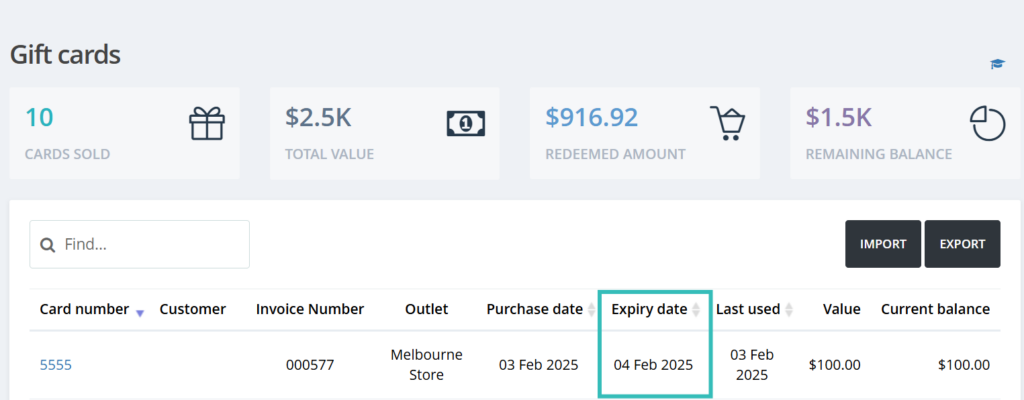
You can also check the expiry date for each gift card on the Gift card listing page.

Please note that you cannot add an expiration date to existing gift cards (Issued before this feature release). It will be only available for new gift cards.

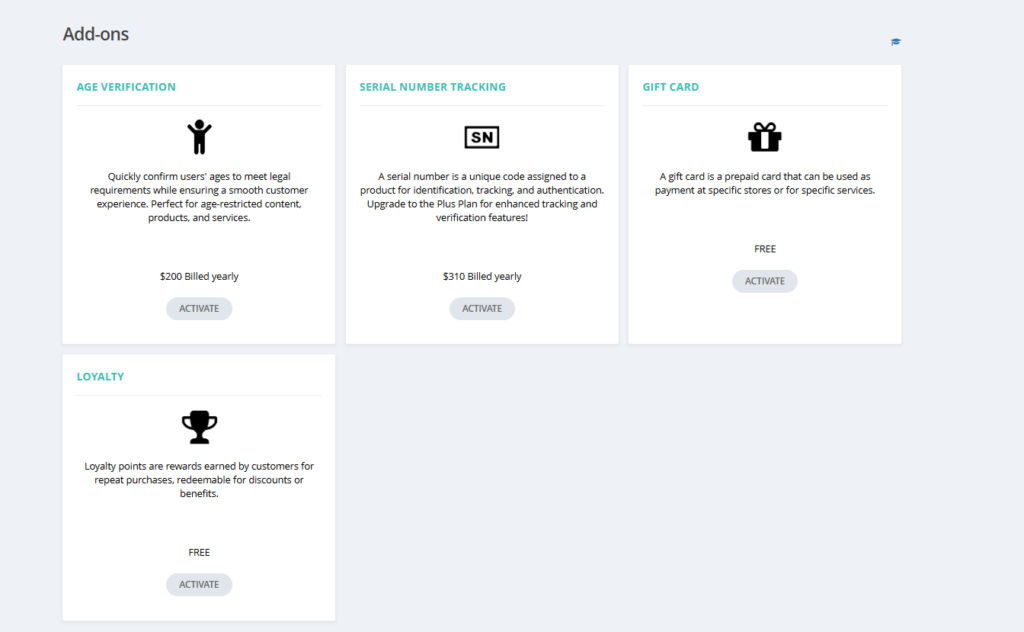
Add-on selection option for additional features.

(Supported plan: Hike Plus)

We are excited to inform you that some new major features will be available as an add-on within Hike POS for a small subscription fee. If you do not wish to use this feature, don’t worry.

However, if you are interested, you can easily add the feature from the Store set-up >> Add-ons section.

We look forward to your continued success into the year and we will be in contact during the year with many additional features to help improve your experience with Hike!

If you want to share your positive experience with Hike with others, please consider leaving us a 5-star review on the platform of your choice. You can use the links below to access the review pages:

Your review will help us to reach more customers and grow our community. It will also motivate us to keep working hard and delivering more value to you.

Let’s make 2025 the year your retail operation shifts into hyperdrive!  For questions or pro tips, our team is available 24/7 on chats and on support@hikeup.com to fuel your success.

Get started today

Ready to get started with Hike?

Try Hike free for 14 days. Instant access, no credit card, no risk.

  • 14-day free trial
  • No credit card
  • Cancel anytime