
Hike Update: April 2025

New Features Designed Just for You—Because Your Voice Matters!
At Hike POS, we’re thrilled to announce our latest feature-packed update, crafted directly from your feedback! This release is all about empowering your business to run smoother, sell smarter, and delight customers like never before.
Why You’ll Love This Updates:
These features are your secret weapons to streamline operations, boost revenue, and leave competitors in the dust. Whether you’re a boutique retailer, a bustling café, or a multi-location brand, Hike POS is here to make every transaction and interaction unforgettable.
Let’s check all the features in detail.
Supplier Invoice Number Search
(Supported plan: All)
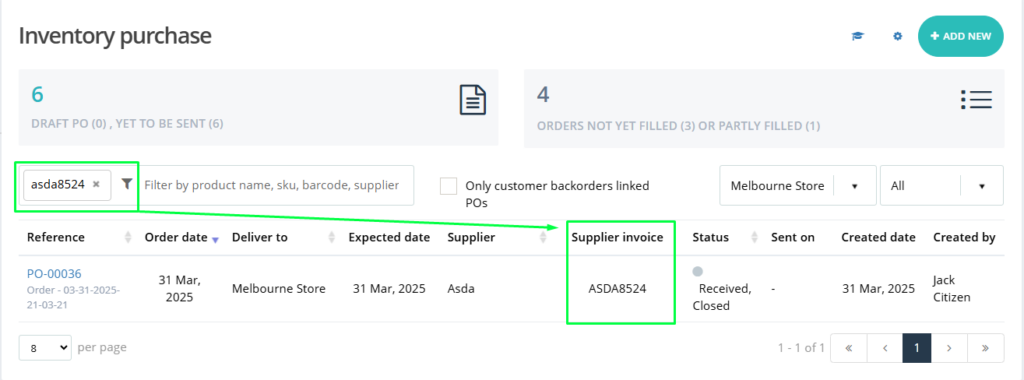
Now, your team can instantly locate transactions using the exact supplier invoice number—no more manual matching. On the search bar where you used to search with the PO reference number, you can now also search with the supplier invoice number.
Use bar-code with Embedded Weight within Hike
(Supported plan: All)
Based on your requests, Hike POS now supports user barcodes with embedded weight data—a breakthrough for businesses selling by weight.
Simply scan your custom barcode (already programmed with weight details), and watch as Hike POS instantly auto-populates the product and exact weight. No more double-checking scales or keying in numbers—just seamless, error-free transactions.
This feature is perfect for delis, grocery stores, or any business using weight-embedded bar-codes.
help.hikeup.com/portal/en/kb/articles/use-weight-mbadded-bar-code-in-hike
Save the Detailed Analytics report for future use
(Supported plan: Hike Plus)
Hike POS now lets you save, name, and reuse your Detailed Analytics reports—no more starting from scratch.
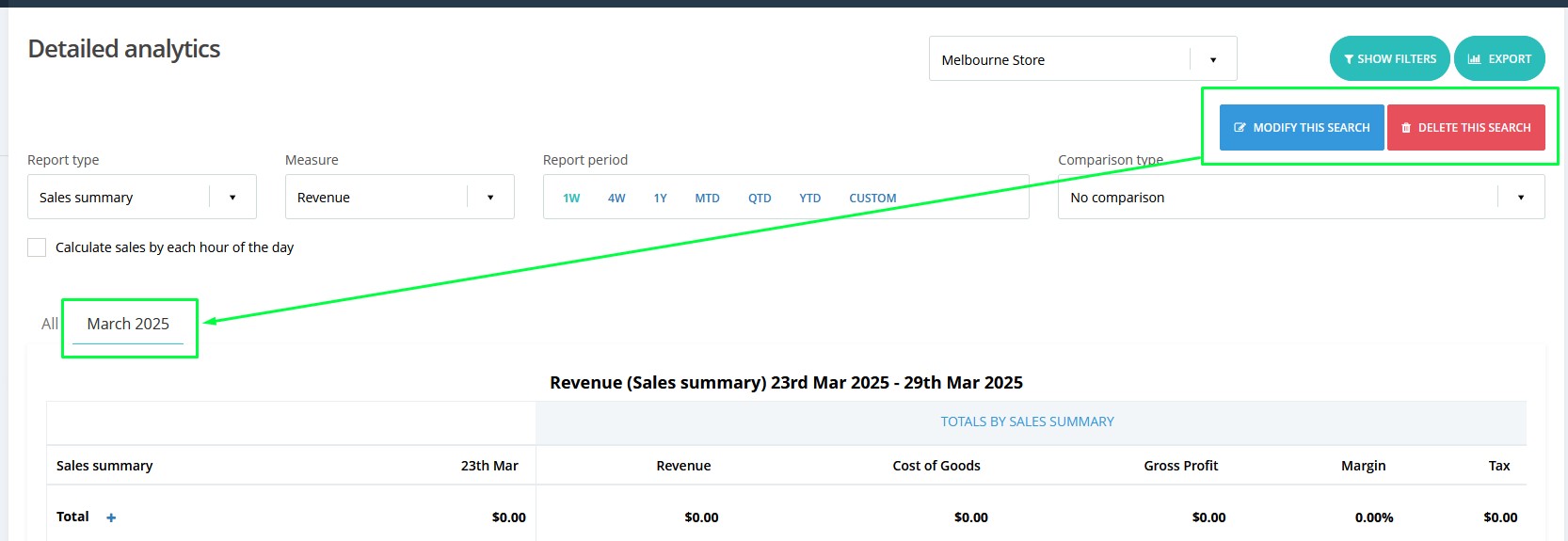
Store your most used Detailed analytics reports (filters, date ranges, measures—all intact), and launch them with one click. Finally, the depth of “Detailed Analytics” meets the convenience of “Custom Reports.”
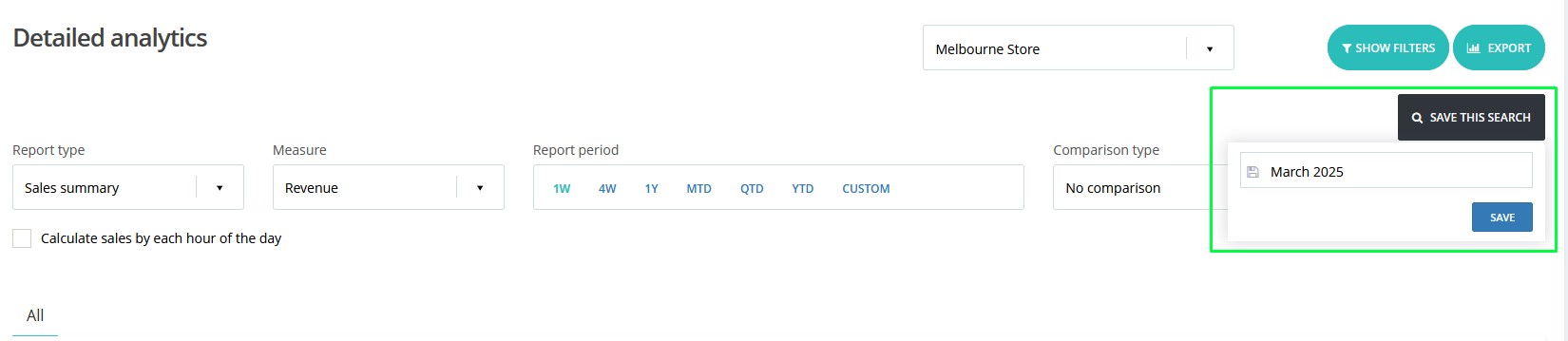
You can create a Detail analytics report and save it with a name for future use. You can also modify or delete this in the future if you wish.
Export Voided sales report
(Supported plan: All)
By popular demand, Hike POS now lets you export voided transactions—filtered by register and date—in seconds.
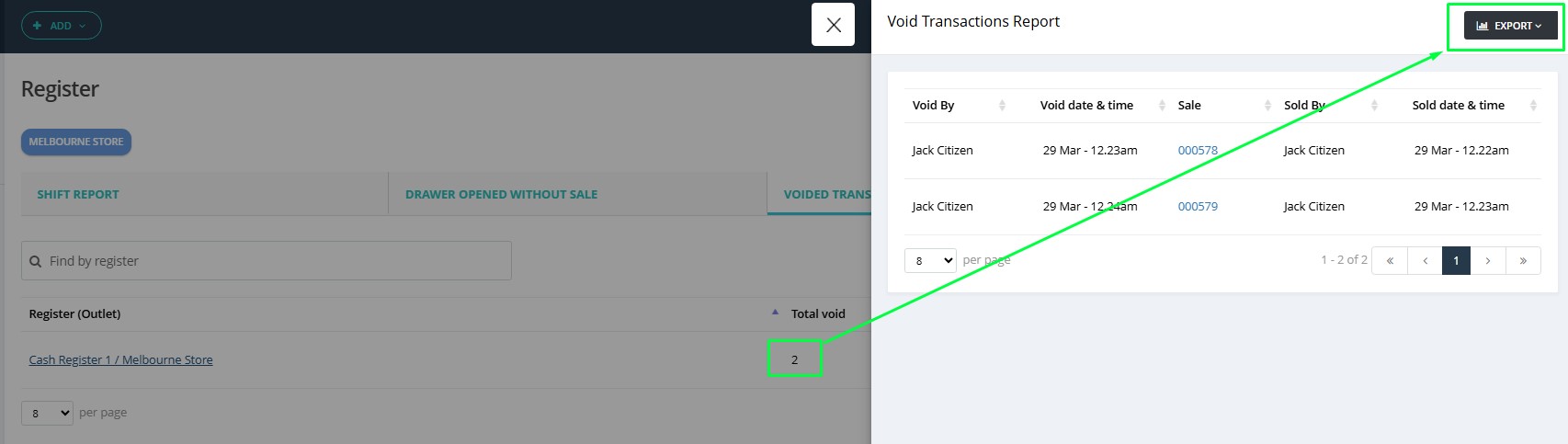
This list can now be exported in both Excel and PDF formats.
Dynamic re-order quantity for the Purchase Order stock
(Supported plan: All)
By popular demand, Hike POS now automates precision with Dynamic Re-order Quantities—a smarter way to restock.
Enable this feature, and when using Auto-fill Low Stock Items for purchase orders, Hike POS calculates the exact quantity needed to hit your reorder point.
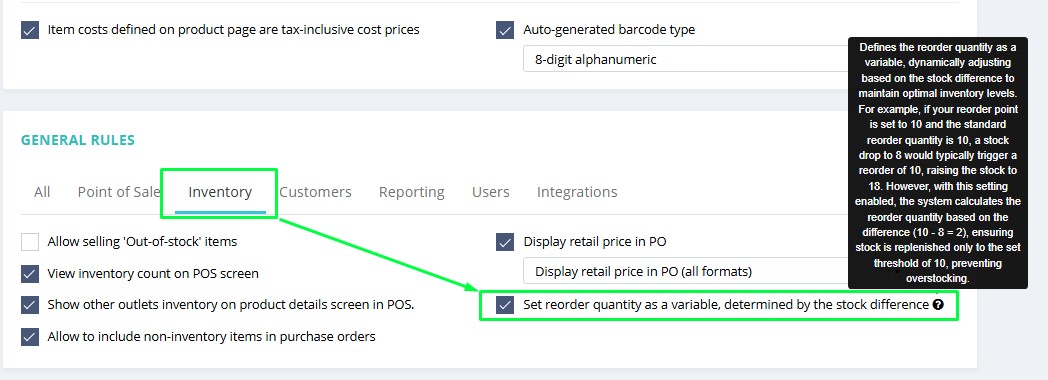
If Reorder Point = 10, On-Hand = 1 → PO Adds 9 (gap filled).
Disabled? It defaults to your preset reorder quantity (e.g., 10).
With this feature, the users will eliminate human error in restocking calculations, prevent stockouts, and reduce excess inventory costs.
Total of Cash IN and Cash OUT in the register report
(Supported plan: All)
Hike POS now delivers Total Cash In/Out Reporting Automated Register Closure Prints—so your end-of-day routine is faster, clearer, and audit-ready.
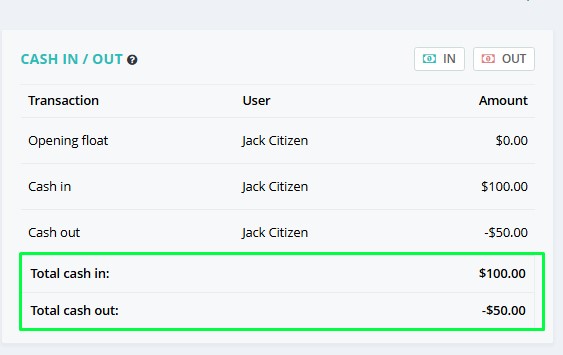
Perfect for busy retail teams, multi-register setups, real-time Cash Tracking, or anyone craving a stress-free closeout.
The product type is available on the POS product details page
(Supported plan: All)
For businesses with sprawling inventories, Hike POS now displays Product Type directly on your POS product details page—so your team can find, verify, and sell with laser focus.
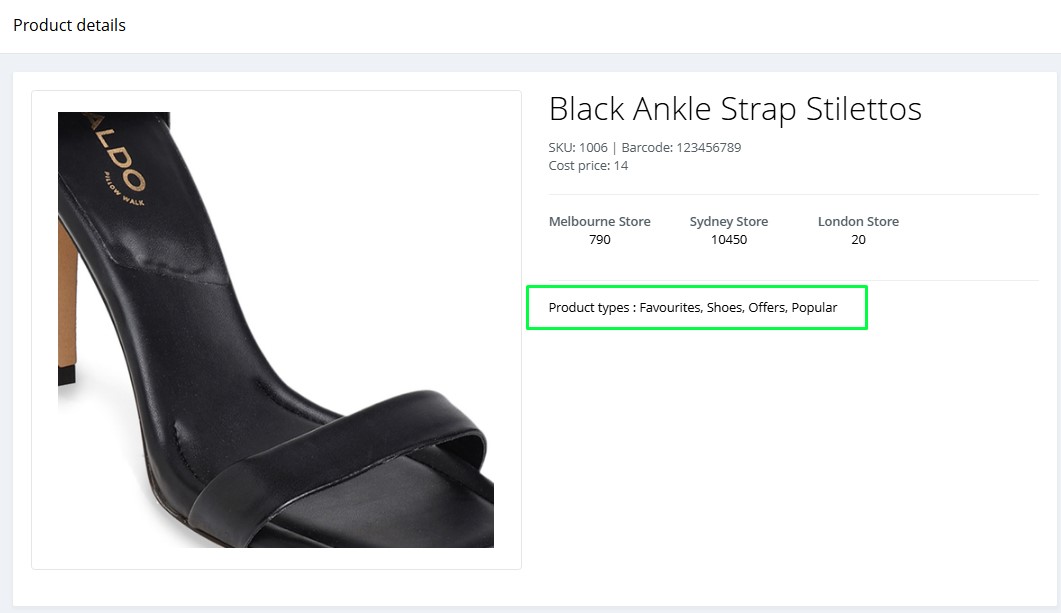
This will help streamline the search for the product in the store, reduce errors, and help with faster check-outs.
This feature will be Ideal for fashion boutiques, hardware stores, or any business where details make the sale.
Exclude entities from the Discount offer
(Supported plan: Hike Plus)
By popular demand, Hike POS now lets you exclude specific products, Product types, Brands, and Product tags from store-wide sales—turning hours of setup into seconds.
Create Your Sale: Set a store-wide discount (e.g., 20% off everything).
Exclude in Clicks: Handpick product type/Brand/Products, tags to exclude (like high-end or seasonal products).
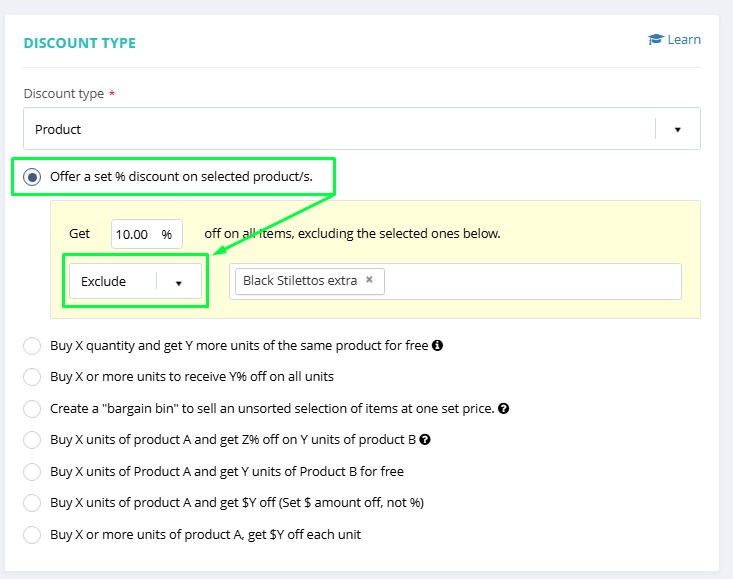
This will be perfect for flash sales, holidays, or vendor-specific restrictions.
PIN authorization to redeem customer’s Loyalty points
(Supported plan: Hike Plus)
This feature is designed to give businesses greater control over loyalty programs. This update ensures that only authorized managers or admins can approve loyalty point redemptions, safeguarding against unauthorized use.
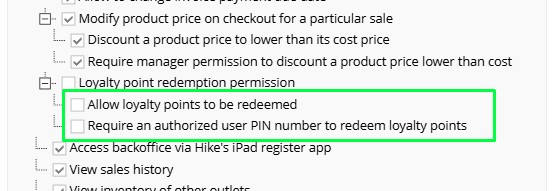
With first permission, the user will be able to redeem points; otherwise, they won’t be able to process a sale payment using loyalty points.
If the second permission is Active, a PIN will be required when processing the payment. Admins or managers will enter the PIN to redeem points.
This feature is perfect for businesses prioritizing security without compromising customer experience.
Option to change the Retail price during the Purchase orders
(Supported plan: All)
As requested by multiple customers, when creating purchase orders in Hike, you can effortlessly check and modify product retail prices directly within the process. No more jumping between screens or delaying orders—update pricing on the fly to reflect supplier changes, promotions, or margin adjustments.
You will find this option when changing the cost price of the product.
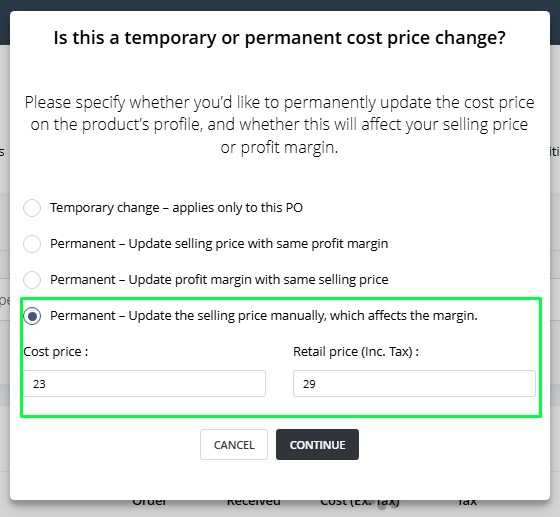
This update empowers businesses to maintain pricing precision while speeding up procurement.
Report to get all sales/transactions completed by a customer
(Supported plan: All)
Now you can easily generate a full statement of all transactions for any customer! We have introduced a filter with the customer name on the Sales by Transaction report.
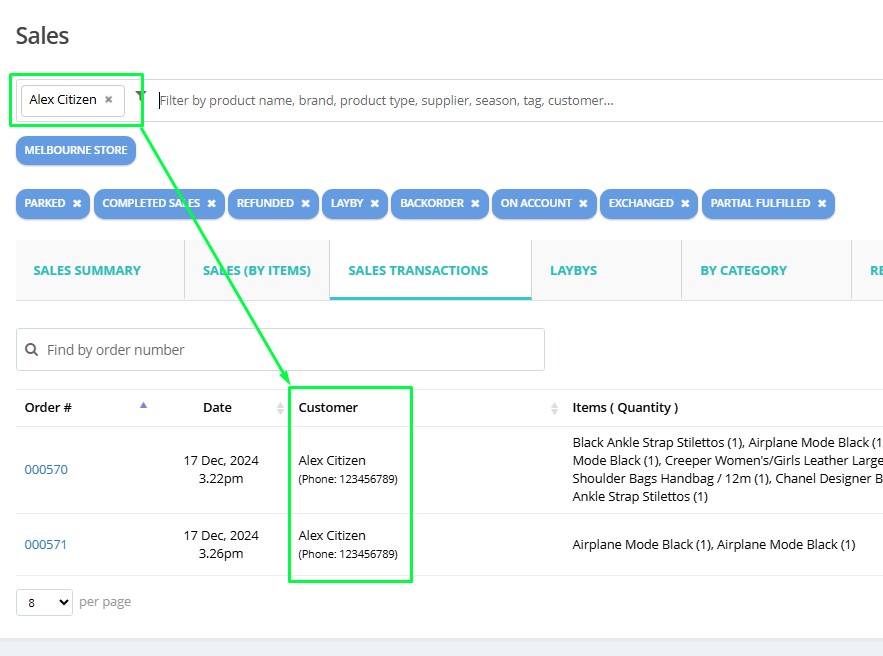
Simplify audits, resolve disputes faster, or share records with customers.
Track everything in one place—no more digging through receipts!
Showing the Rounding amount before the payment is made
(Supported plan: All)
When the rounding-off option is selected on your Store’s general settings, the system will show the exact amount after the rounding-off before completing the payment.
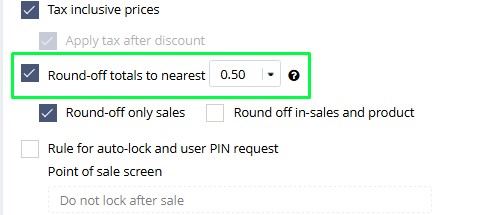
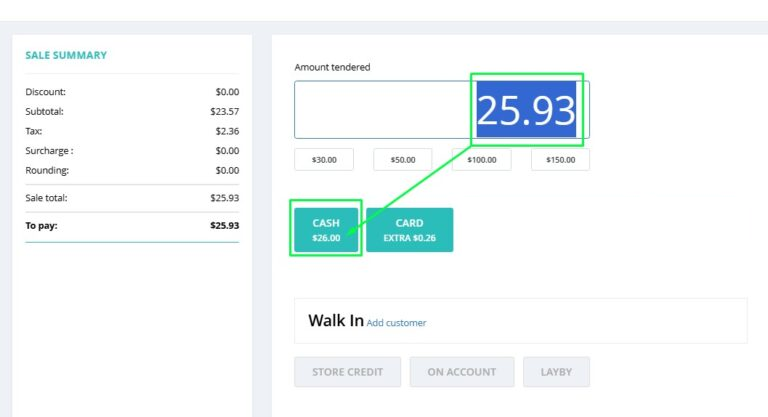
This way customer knows what amount to pay at the check-out and the user can also tender the amount based on the figure.
This option is only available for the Cash payment method.
Store credit report: Entire customer name is now available
(Supported plan: All)
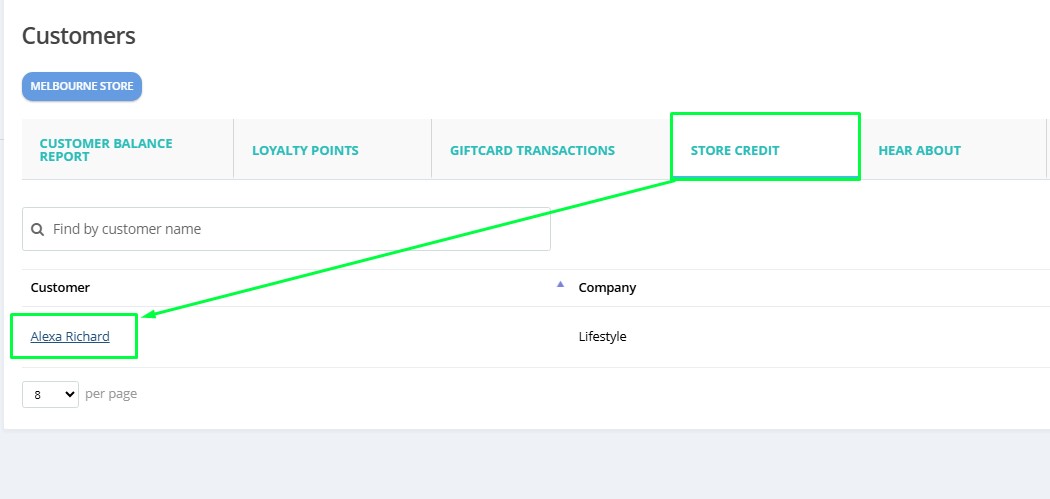
With this release, we have added the customer’s full name, including any last name on the Store credit report. Earlier, it was just the first name and some clients find it difficult to identify customers with the same names.
Low inventory notification email now includes Re-order Quantity
(Supported plan: All)
Your low-inventory emails just got smarter! Now, when you receive a Low Inventory notification via email, you will also be able to see the recommended reorder quantity for each item right in the email.
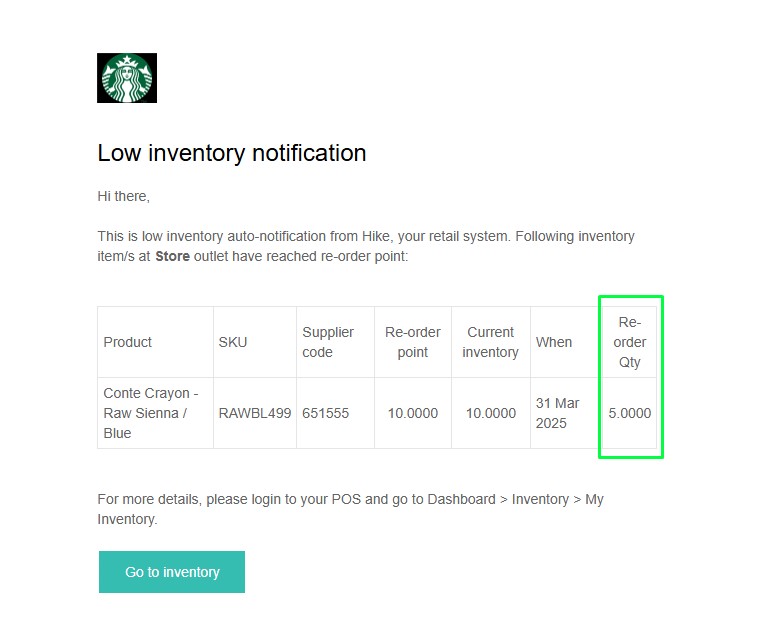
No more guessing—know exactly how much to restock to keep your shelves full!
Option to have the counted field blank while closing the register
(Supported plan: Hike Plus)
Based on your feedback, we’ve updated the closing process to ensure cashiers actively confirm the counted cash amount—no more skipped steps.
When the following permission is not assigned to a user, the “Counted Amount” field will be blank during the register closing. The user must manually enter the physical cash count before finalizing, eliminating any oversight.
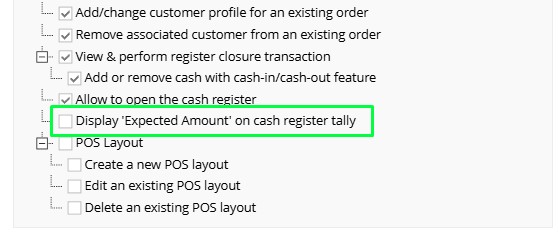
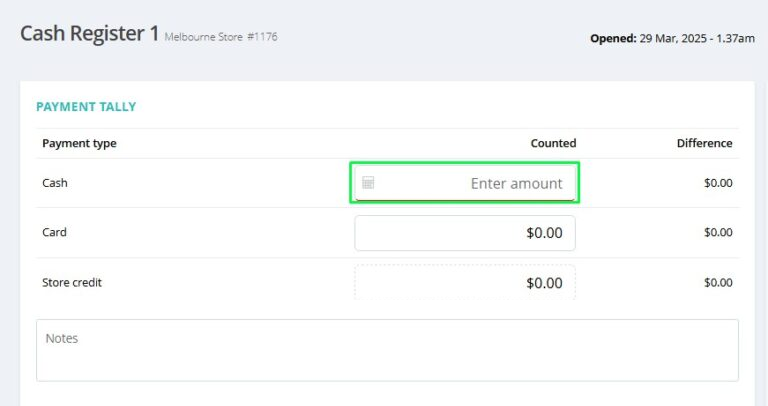
This will result in reduced Errors, a boost in accountability, and improved compliance.
Print bar-code labels directly from the Product page
(Supported plan: Hike Plus)
Good news! Hike POS now lets you print barcode labels in one click—right from the product page. No more switching screens or manual entry.
Access and print barcode labels instantly from the product listing page and select multiple products in one go. Customize and print label quantities without leaving your workflow.
The option is provided on the Product listing page and from there it will re-direct you to the Print label page.
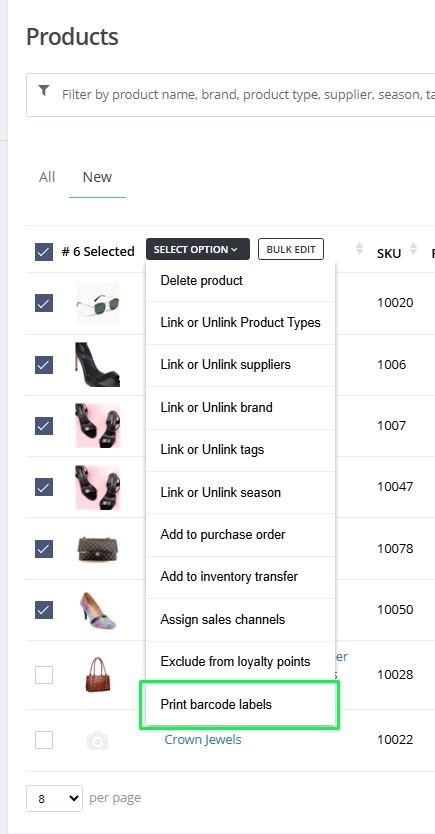
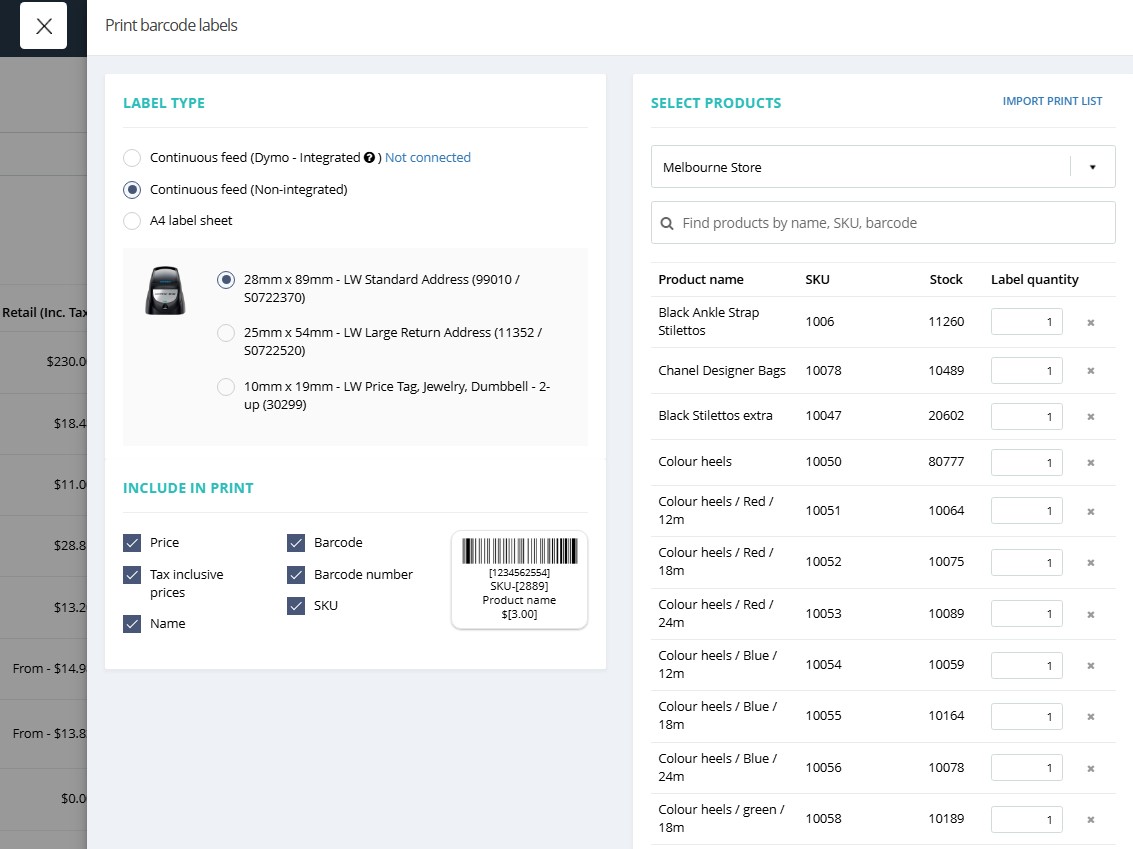
This feature will reduce cost and time for retailers as they can now print the bar code as and when needed.
Option to Duplicate sale to save time and effort
(Supported plan: Hike Plus)
Hike will now let you duplicate existing invoices with just one click—no more manual re-entry.
The option to duplicate is provided on the Sales history after opening the sale, by clicking on Duplicate, the system will create the same sale on the sales page.
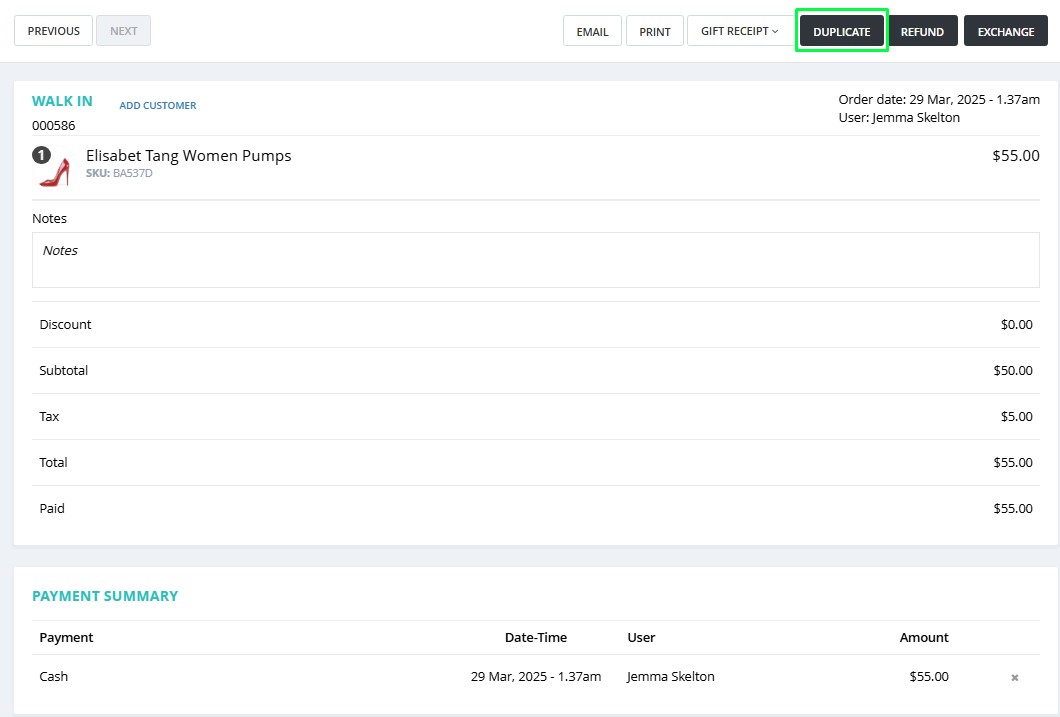
Whether you’re handling repeat orders, bulk purchases, or splitting a customer’s request into multiple invoices, this feature saves time and keeps your workflows smooth.
A Customization of the email templates based on business requirements
(Supported plan: All)
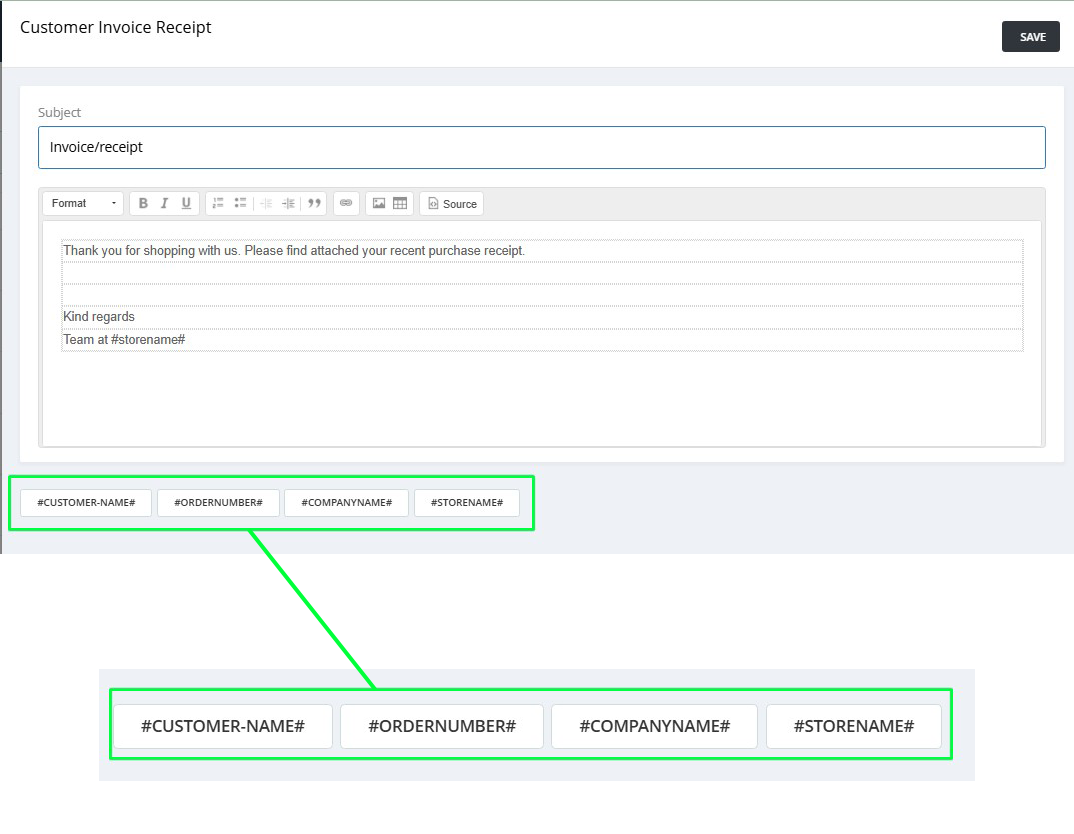
Hike POS is rolling out enhanced email templates with new placeholders and a streamlined editor to help you personalize communications faster and more effectively.
We have introduced new placeholders for all email templates.
All placeholders—existing and new—are now displayed in the template editor at the bottom. Select your required placeholder and customize it with ease!
SKU on Detailed Analytics report
(Supported plan: Hike Plus)
Hike POS now includes SKU numbers alongside product names in all detailed analytics reports—because precision matters.
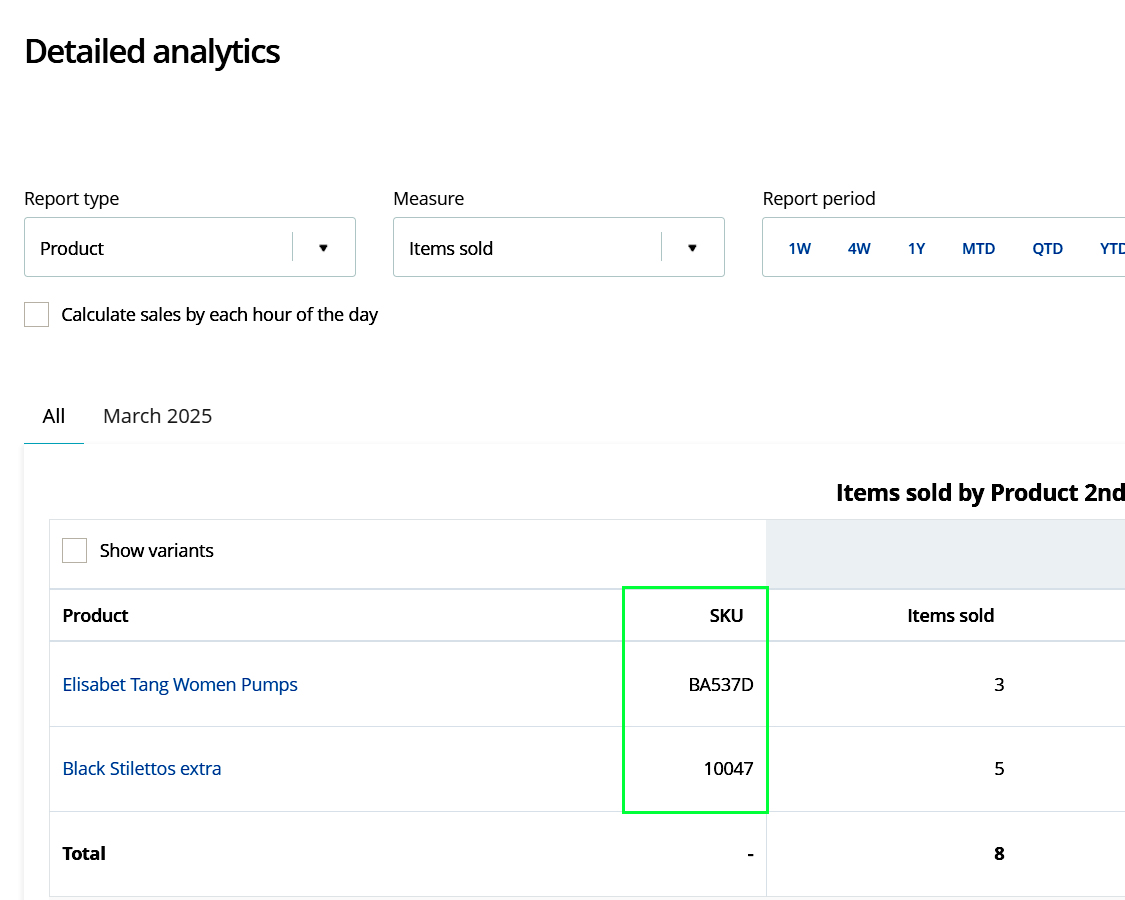
View both product names and SKU numbers in sales reports for unmatched accuracy.
Filter products by In-active in E-commerce only (Product listing page)
(Supported plan: Hike Plus)
Now you can quickly find products that aren’t visible on your eCommerce site! With the new “Inactive in eCommerce” filter on the Product Listing Page:
Go to your Product Listing page >> Click the filter dropdown.
Select “In-active in eCommerce” to view affected products.
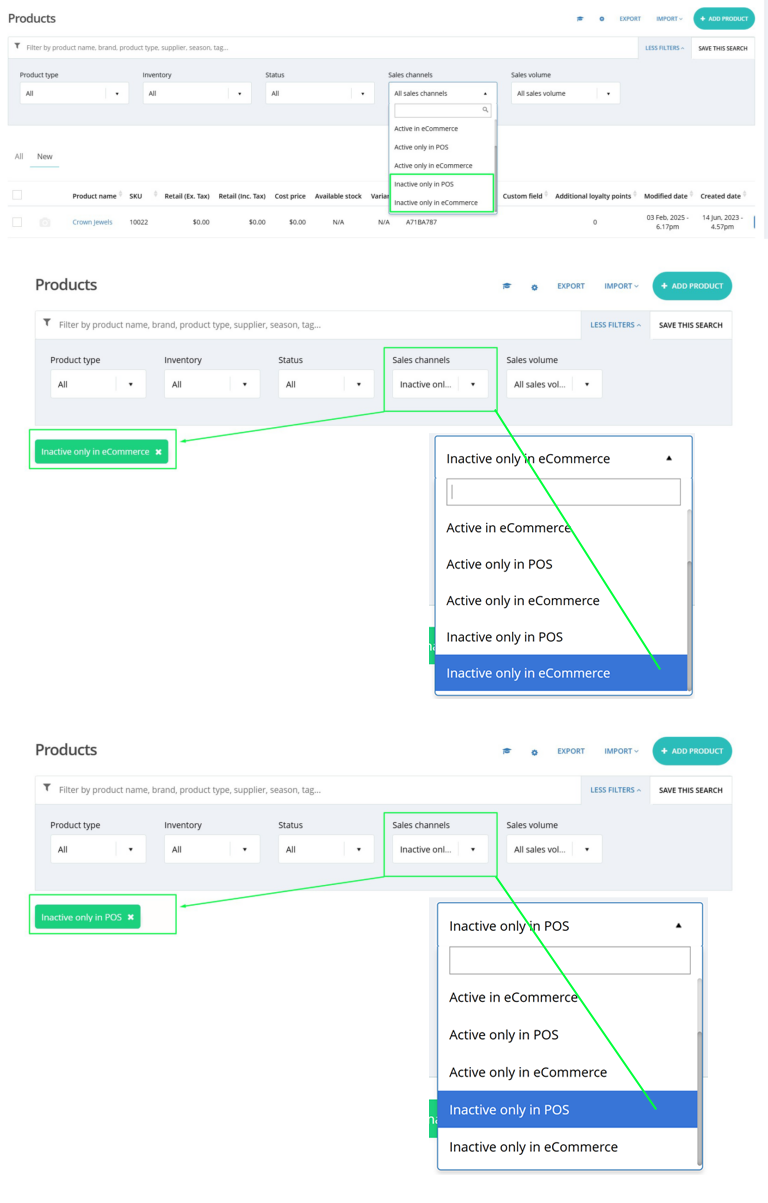
This makes managing your online catalog easier than ever!
Search by product name within the Inventory transfer list
(Supported plan: All)
Users can now search for Inventory transfers by product names, bar-code, or SKU, reducing the need to open each transfer individually. This improves efficiency while maintaining system performance and security.
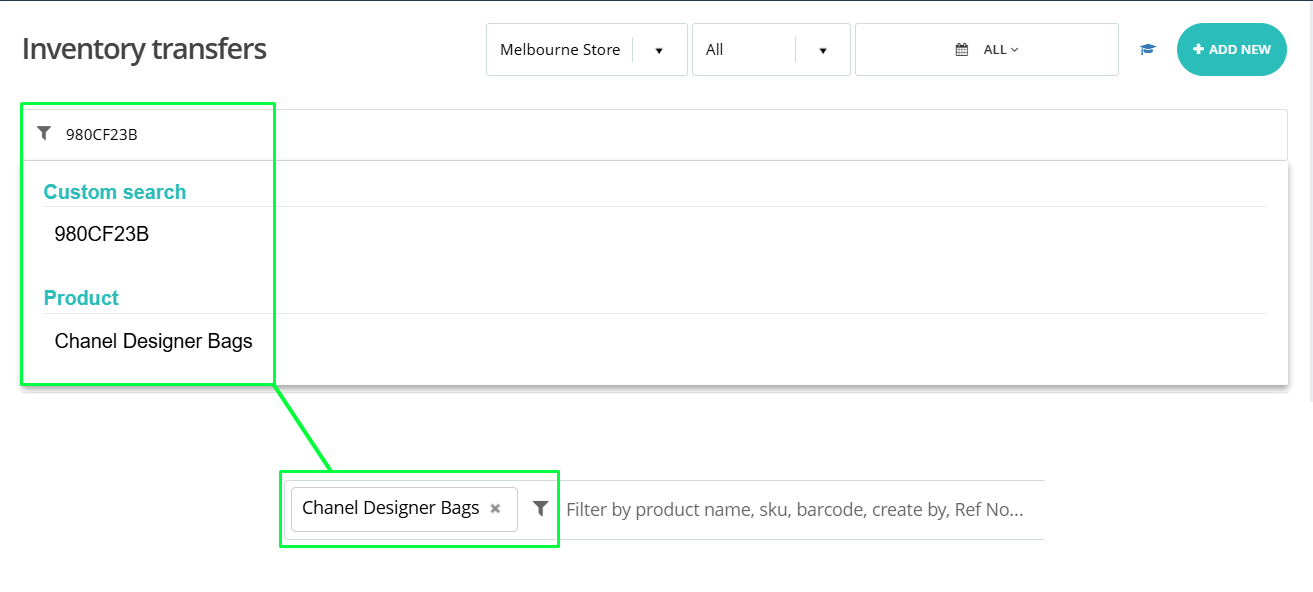
Earlier, you could only search here using the transfer reference number. This has extended the search function dramatically.
A separate Unit price column for A4 sales receipts
(Supported plan: All)
As per the client’s request, we have added a separate column on the A4 receipt to display the product’s unit price.
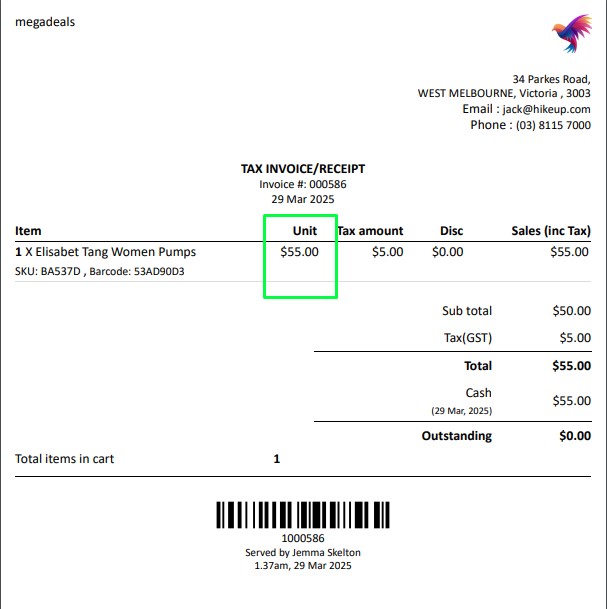
This features is only available with A4 receipts at the moment.
Sync On-account sale Purchase order number from Hike to MYOB
(Hike Plan: All)
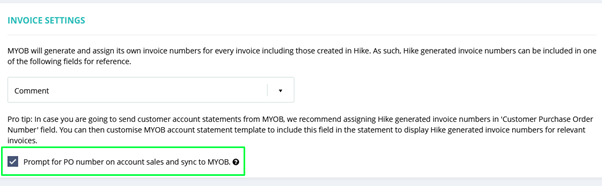
We’ve enhanced our MYOB integration to streamline how on-account sales are tracked! You can send custom on-account PO numbers directly to MYOB, ensuring seamless alignment between Hike POS and your accounting system.
You will need to select a setting provided on the Hike-MYOB integration page.
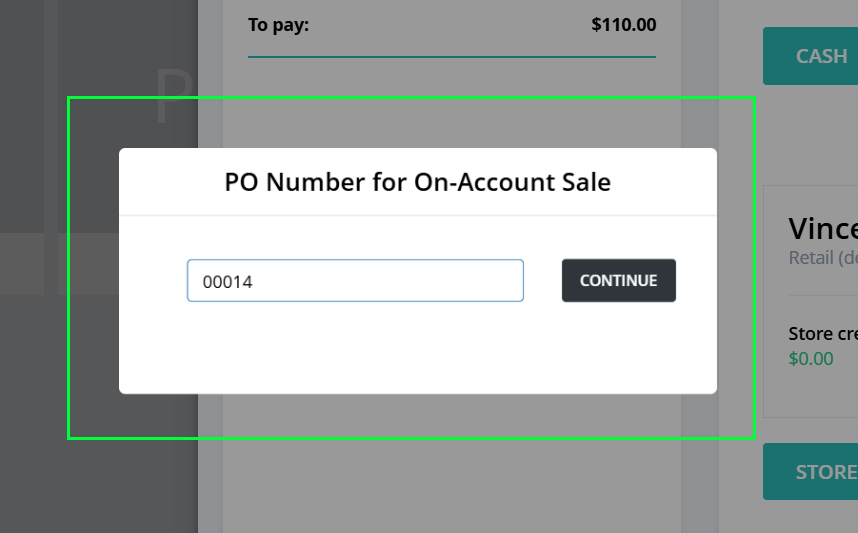
A new prompt appears during on-account sales to capture the PO number.
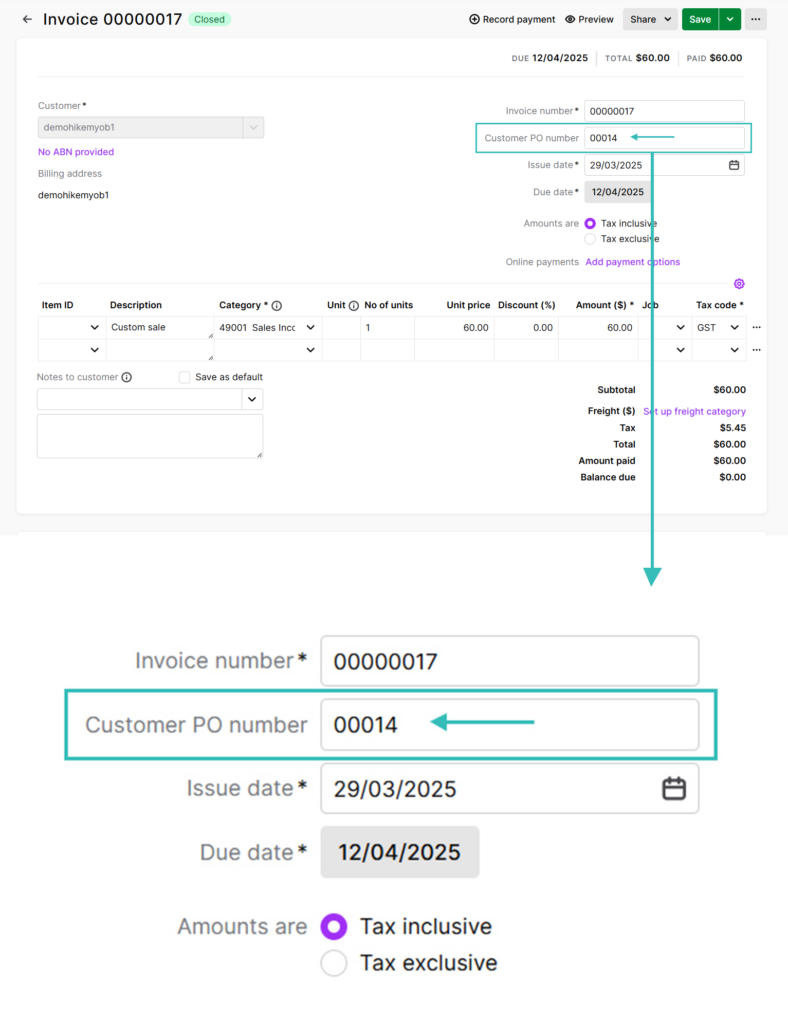
This feature will help customers to eliminate manual entry errors in MYOB.
These features will save time and boost customer engagement for retailers.
If you want to share your positive experience with Hike with others, please consider leaving us a 5-star review on the platform of your choice. You can use the links below to access the review pages:
[Google]
[Trustpilot]
This is only the beginning—stay tuned for more groundbreaking updates as we continue building with you, for you.
Thank you for pushing us to innovate.
Let’s Hikeup your success, together!
Cheers,
The Hike POS Team