Hike Update: April 2024

Hello everyone,
We hope you are well!
Thank you all for your love and support over the years. We hope you are enjoying the Hike and getting the most out of it.
We are thrilled to announce that we have just released some new features for Hike. We hope you enjoy these new features and find them useful and fun.
Here is the list of new features that went live this month:
Supplier code for variants
(Supported plan/s: All )
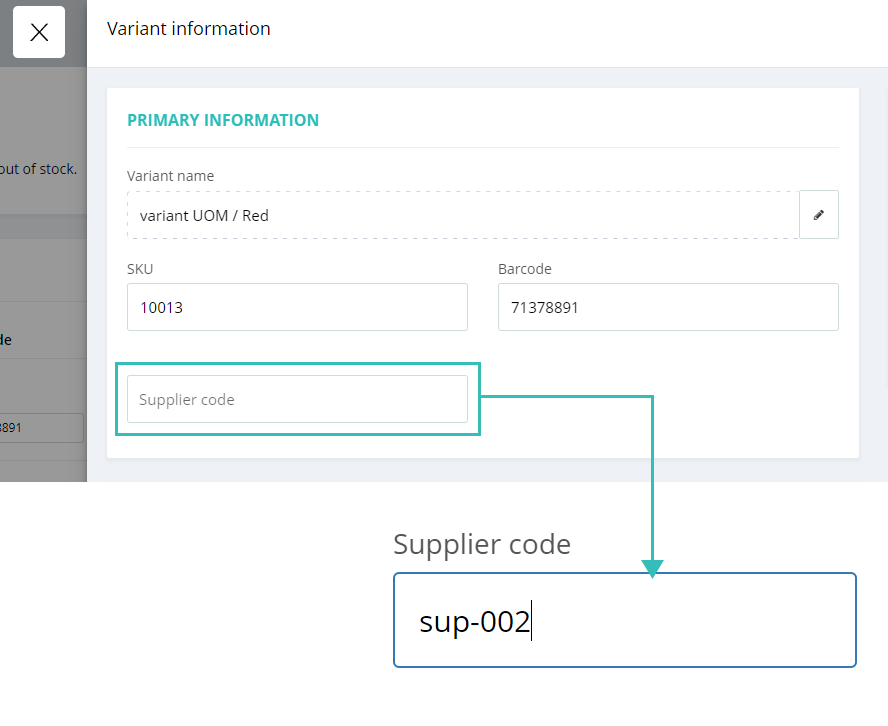
Now, you can set supplier codes for each variant of a product. Suppliers have their internal numbering system for each product, meaning each variant can have a different supplier code from the parent product. To accommodate this, we have provided the option to add the supplier code on each variant detail page.

The supplier codes for each variant will also be available on the Excel file for bulk import.
Remove the Expected column from the Cash register for selected users:
(Supported plan/s: Hike Plus )
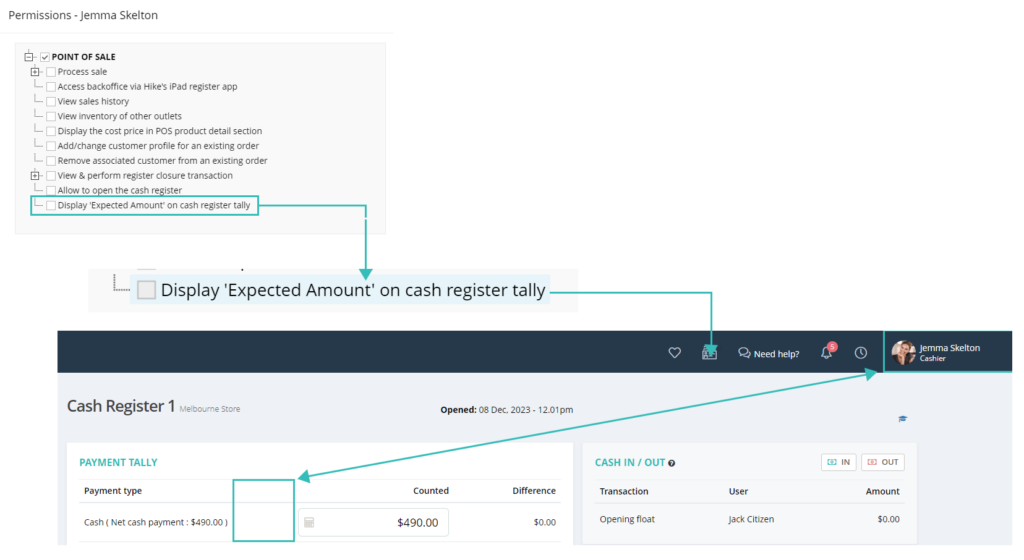
We have introduced a special feature for cash register user permission. As per client feedback, they want some of their staff to access the Hike cash register but do not want them to see the expected cash register total for each payment type. With this feature, you can now turn off the expected amount column for specific users. The setting is provided in the User permission list. (Users >> Action >> Permissions)

If the permission is not selected, the expected column will be removed from the cash register page for this user. The expected column will also be removed from the printed register closure receipt and register report for this user.
A new report for product sync logs
(Supported plan/s: Hike Plus )
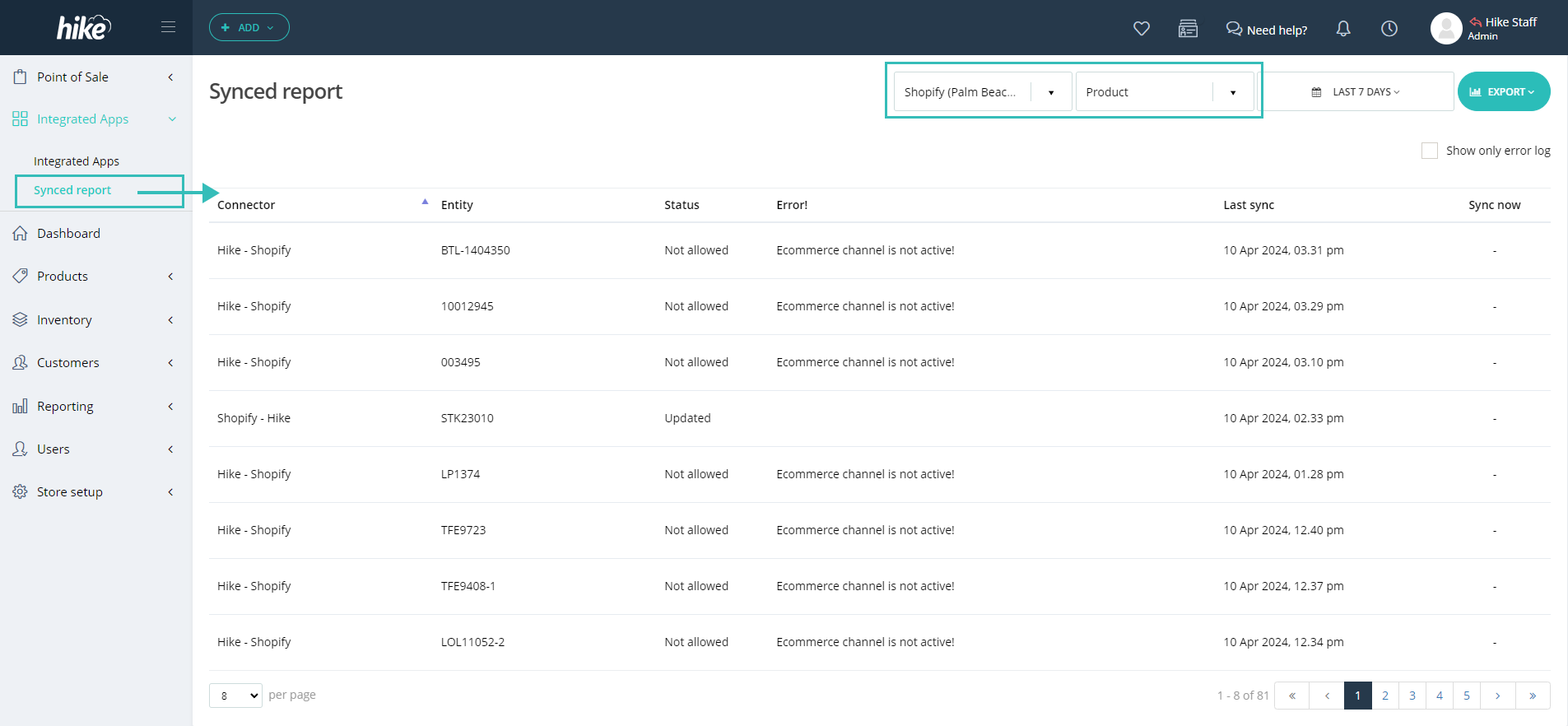
As per the client’s suggestion, we have introduced a new section to check the Sync history logs for Hike. The new report will provide a clear idea of how much data has synced and which data has sync errors.
You can filter this report based on integrations, entities (such as products, Sales, purchase orders, and registers), and time. As always, you can export this report into Excel.

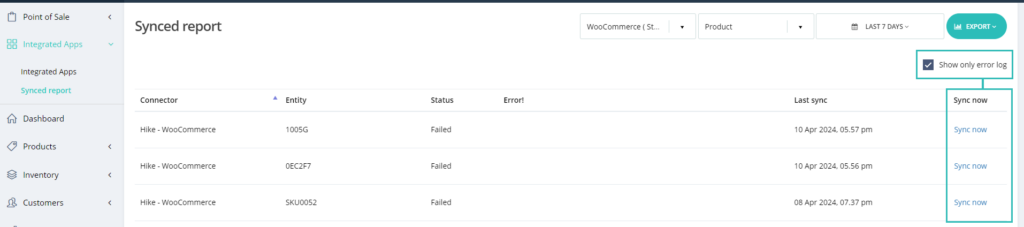
Moreover, you can only filter Errors using the ‘Show only error log’ for the entire report and process a manual sync for just error logs data.
Please note that the ‘Sync now’ option will only be available for Error log

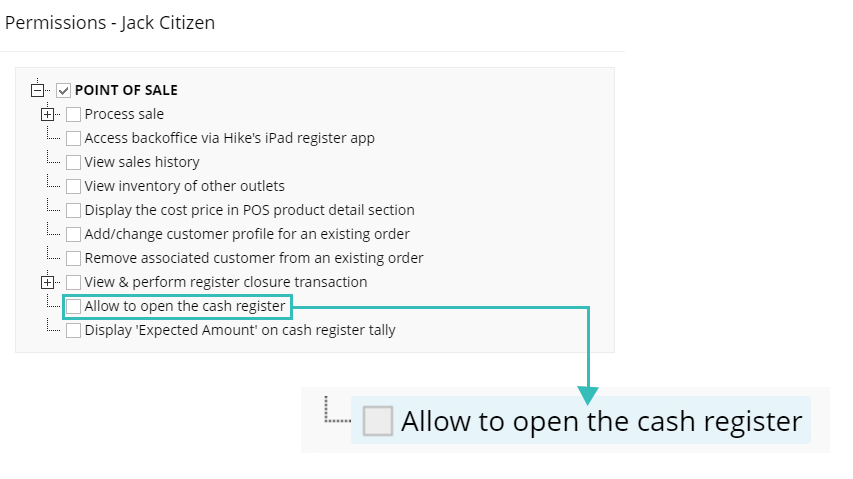
User permission to open the register
(Supported plan: Hike Plus)
As per the client’s request, we now provide new permission to restrict the opening of the Cash register for selected users.

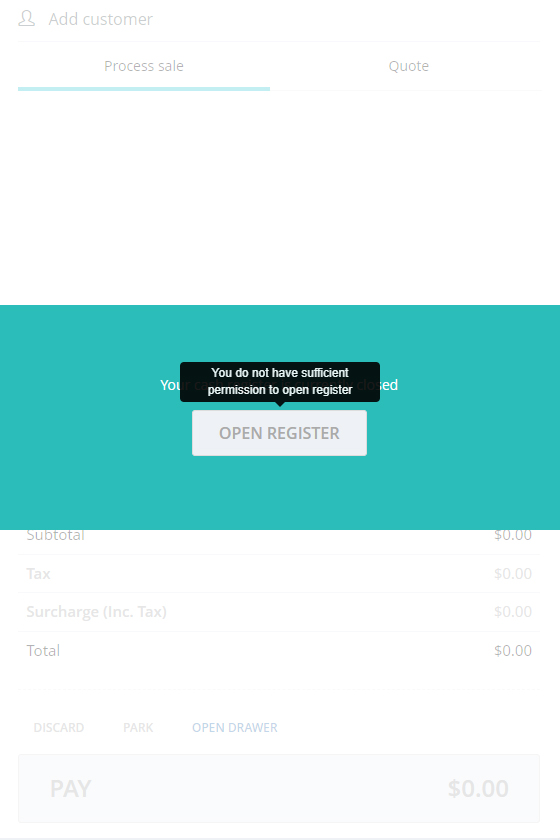
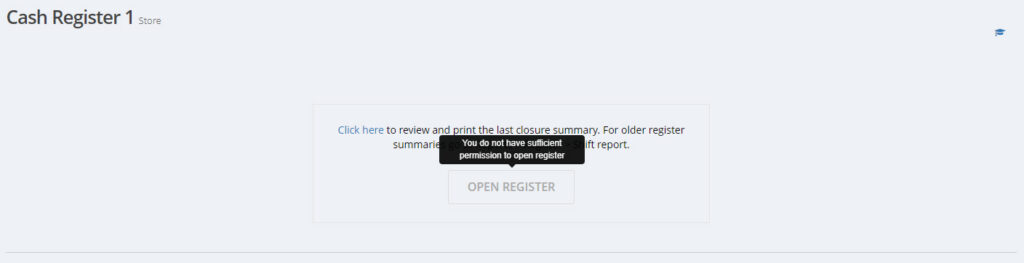
If permission is denied for the users, they will see the below message when opening the cash register.


This permission only applies to the opening of the register. The user will be able to close this register normally.
Check next and previous sales from sales history
(Supported plan: Hike Plus)
You can now go to the next or previous sales on your sales history with just a click of a button. You will not have to close one sale and open the other one. This option is provided on the Sales view page on Sales history.

This is particularly helpful with businesses that have large sales volumes and the user wishes to go through multiple sales in a short time.
Option to not display deleted outlet in reporting
(Supported plan: Hike Plus)
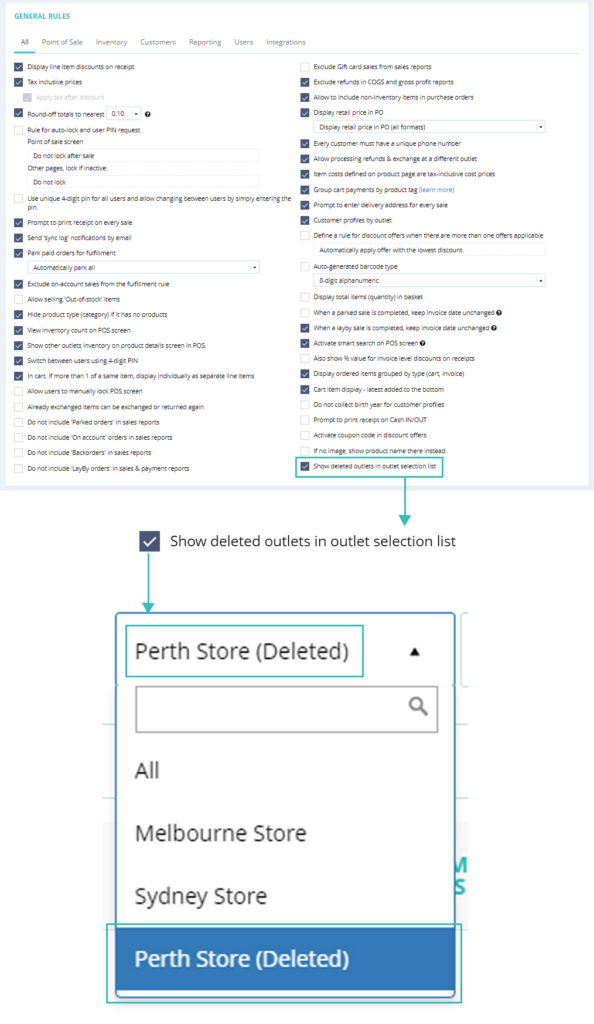
We have already provided the option to check the details for ALL deleted outlets in relevant sections in last year’s feature release. We have gone one step further and provided a new general setting for this with the new release. If the Owner/Super admin wants to include the Deleted outlets in the drop-down list while checking these data, they can update the below General settings.

If they do not wish to see the Deleted outlet in the list, they need to simply untick this setting; and deleted outlets will not show in any reports.
Please note that this functionality is only available for the Owner/ Super Admin of your Hike store. It will not be available for other users.
Additional Sales reporting option: Exclude data from the Sales report
(Supported plan: Hike Plus)
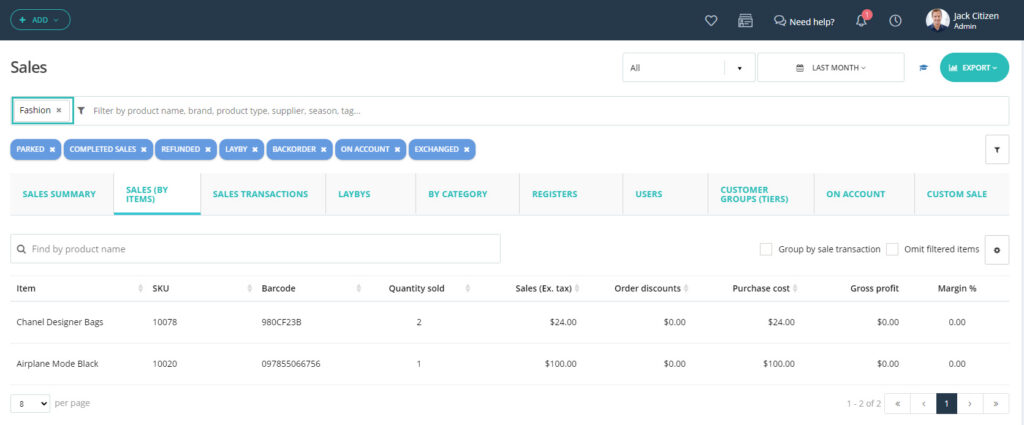
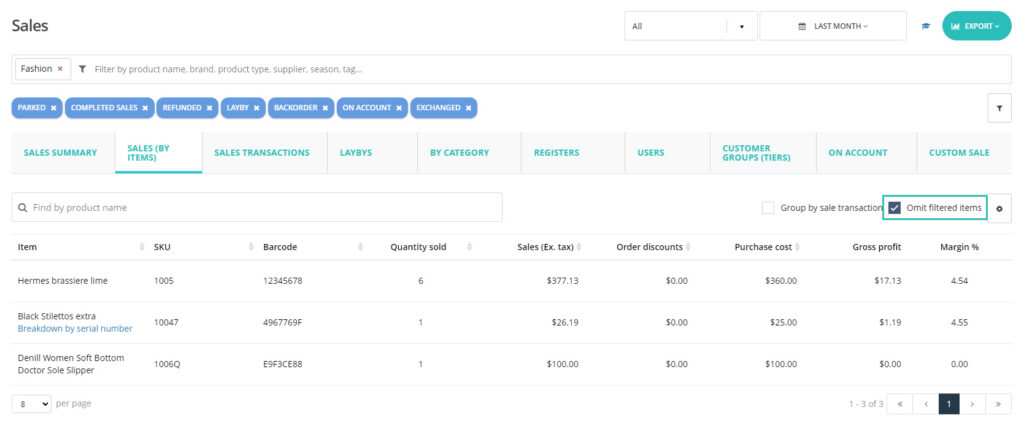
We have introduced a new filter in the Sales by Item report where you can exclude certain products, product types, Brands, Tags, Suppliers, seasons, and Tags from the report.
This means you can get more options for your report and not have to filter the report from Excel files.
Example: You wish to exclude a specific product from the Sales by Items report.

Then add this product name, bar code, or SKU on the search bar and select.

Now, click on “Omit filtered items” and this product will be excluded from the report.

This will work similarly with Product types, Brands, tags, suppliers, and seasons. As always, you can Export this report into Excel or PDF.
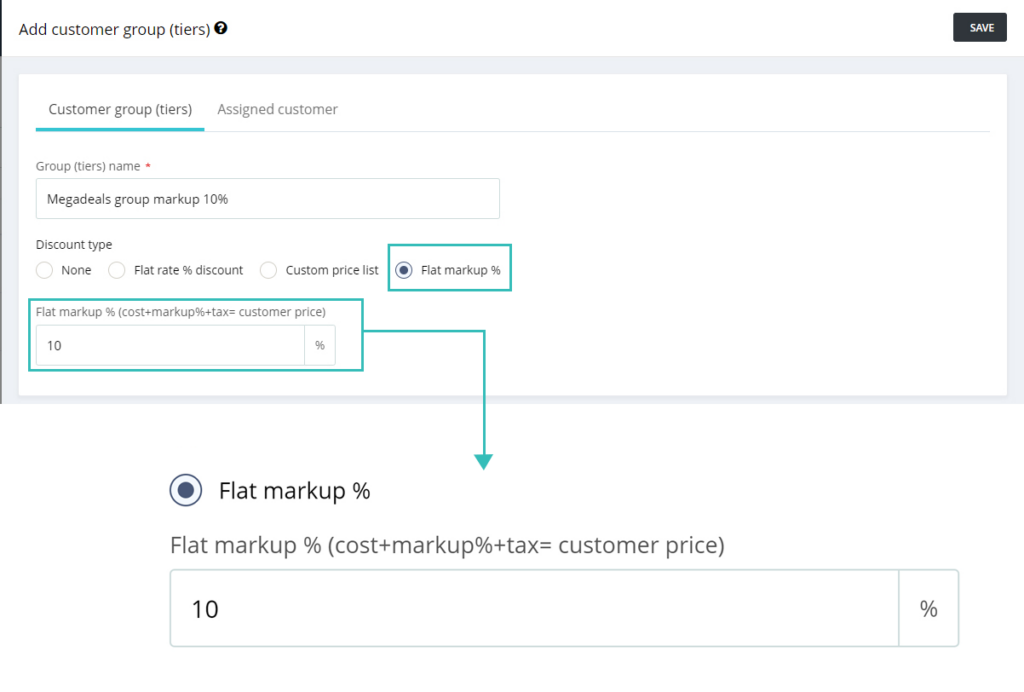
Flat Mark-up percentage (%) for customer groups
(Supported plan: Hike Plus)
This is another customer suggestion approved! This feature will allow you to have a customer group pricing based on the Cost of the product and your selected mark-up value. Example: You like to have special pricing for your employees at Cost + 25% markup.
If your normal markup is 50% on the product page, for this customer group, the markup will be 25%. The ex-vat price will be calculated based on this 25% mark-up.

This will be particularly helpful for businesses where prices change frequently and different products have different mark-ups.
Note: This feature will not work on Composite products. For composite products, you cannot set flat/custom markup at the moment. It will work on all other product types.
Detailed Credit note receipt
(Supported plan: Hike Plus)
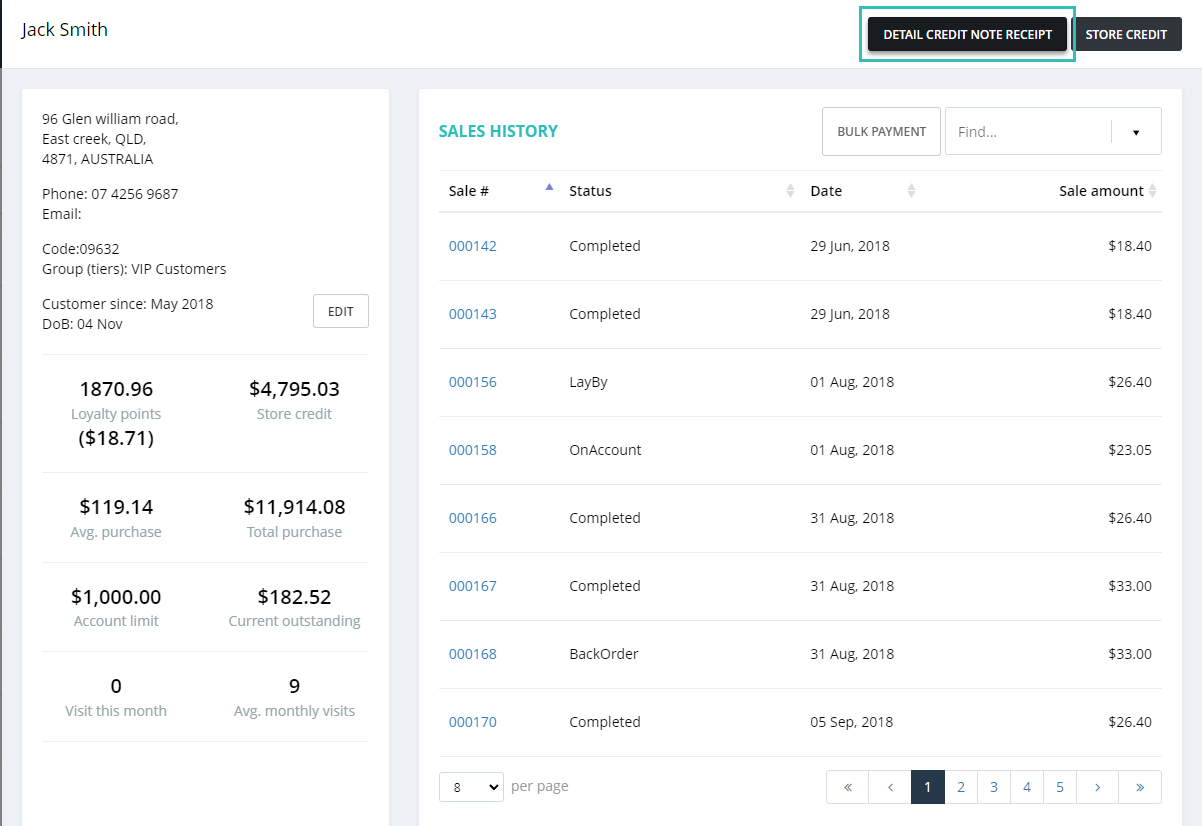
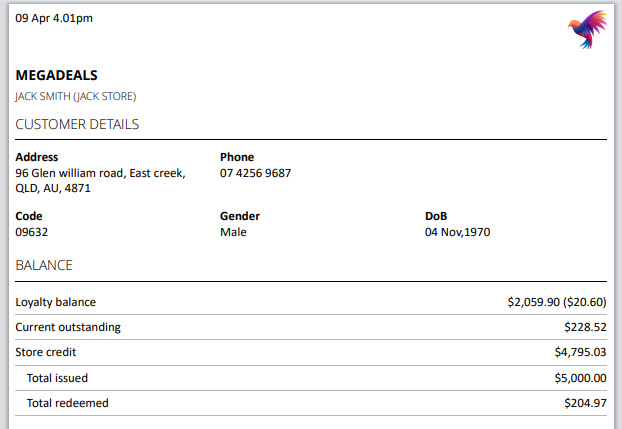
We have introduced this excellent new feature on the Customer profile where you can print the customer’s entire data into the A4 receipt format.

This includes customer personal information and Customer code, Loyalty balance, Current outstanding balance, Store credit, Total issued, and total redeemed.

Note: For now, you can only print this Detail Credit Note Receipt in A4 format.
Bulk edits option to change re-order points and re-order quantity for all outlets.
(Supported plan: Hike Plus)
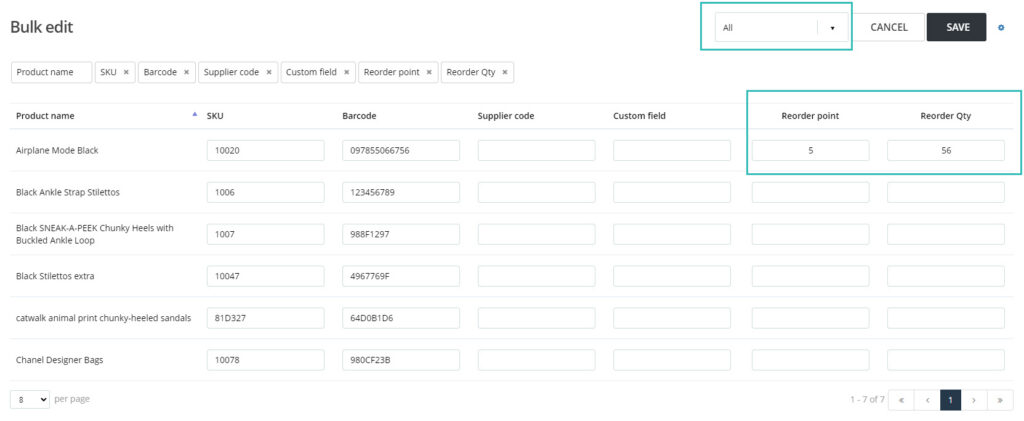
When you have multiple stores/outlets, in most cases, the product’s re-order value and re-order point will be the same across all stores. To facilitate this, we have introduced an option to Bulk edit the product re-order point and re-order quantity for ALL outlets at once.
For multiple outlet set-ups, when you use the Bulk edit product feature, you will need to select ALL outlet option on the next page. This feature is only available when you select the All option under the outlet drop-down.

You will need to update your Reorder point and Reorder qty for the products, Save the changes at the top, and this information will be copied to all outlets for this product.
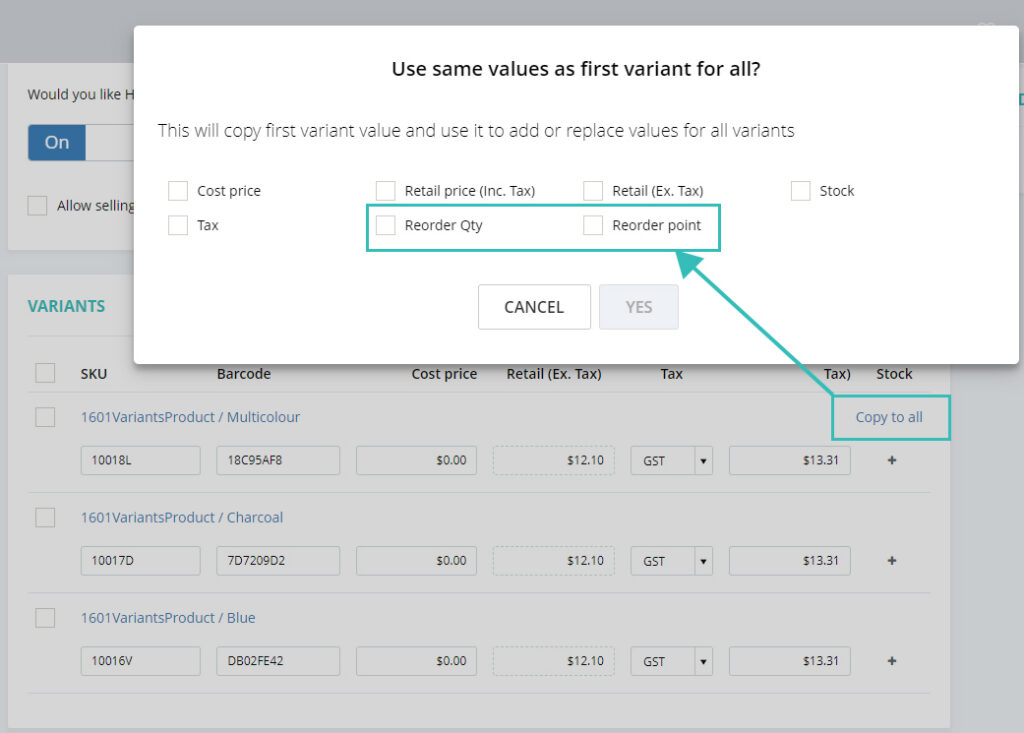
Additionally, we have introduced Reorder quantity and Reorder point bulk edit for the variant products as well. Here, you can copy the data for the first variant to all variants. In most cases, the re-order point and re-order quantity will be the same for all variants.

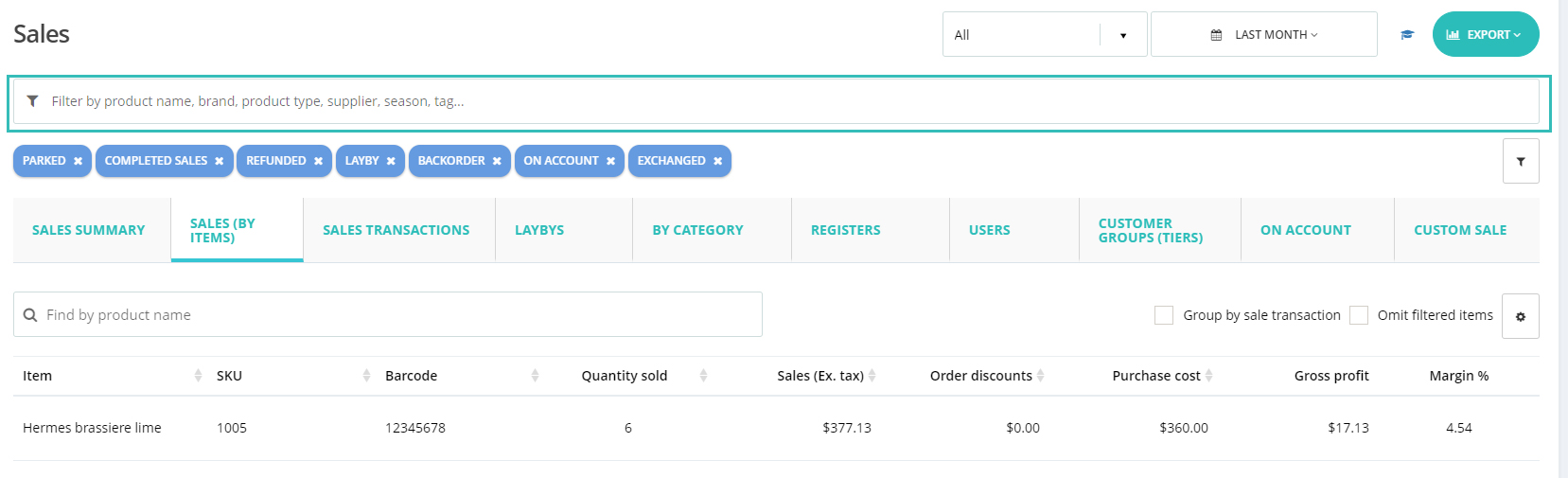
Sales summary report advance filter.
(Supported plan: All)
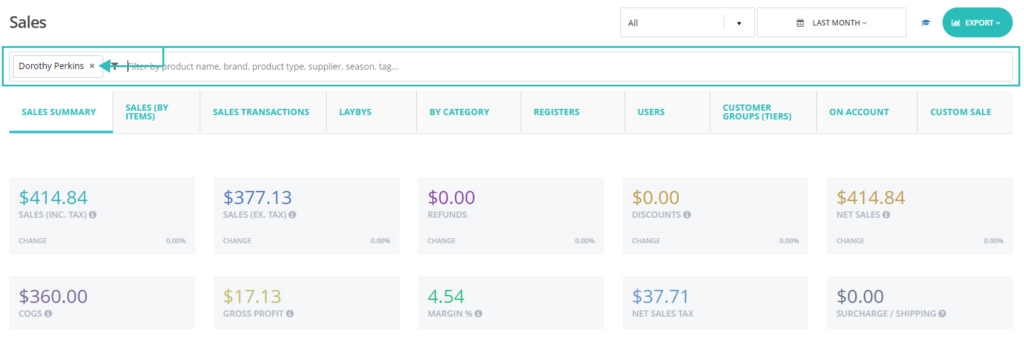
If you want to filter the Sales summary reports based on Product name, Product Type, Brand, Supplier, Season, or Tag, look no further.
We have added this new search filter to the Sales Summary report.

Once selected, sales related to the Product, Product Type, Brand, Supplier, Season, or Tag will be calculated in the sales summary report.
This will help you check the report for a section of our business, not just for the whole business.
Term of payment for On-account customers
(Supported plan: Hike Plus)
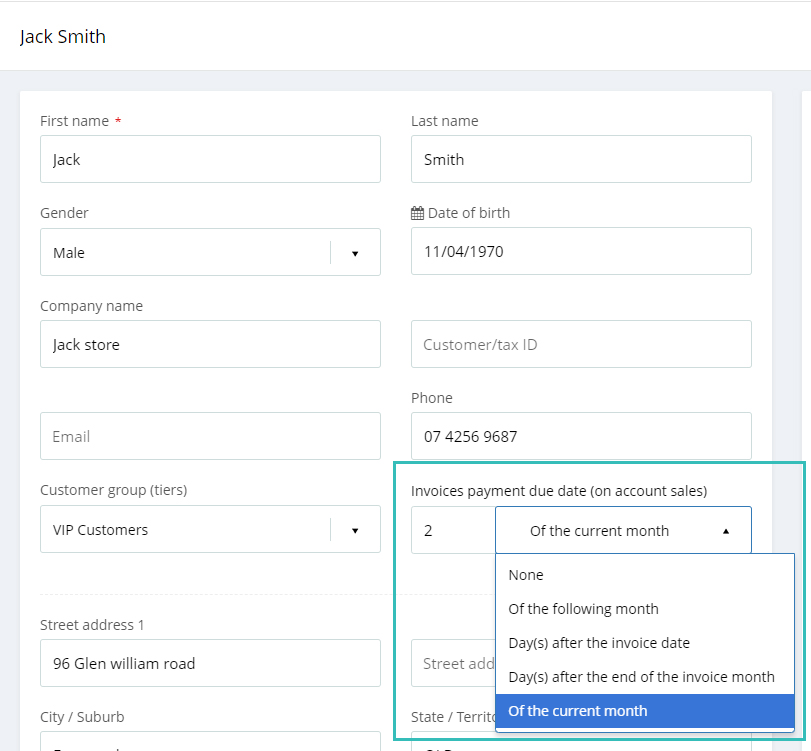
With this new feature, you can now add and track terms of payment for your On-account customers.
This new feature lets you set the desired payment due date on the customer profile. This could be based on your business policy: 7 days, 30 days, 1st of each month, 30th of each month, etc.

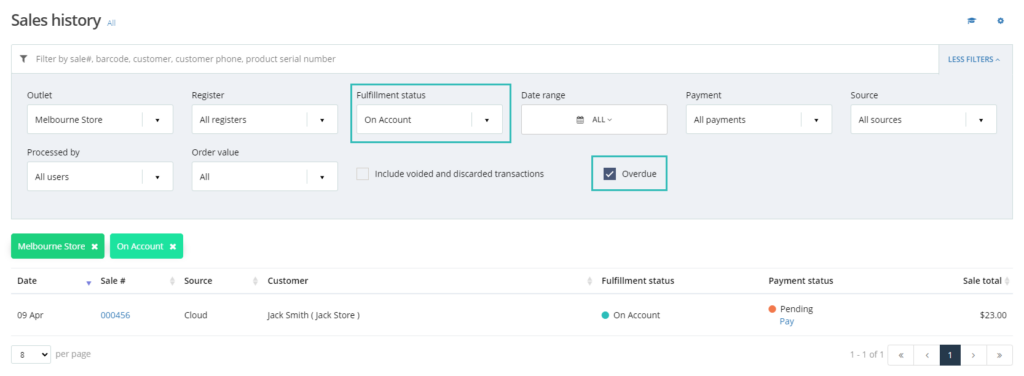
Additionally, you can filter the due date sales from Sales history as well when selecting On-account status. When selecting the On-account filter with the ‘Overdue’ checkbox, you will be able to see a list of overdue sales in the selected outlet.

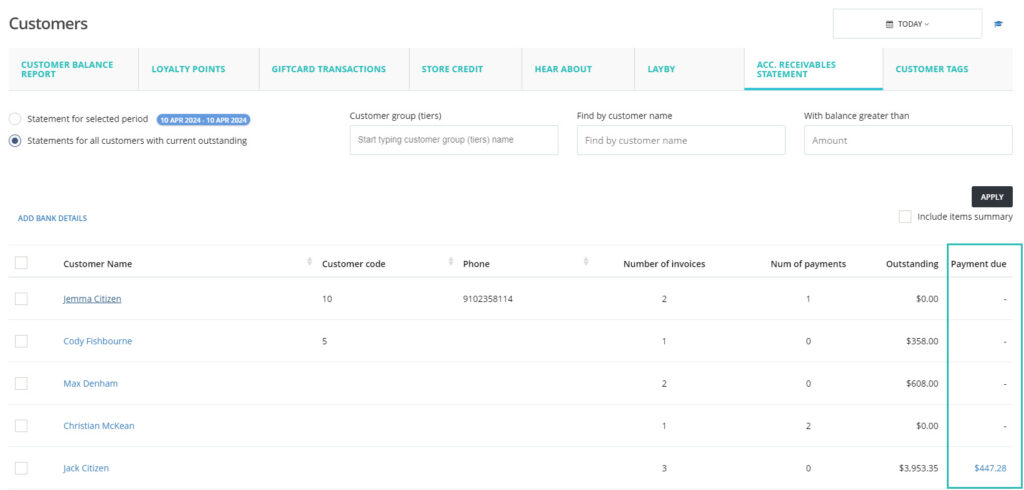
Overdue invoice information is also available on the Account receivable statement under the Customer report. Here, you can see the Payment due for each sale and contact this customer accordingly for the payment.

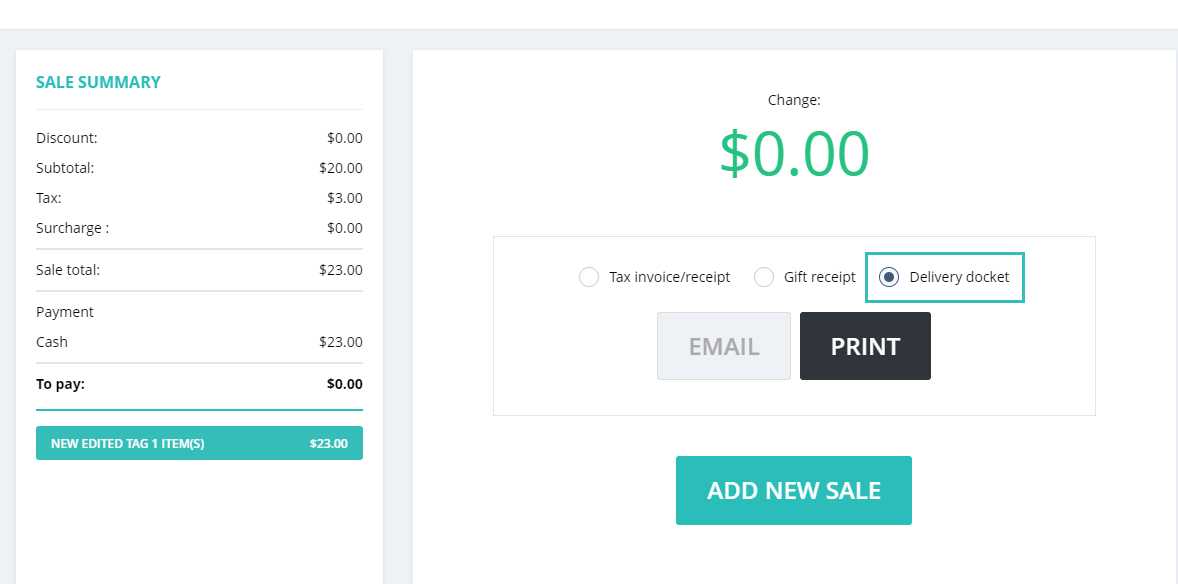
Print delivery docket and sales receipt both at the end of the sale.
(Supported plan: All)
With this new feature, you will be able to Print sales receipt and delivery docket both after completing the sale. Earlier, you could only print Sales receipts or Gift receipts on the sales page.

This feature will provide more convenience for the cashier user. This process can eliminate the human error issues such as when staff forget to go back to the sale and print the delivery docket, and the delivery is missed as a result.
Transfer open sales from the deleting register to the active register.
(Supported plan: All)
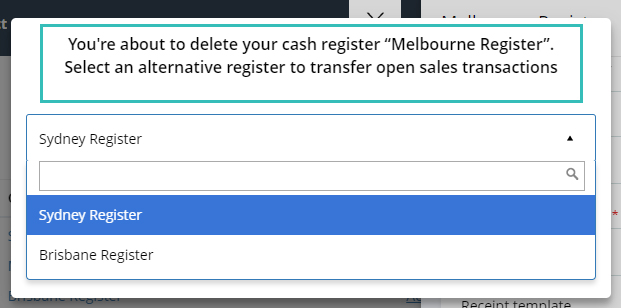
When you delete an additional register, sometimes, there are open Parked, Lay-by, or On-account sales that you wish to keep for the future. You can now transfer these sales to your existing register and complete them on this active register in the future.
You will get the below message when you delete an existing register with open sales.

Select the register from the drop-down for the sales and continue with deleting the register. Your sales will be simply transferred to the selected active register.
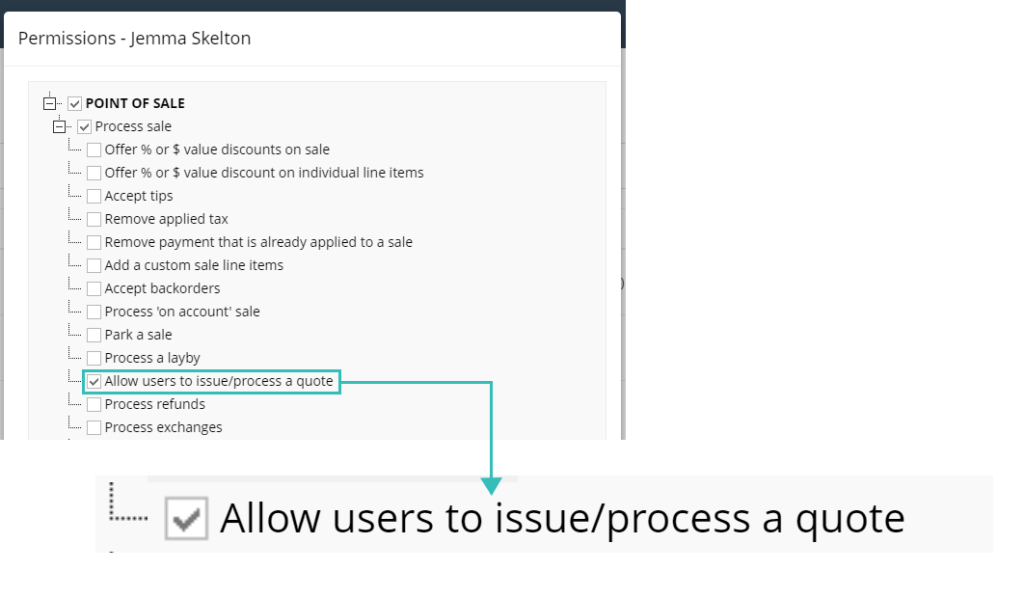
User permission to access the Quote feature.
(Supported plan: Hike Plus)
We have introduced a new User permission to issue a Quote. Some businesses allow only a few users to issue a Quotation feature. To cater to this request, we have added a new User permission for the Quote issue. Only users who have this permission will be able to process/issue a Quotation in Hike.

We hope these features will help you with your ever-growing business!
We look forward to your continued success into the year and we will be in contact during the year with many additional features to help improve your experience with Hike!
If you want to share your positive experience with Hike with others, please consider leaving us a 5-star review on the platform of your choice. You can use the links below to access the review pages:
• [Google]
• [Trustpilot]
Your review will help us to reach more customers and grow our community. It will also motivate us to keep working hard and delivering more value to you.
Thank you for your support and loyalty. We appreciate you being a part of our Hike family.
Good luck!