Hike Update: July 2026

This July, Hike didn't just get an update. It got a proper upgrade, and there is a lot to be excited about.
Ten new features have landed across checkout, customer management, inventory, reporting, staff controls and more. Some will save you time, some will give you better control, and a few may solve those small everyday frustrations you have simply learned to live with.
Many of these updates came directly from feedback shared by Hike merchants, which makes this release even more exciting. These are practical improvements built around the way real stores work, from smoother sales and cleaner stock management to more flexible POS layouts and faster mobile scanning.
Ready to see what's new?
1. Catch Missing Customers Before Completing a Sale
(Supported plan: Plus)
Ever completed a sale and then realised no customer was attached to it?
That can quickly become a problem when the items need to be tagged for customer pickup. By the time you notice, the customer may already be halfway out the door.
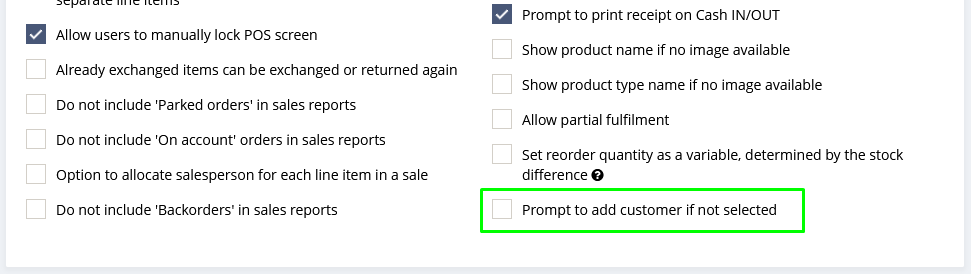
The new Prompt to add customer if not selected setting gives your team a helpful reminder before the sale is completed.
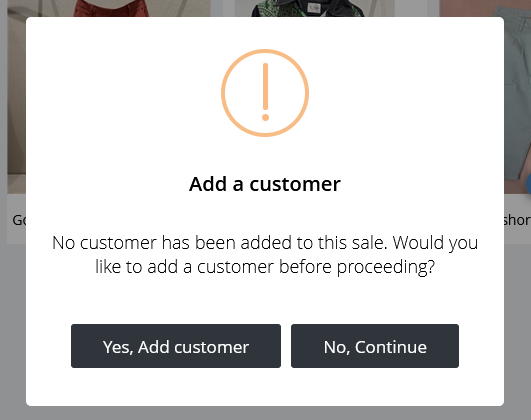
When a transaction does not have a customer attached, a pop-up appears on the POS screen. The cashier can then add the customer immediately or continue with the sale.
To activate the feature, enable Prompt to add customer if not selected from the General Settings page.

Once it is switched on, Hike will check each sale and prompt the cashier whenever a customer has not been selected.

No forgotten names. No unassigned pickup items. Just cleaner sales from the start.
2. Keep Customer Balances Visible to the Right User
(Supported plan: Plus)
A customer's outstanding balance can be useful information for managers and team members handling on-account sales.
That does not mean every user at the checkout needs to see it.
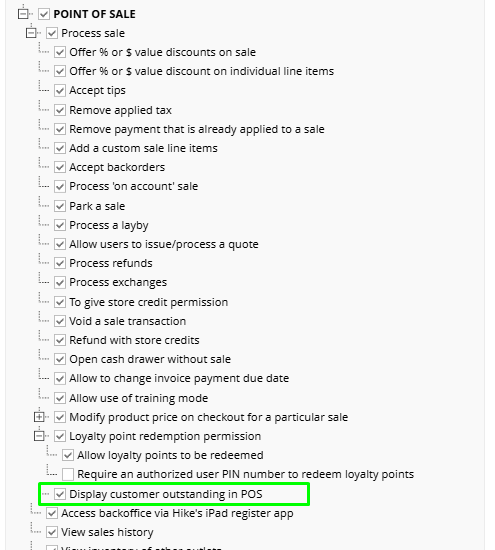
The new customer outstanding balance permission gives you more control over who can access this information on the POS screen.
The permission is managed from the individual User Profile under Display customer outstanding in POS. When it is not enabled, that user will not be able to see a customer's outstanding balance while completing a sale.

This is especially helpful for stores with larger teams, casual cashiers or different levels of responsibility. Sensitive customer information stays visible to the people who need it and hidden from those who do not.
A little more privacy, without adding more work.
3. Export Customers by Outlet
(Supported plan: Plus)
Planning a local offer for one store should not require exporting your entire customer database and then spending the afternoon filtering a spreadsheet.
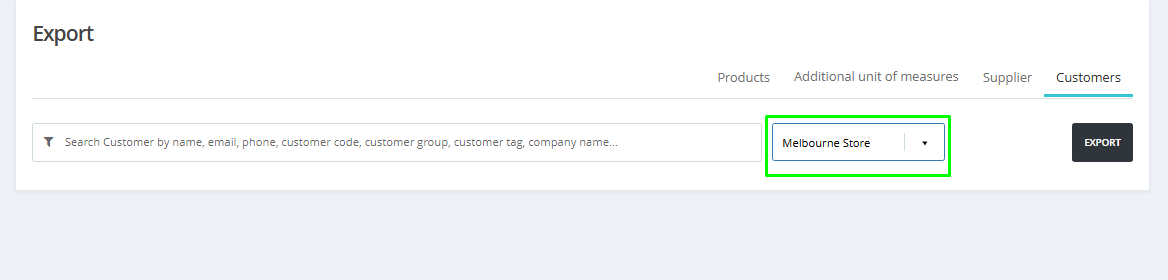
With the new Outlet-based Customer Export, you can export customer records for a specific outlet or include all outlets when needed.
The outlet selection option now appears when you export your customer data. Simply select the relevant location and export a cleaner, more targeted customer list.

This can be useful when you want to:
- Send an offer to customers from a particular outlet
- Promote a store-specific event
- Create a local marketing campaign
- Work with customer data without manually filtering it afterward
The right customers, the right store and far less spreadsheet detective work.
4. See Who Changed a Product's Status
(Supported plan: Plus)
A product has suddenly disappeared from sale.
Who deactivated it? When did it happen? Was it intentional?
You can now find the answer in Reports.
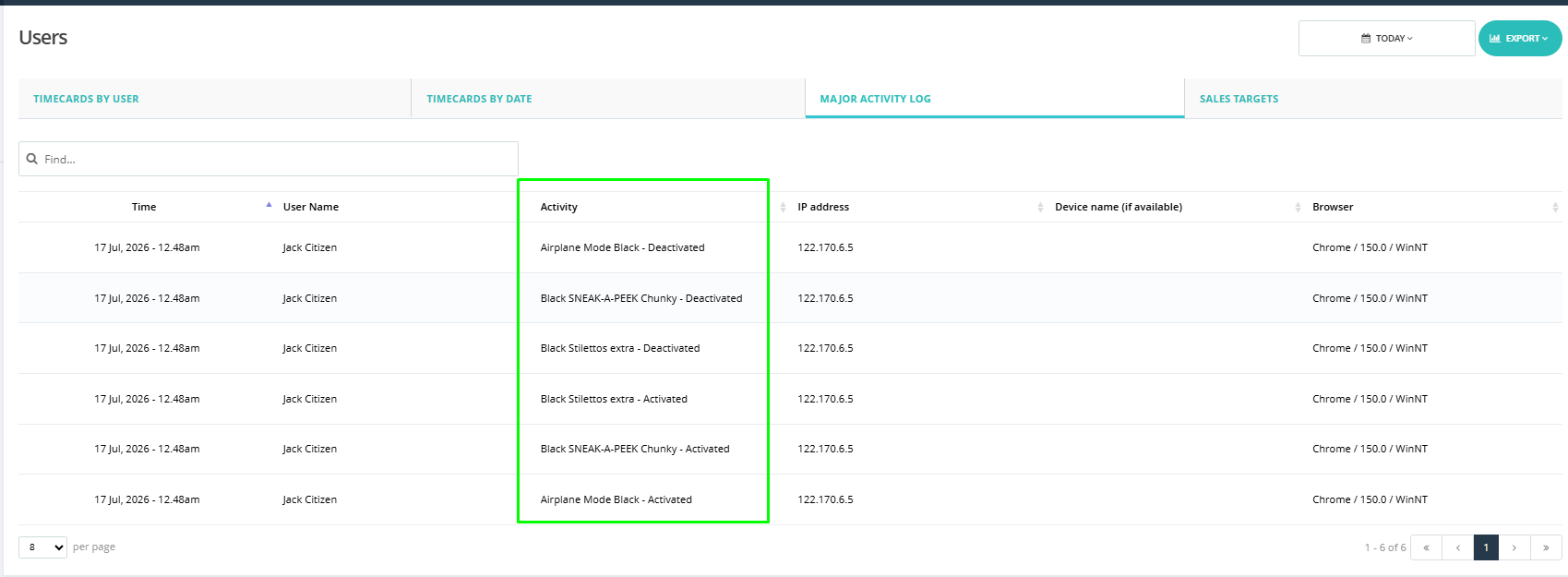
The new Product Activation/Deactivation History records every time a product is activated or deactivated.
Each change creates a detailed entry in Major Activity Logs under User Reports, including who made the change and when it happened.

This gives administrators and managers a clearer audit trail across the product catalogue. It is also useful when several team members manage products and you need to understand exactly what changed.
No guessing. No asking around. The activity is already recorded.
5. Sell Clearance Stock Without Reordering It
(Supported plan: Plus)
Clearance products, discontinued lines and ageing stock may still need to be sold.
What they do not need is a surprise return in your next purchase order.
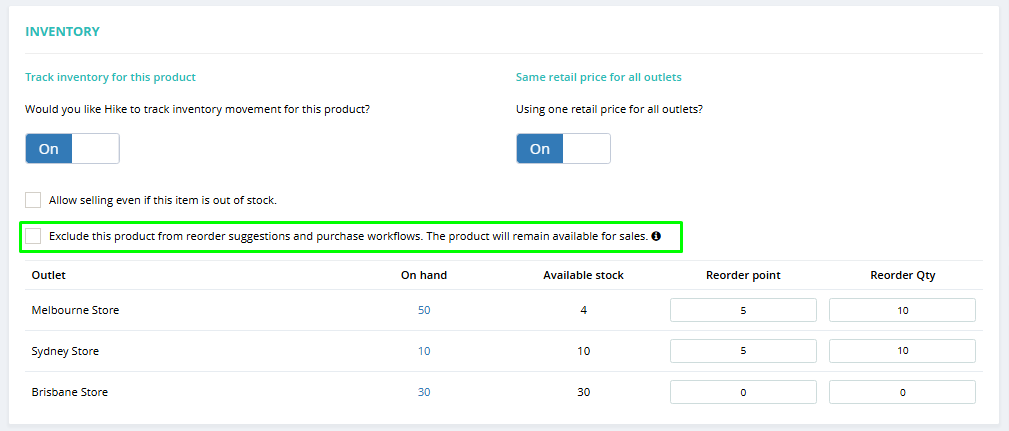
The new Do Not Reorder option lets you exclude selected products from:
- Reorder suggestions
- Low-stock alerts
- Purchase workflows
The product remains fully available for sale, but Hike will no longer recommend ordering more of it.
You can enable the option from the individual product page. It is also available through bulk editing using an Excel file, which makes it easier to update several products at once.

This gives you better control over your inventory management without taking products off the sales floor. You can keep selling the stock you already have while keeping future purchase orders focused on the products you actually want to replenish.
Clearance stock stays cleared. Just as intended.
6. Keep the Clock In/Out Screen Tidy
(Supported plan: Plus)
Not everyone with a Hike user profile needs to clock in and out.
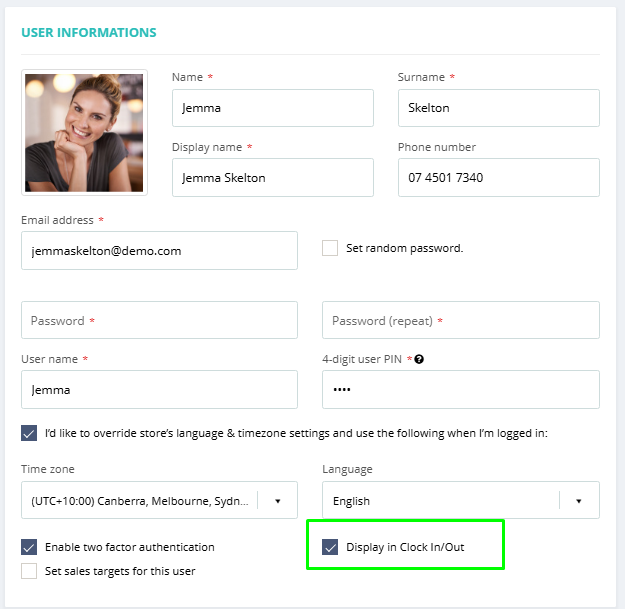
The new Display in Clock In/Out setting lets administrators choose exactly which users appear on the Clock In/Out screen.
You will find the toggle on the User Details page. Enable it for employees who need to track attendance and disable it for users who do not.

Once the setting is updated, that user's visibility on the Clock In/Out screen changes accordingly.
The result is a cleaner list, less scrolling and fewer people wondering whether they are supposed to tap their name.
A small update, but a welcome one during a busy morning.
7. Choose the POS Layout That Works for You
(Supported plan: Plus)
There is no single POS layout that works perfectly for every store.
Some businesses want more products visible on the screen. Others prefer a wider view, a cleaner workspace or the familiar layout their team already knows.
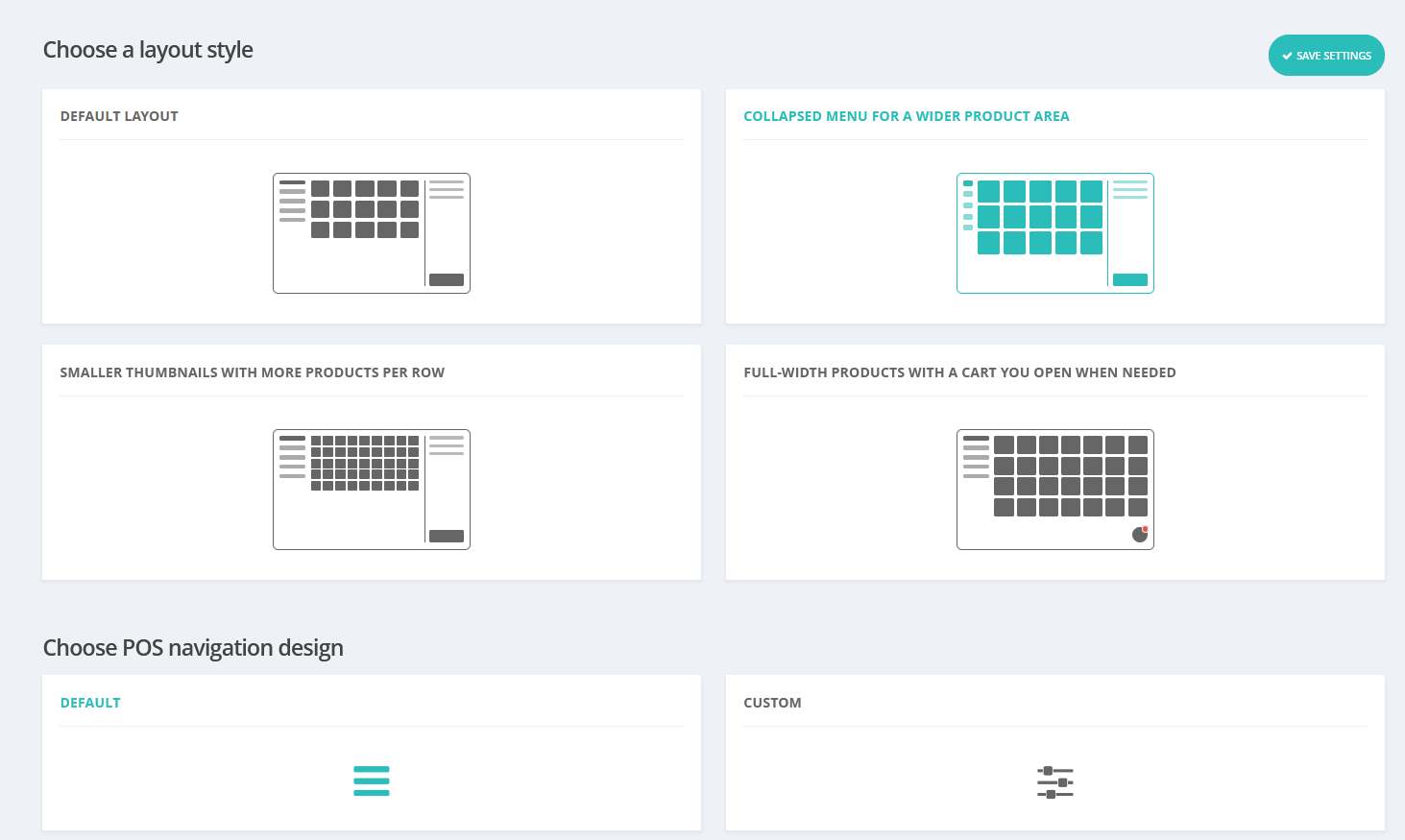
The new POS Layout View Options page lets you choose from four different POS screen layouts.

You can select the layout that best suits the way your team works at the checkout. This can reduce unnecessary scrolling, make better use of the screen and give staff a workspace that feels more natural.
Instead of adjusting your workflow to the POS, you can now choose a Hike POS layout that better fits your workflow.
Your store works your way. Your POS screen can too.
8. Manage Hike Subscriptions in Euros
(Supported plan: All)
Good news for Hike merchants across Europe!
Euro (EUR) support is now available for Hike subscription plans.
European customers can now view, manage and pay for their Hike subscription in Euros, making billing clearer and more convenient.
There is no need to estimate subscription costs using currency conversions or changing exchange rates. Customers can simply view their subscription pricing in their local currency.
It is another step towards making Hike feel more local for businesses operating across different regions.
Bonjour, Euro.
9. Convert a Quote to a Back-Order in One Click
(Supported plan: Plus)
When a customer wants an item that is not currently available, manually recreating their quote as a back-order adds an unnecessary extra step.
The new Convert Quote to Back-Order option removes that double-handling.
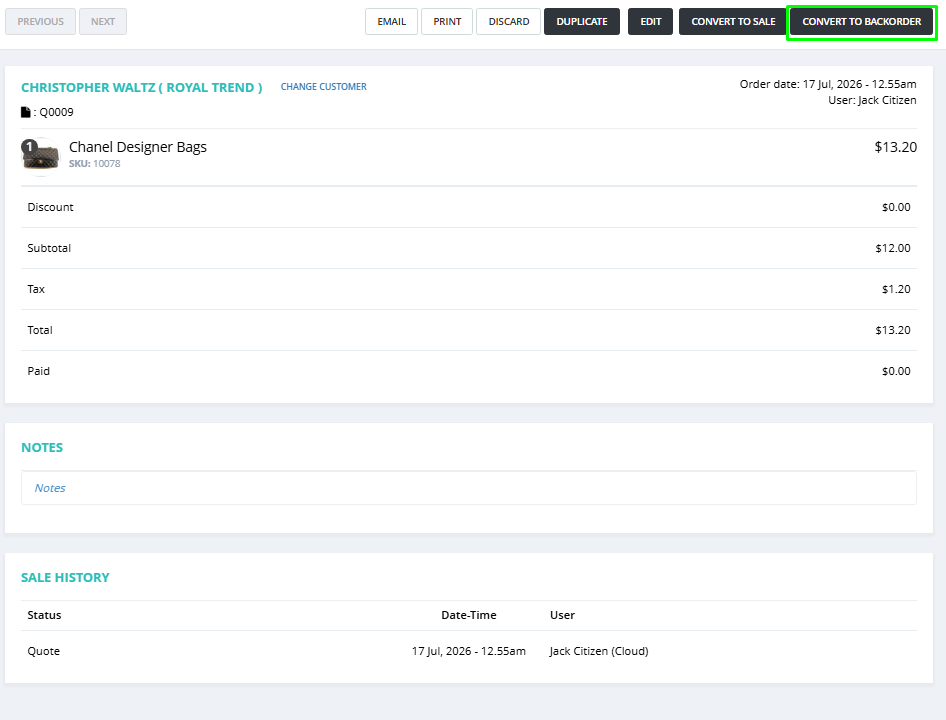
Once enabled, you can transform an existing quote into a back-order with one click. The information from the quote carries across, so your team does not need to enter the order again manually.
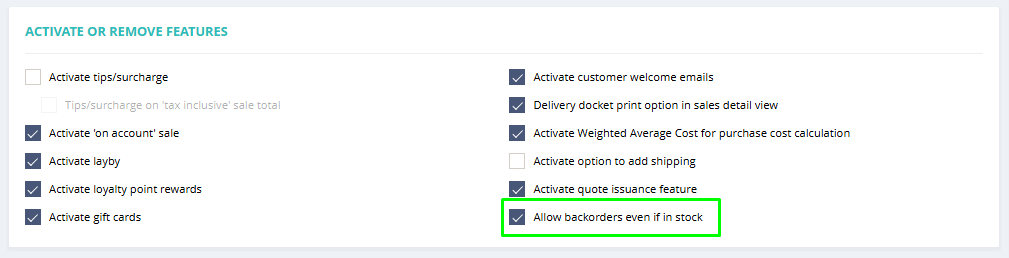
To activate the feature, enable Allow backorders even if in stock in General Settings.

Once activated, a Convert to Backorder button will appear when a quote sale is opened from the Sales History page.

This is a practical improvement for stores that regularly manage:
- Customer pre-orders
- Supplier orders
- Out-of-stock products
- Items ordered specifically for a customer
Less retyping, fewer data-entry errors and a much smoother path from quote to back-order.
Your keyboard may miss the extra attention. Your team probably will not.
10. Meet Inventory Scan (X)
(Supported plan: All)
We saved a big one for last.
Inventory Scan (X) is Hike's new Android app, designed to make mobile stock scanning faster, easier and more efficient.
Whether you are counting products on the shop floor, receiving stock at the back door or working through inventory in the warehouse, Inventory Scan (X) turns your Android device into a professional-grade scanning tool.
It is designed to make stocktakes and everyday inventory tasks easier to manage from wherever the work is happening.
And the best part? Inventory Scan (X) is completely free for all Hike merchants.
Download Inventory Scan (X) from Google Play
That's the July Release
Ten practical updates, built for the way stores work — all designed to remove a little friction from the working day.
Some will help your team move through checkout more smoothly. Others give you better control over customers, products, staff and inventory. One of them turns an Android device into a free professional scanning tool.
You may not use every feature immediately, and that is perfectly fine. The real value is finding the ones that solve a problem in your store and make the day feel a little easier.
Take a look through the new settings in your Hike account, try the features that suit your workflow and let us know what you think.
Have questions or feedback? Talk to the Hike team.