Hike Update: June 2024

Hike Update: June 2024

Hello Retailers,

It’s already mid-year, and we know you’re looking for ways to take your business to the next level. That’s why we have been focusing on filling gaps and preparing for our features coming out soon. This month we’ve made Hike more flexible for retailers of different shapes and sizes.

This update is designed to make your experience smoother and more exciting with a suite of fantastic new features. These upgrades will streamline your operations and supercharge your interactions, ensuring an effortless and profitable retail journey. Read out to learn more!

Experience the convenience of viewing cart products in full screen on the POS page

(Supported plan/s: Hike Plus )

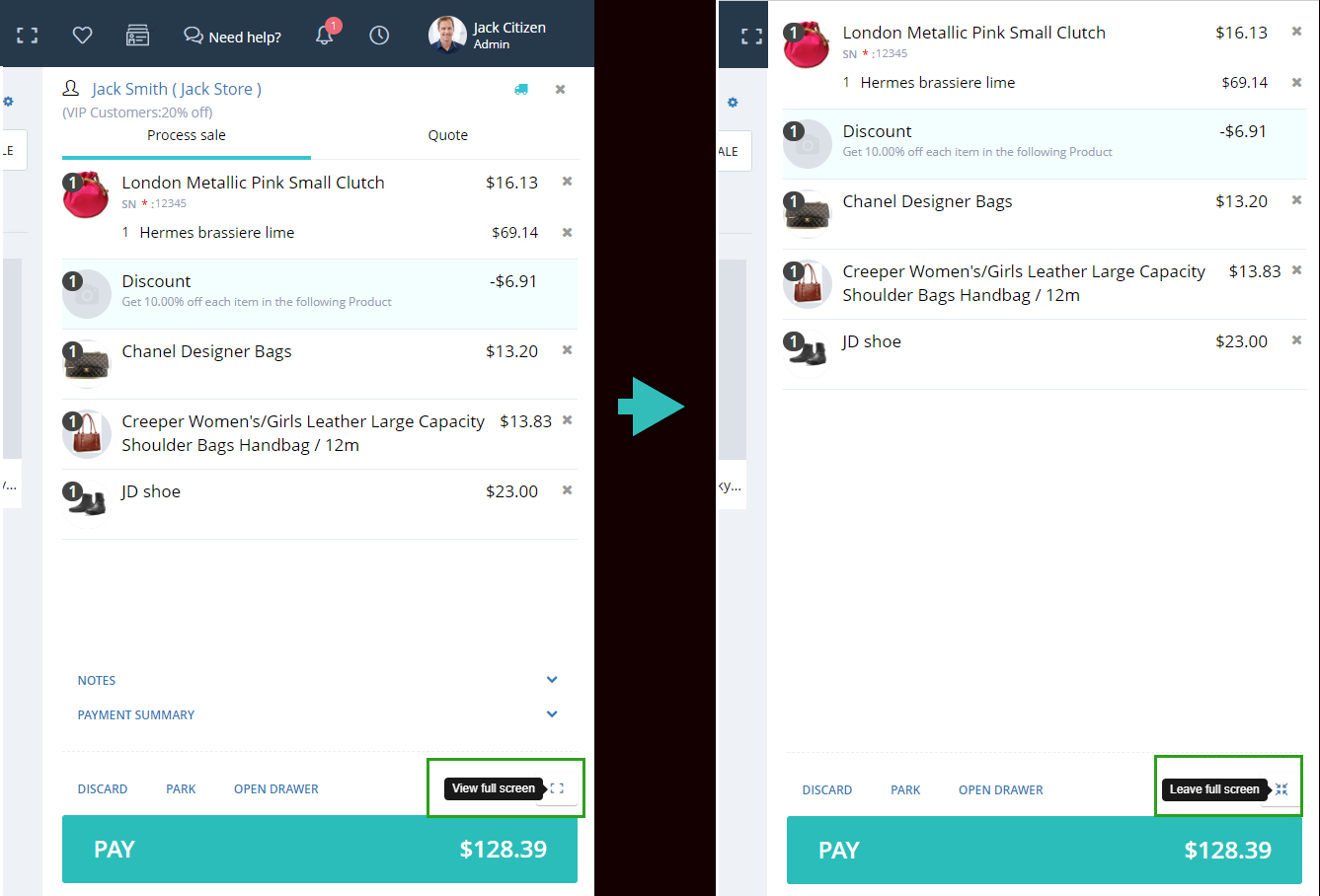
When processing a sale with 20 or more products, not all items were visible in the cart view, they would have to scroll down to check all products.

To address this issue, we have introduced a Full-Screen mode feature, where you can check the entire cart products in Full-Screen mode.

This enhancement allows users to view the entire invoice in one organized view, removing the need for excessive scrolling. If there are multiple products, you can easily scroll through the full-screen page to see all the items listed. Additionally, switching between the full-screen invoice mode and the normal view is simple; just click the same button to swap between modes. This new feature streamlines the process, making it more efficient and user-friendly.

Customer phone number and customer code added to sales by transaction and custom sales report

(Supported plan/s: All )

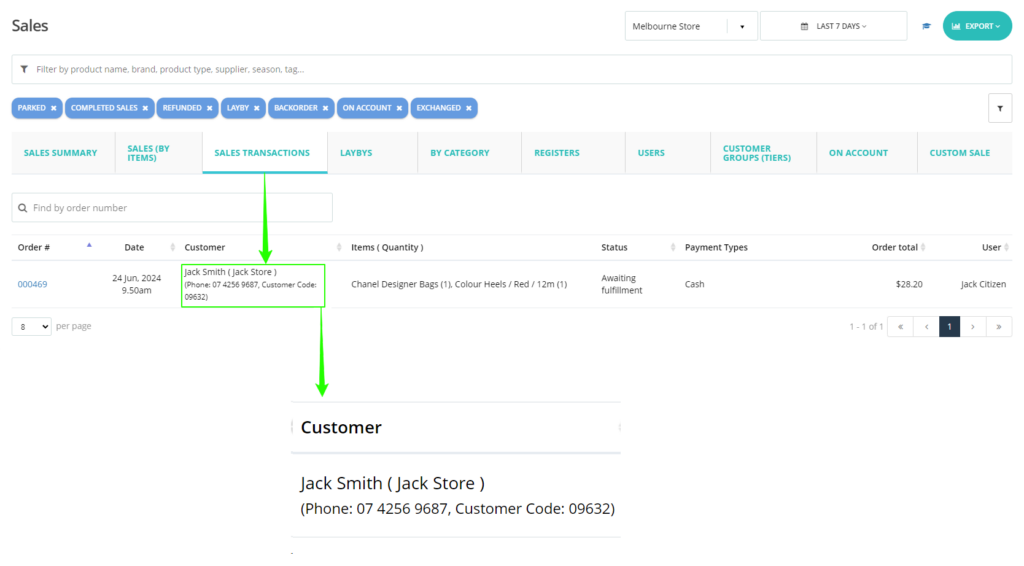
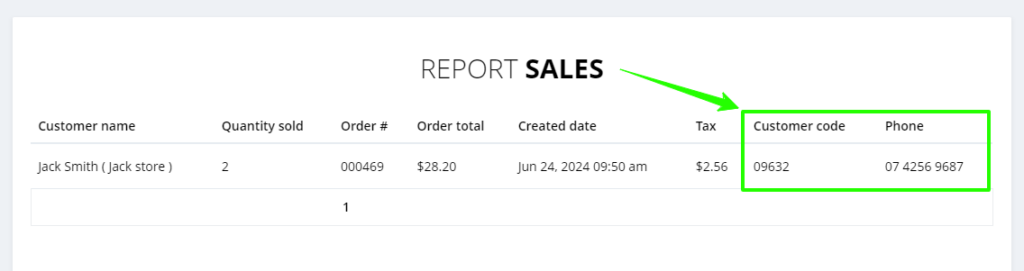
Enhancing the sales by transaction report and custom sales report by including the Customer phone and Customer code (if available).

Sales transaction report:

Custom sales report:

This addition addresses the issue of distinguishing customers with the same names, allowing for more precise identification and improving targeted marketing efforts.

Product Image display in receipt emails

(Supported plan/s: Hike Plus )

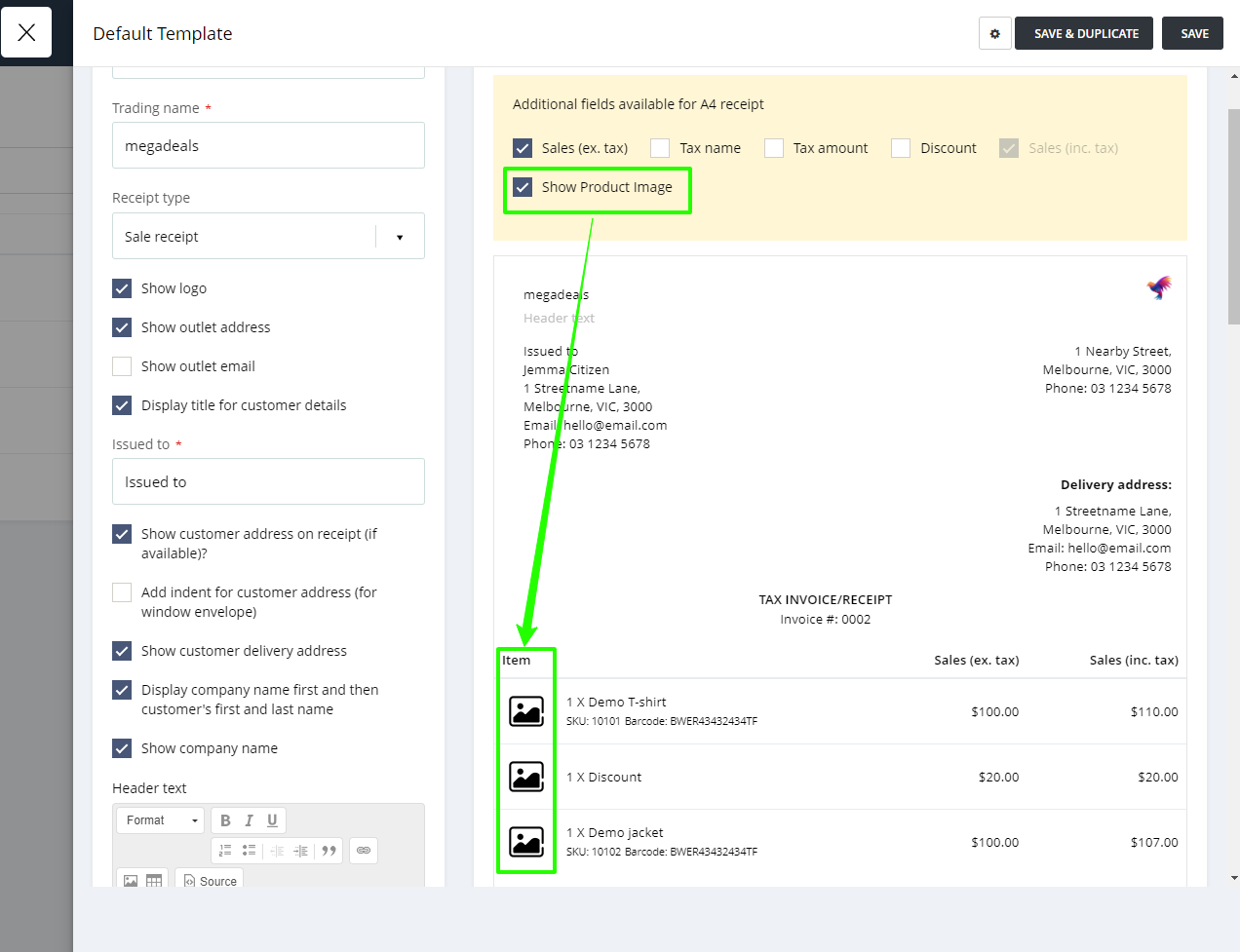
We have enhanced the Sales receipt by incorporating product images when it is sent via email to customers. Initially, this feature is available exclusively for email A4 receipts and will be delivered in PDF format.

This update is particularly beneficial for the quotation receipt, allowing customers to easily review product details through images.

Note – This feature is not applicable to printed A4 receipts.

Product tag added to the discount offer

(Supported plan: Hike Plus)

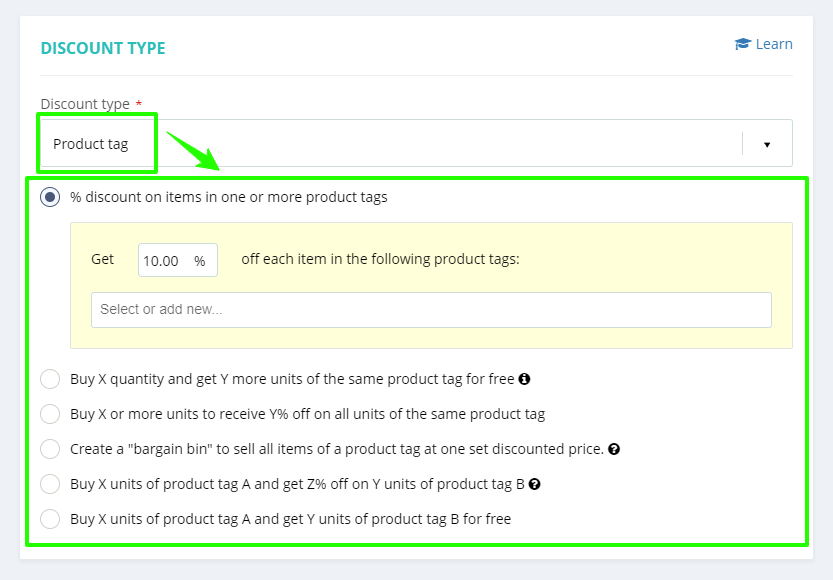
Addition of this this new feature allows you to apply discounts based on product tags. This Discount type has six discount offers, which you can be set according to your preferences as mentioned in the updated screenshots.

These discounts are customisation to apply on selected days of the week, specific outlets, and targeted customer groups, providing flexibility tailored to your business needs. This enhancement is especially beneficial for retail operations that majorly utilize product tagging, allowing for more strategic and targeted discount management.

Cost price on product listing page

(Supported plan: Hike Plus)

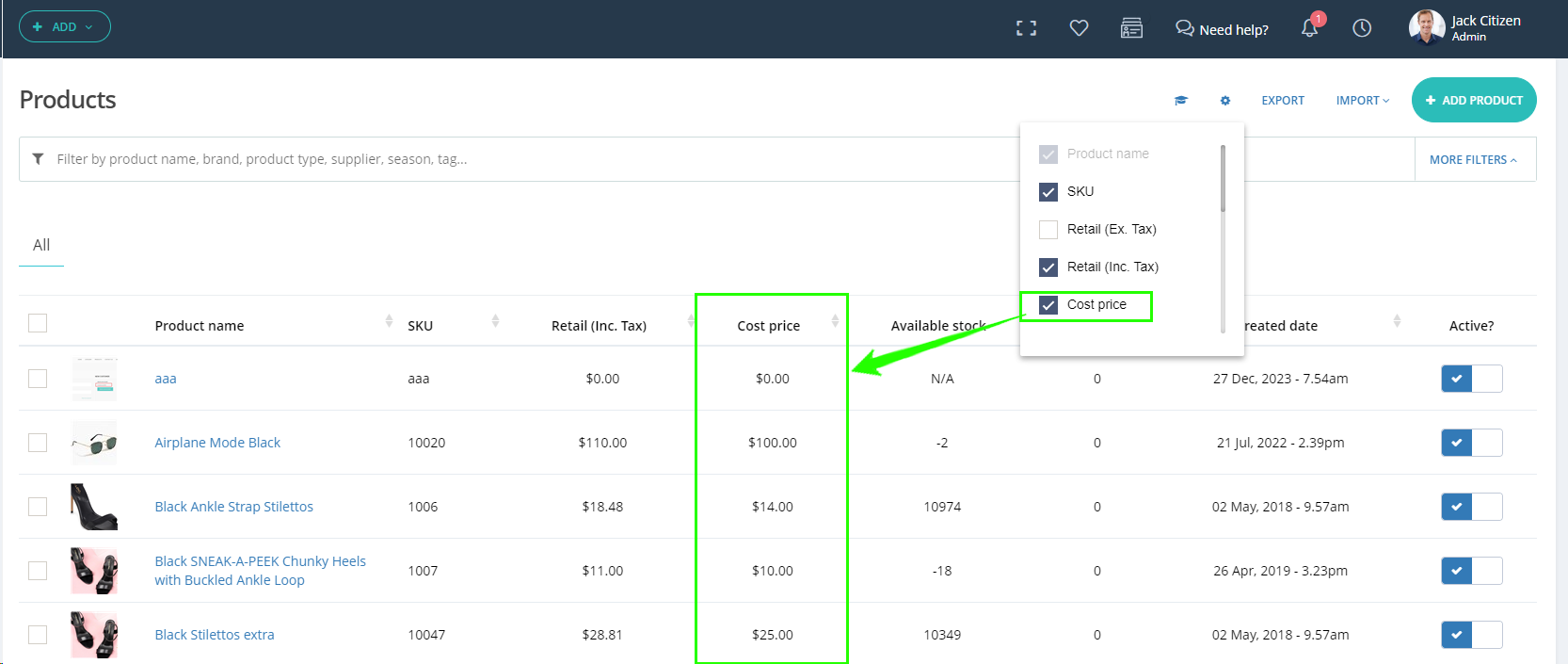
We’ve recently enhanced the product listing page by introducing a cost price column, significantly streamlining your workflow. This improvement eliminates the need to open each product individually to check its cost price, saving you valuable time and effort.

As part of this update, we’ve included an option in the product page settings, giving you the flexibility to display the cost price directly on the Product listing page according to your preference. This means you can easily switch this feature on or off based on your specific needs, ensuring a personalized browsing experience.

Rounding off the total products and sales

(Supported plan: All)

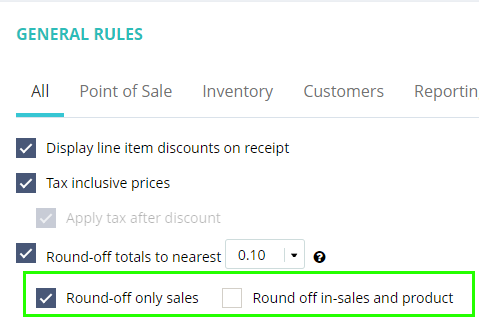
We are introducing a new rounding-off option, which now allows you to round off not just sales totals but also individual product prices.

The rounding option is available for the nearest $0.05, $0.10, $0.50, and $1.00 values. This will apply to both products and sales based on your selection.

SKU generator

(Supported plan: Hike Plus)

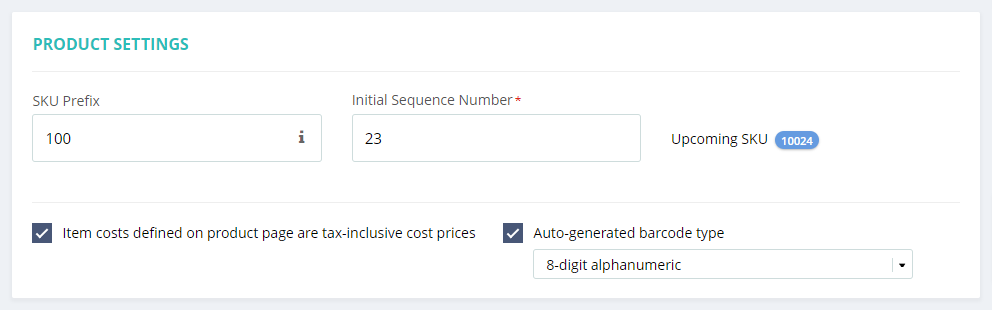
We’re releasing a new feature that lets you build customised SKU. When you manually create products in Hike POS, SKU are automatically produced. However, using the customise SKU generator, you can now override these SKU with your own unique serial numbers, similar to universal barcodes. You have the flexibility to set custom SKU prefix and initial sequence number. This feature allows you to change how SKU are structured and managed in your system.

Access this customizable setting in your store setup, under the General Settings page within the Product Settings section.

Note: You cannot select a number that has already been used as a product SKU.

Composite product inventory report

(Supported plan: Hike All)

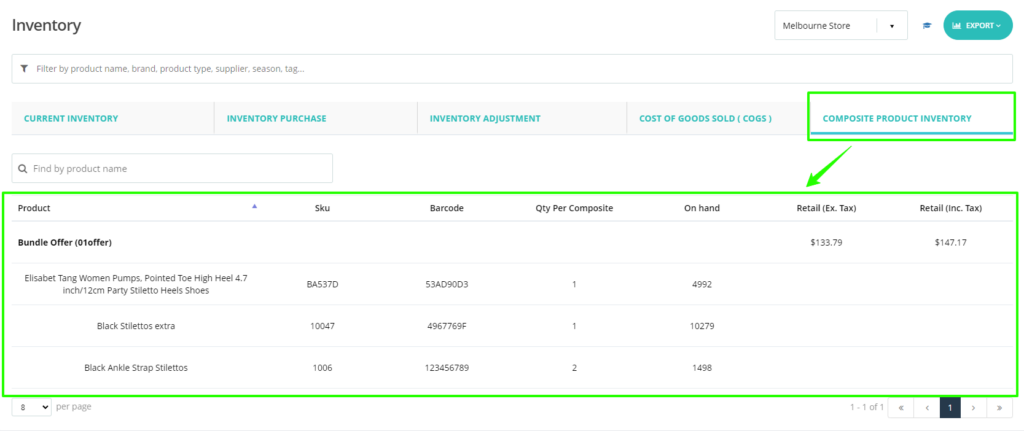
Here’s a new solution to enhance inventory management for composite products. Now, you can effortlessly monitor stock availability for all products within a composite product. This report is available under Reporting > Inventory> Composite Product Inventory.

This report offers a detailed summary of composite products, listing each product along with its current inventory status. This functionality ensures that you have clear visibility into the availability of individual items required for composite products, facilitating efficient stock monitoring and management.

By providing this comprehensive overview, we aim to simplify the process of ensuring all necessary components are in stock when fulfilling orders for composite products. This enhancement reflects our commitment to enhancing operational efficiency and supporting seamless inventory control within our platform.

Reminder email for purchase orders

(Supported plan: Hike Plus)

We are excited to enhance your experience with a new feature for managing Purchase Orders (POs) in Hike POS.

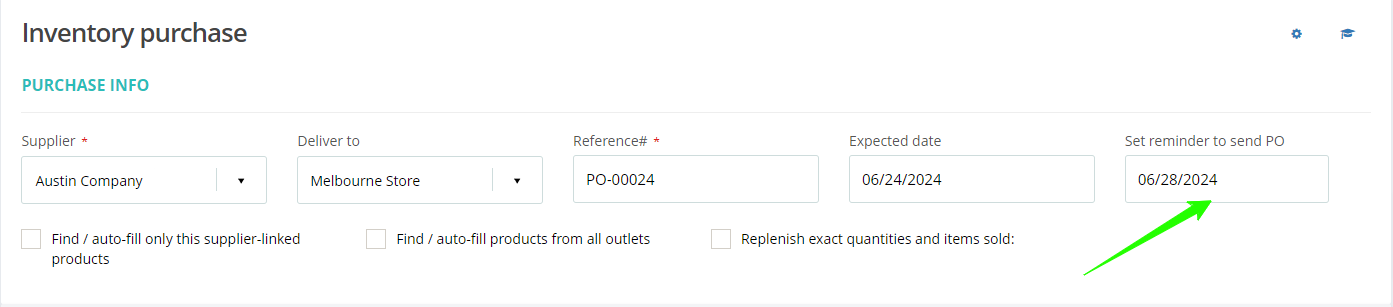
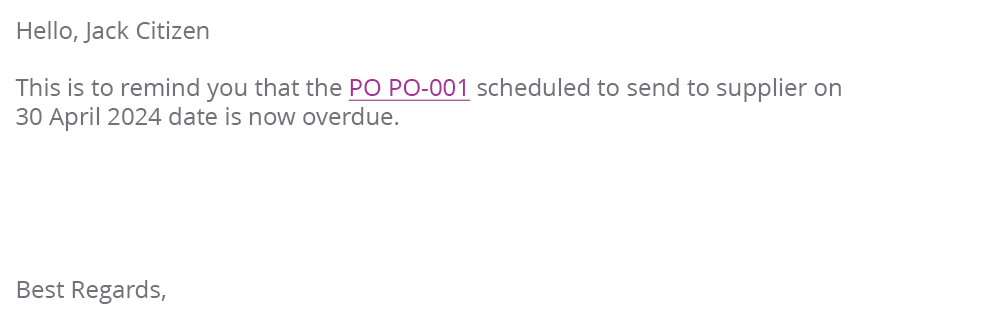
Previously, you could set a reminder date when creating a PO to remind you to send it to the supplier. Building on this functionality, we have now introduced a reminder email feature. This addition sends a reminder email to the Outlet email address, ensuring that you never miss the scheduled date for sending your PO to the supplier.

Email content:

If the outlet email is blank, it will be sent to the Account owner/Super admin email. This is a great feature for you who send multiple Purchase orders to different suppliers and want a reminder for their own records.

Option to activate or deactivate the product variants on the product’s add/edit page

(Supported plan: Hike Plus)

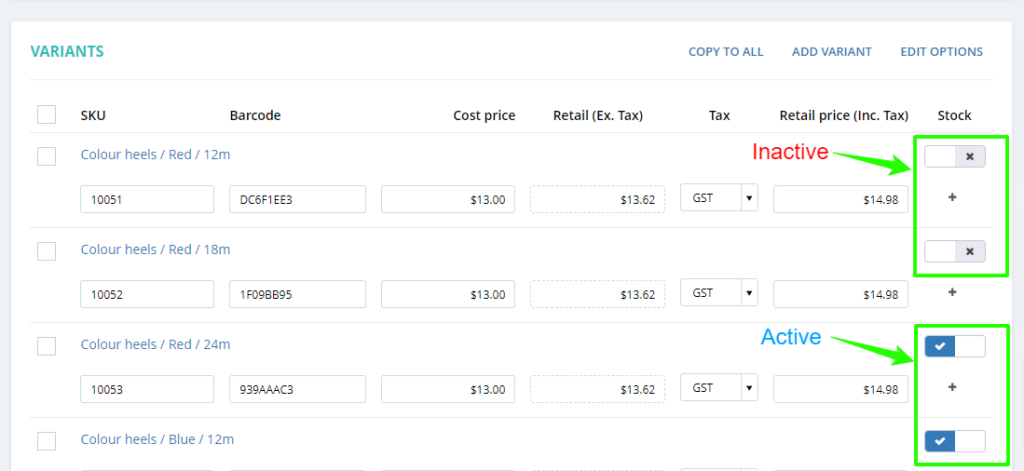
This convenient feature allows you to manage inactive product variants effectively. Now, if there are variants that are no longer available, temporarily not for sale, or you simply wish to deactivate, you can easily mark them as inactive.

Inactive variants will be seamlessly removed from visibility on the POS page, inventory reports, notifications, and purchase orders. This ensures that your operational workflows remain focused on active inventory and current product offerings.

Additionally, to streamline the process further, we’ve integrated support for updating variant statuses via Excel import and export. This capability empowers you to efficiently manage large sets of variants, saving time and ensuring accuracy across your product catalogue.

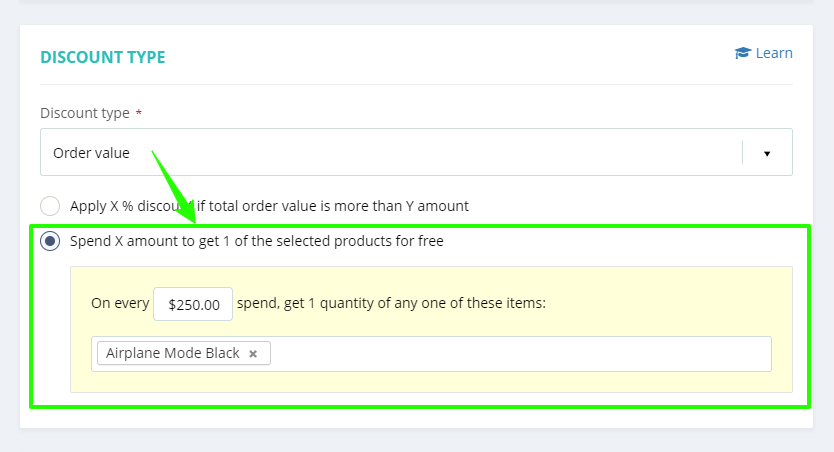
New Discount offer: Spend X amount and get a specific Y product for free

(Supported plan: Hike Plus)

With this new feature, you can now create a discount offer under the Order value discount type where if a customer spends a specific amount on a sale, they will get a designated product for free.

For example:

  • SPEND OVER $80 GET A FREE LAUNDRY BAG
  • SPEND OVER $350 GET A FREE BEACH TOWEL

As always, you can select the applicable days of the week, customer group, and outlet for this discount offer as per your requirement.

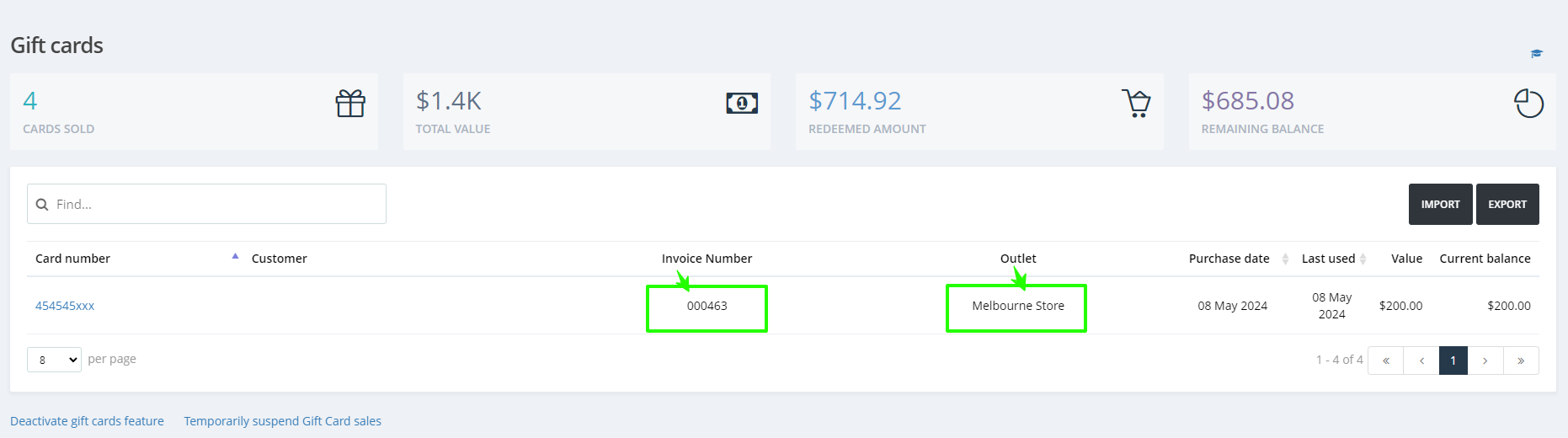
Gift card sales: purchase invoice number and purchase location/store

(Supported plan: Hike Plus)

Based on customer feedback, we’ve enhanced the Gift Cards dashboard by adding two new entities: the Gift Card Purchase Invoice Number and the Purchase Outlet Name. These additions allow you to easily track specific invoices and identify where each gift card was purchased, improving your ability to manage and monitor gift card transactions effectively.

This data will also be available in the Gift card Export file. This will help keep the tab on your Gift card sales based on outlets.

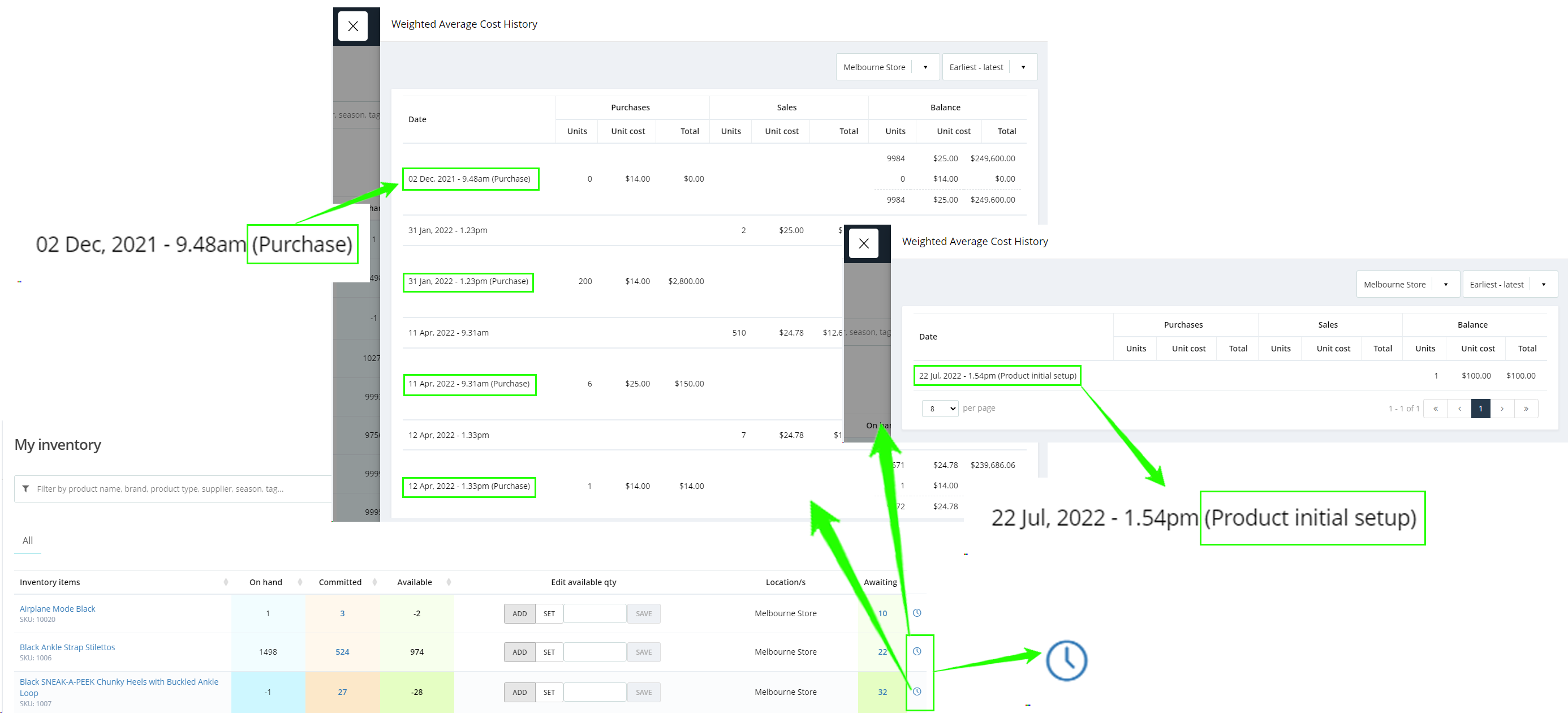
In detail product cost change

(Supported plan: Hike Plus)

The information below displays cost price changes on products in detail, accessible via the “My Inventory” page. It includes cost changes due to:

  • Purchase orders
  • Sales
  • Product initial setup

These includes details of the date, time, and reason for each product price change.

Note: These details are only available if ‘Activate Weighted Average Cost for purchase cost calculation’ is enabled in the General settings.

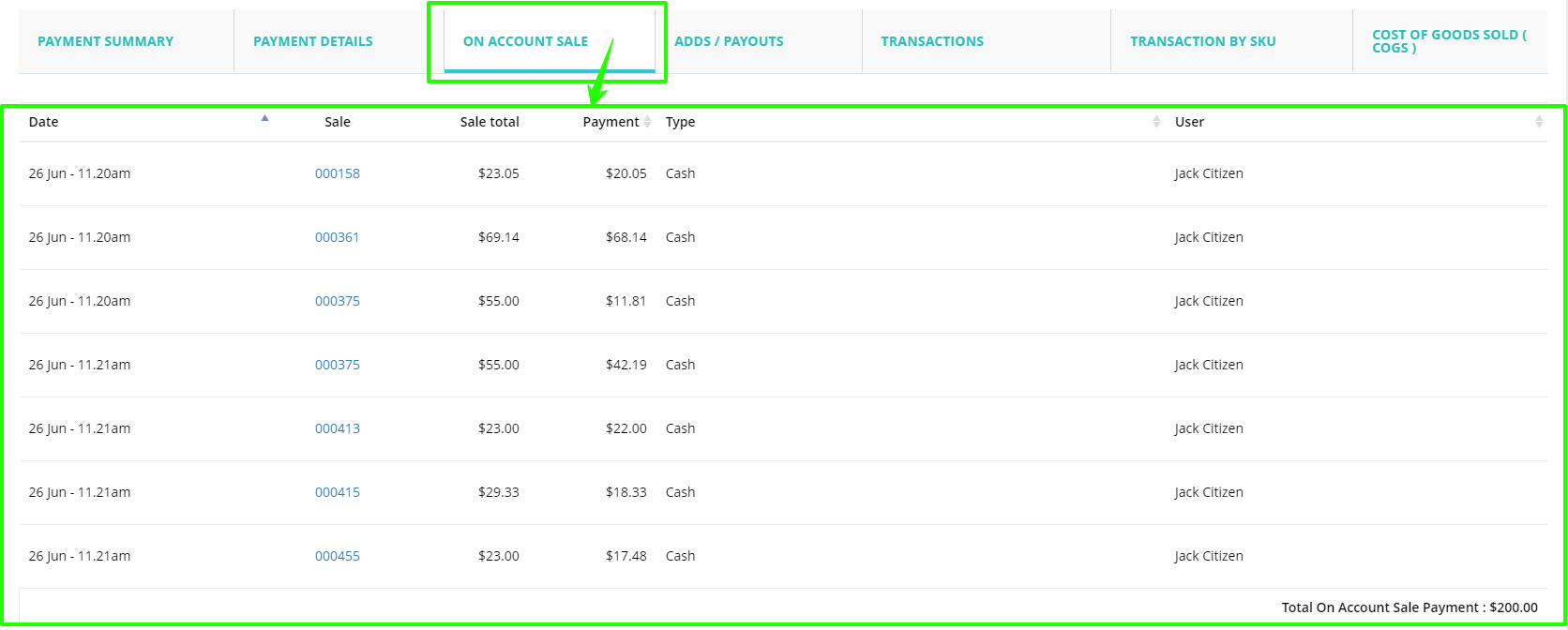
Separate on-account payment report under register report

(Supported plan: All)

As per a valuable suggestion from our clients, they wanted a section on the Register closure report where they can check ALL on-account payments/Bulk payments only.

We have added this section under the Register closure report as On-account sales.

All payments made against the On-account sales, including bulk payment will display in this section.

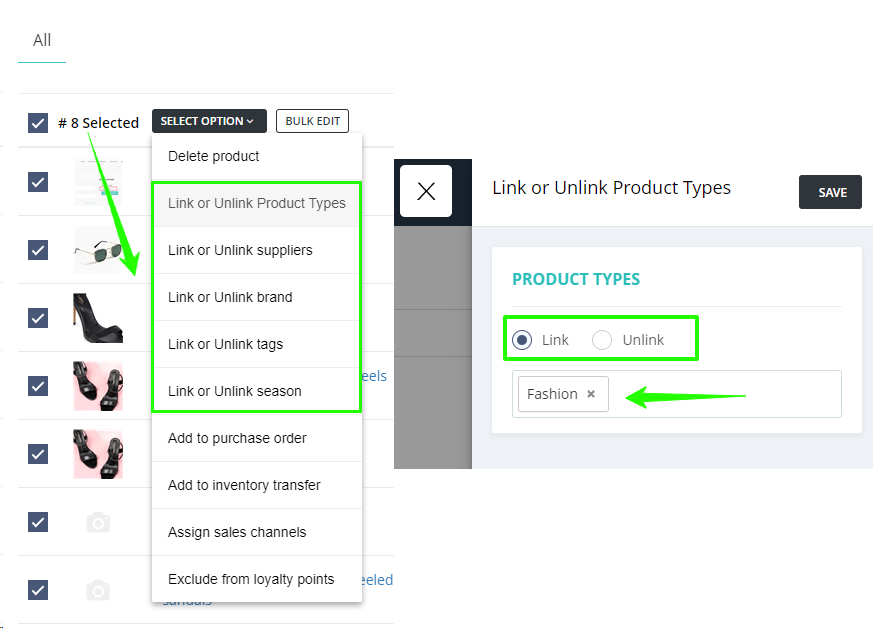
New bulk edit feature: unlink product associations

(Supported plan: All)

Previously, you could Link(associate) Product Types, Tags, Suppliers, Brands, and Seasons in bulk. Now, with our new feature in the Bulk Edit Product option, you can also Unlink(dissociate) these details in bulk. This allows you to easily remove any unnecessary associations from your products. Simply select the entity to be unlinked, and it will be removed from all selected products, streamlining your product management process.

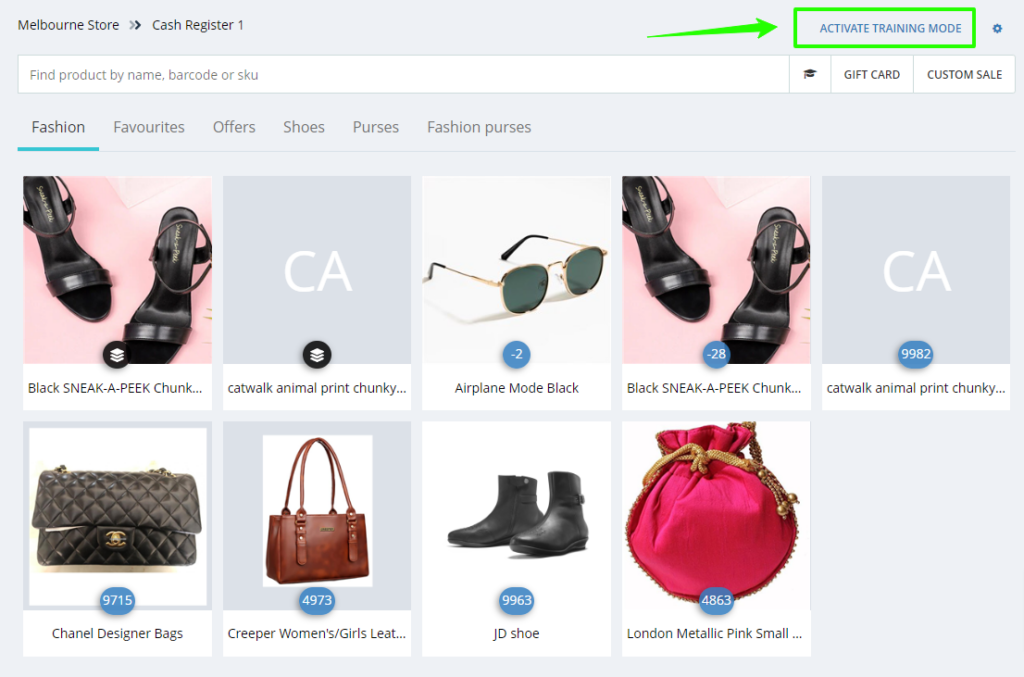
Training mode for testing and demo purpose

(Supported plan: Hike Plus)

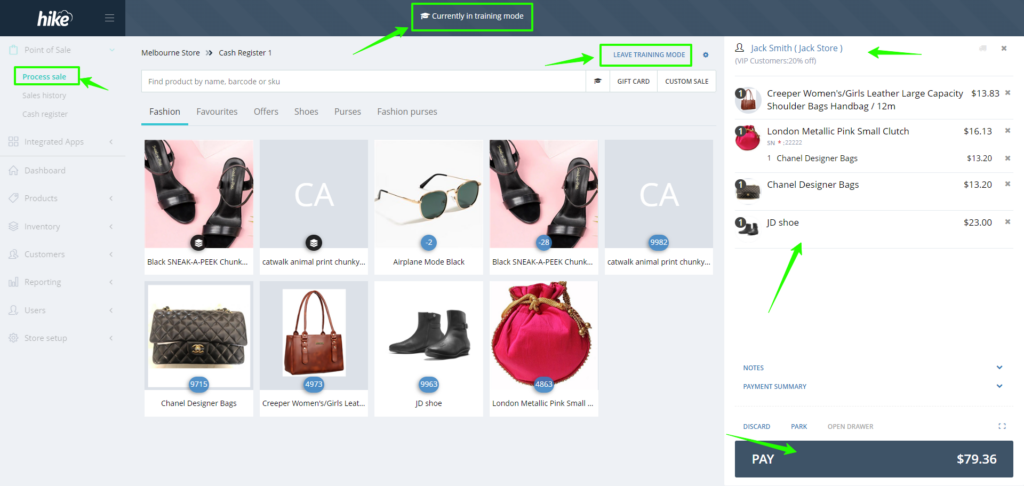
We are excited to introduce training mode, a valuable new feature designed for testing and training your new staff purposes on Hike POS. This feature enables you to conduct dummy sales and familiarize yourself with Hike’s functionality without affecting actual inventory or reporting.

During Training Mode, access to other features such as inventory management, product updates, registers, and customer data is restricted to prevent unintended changes.

Switching back to normal Hike mode is seamless with the leave training mode option available on the POS page. Simplify and enhance your staff training experience with confidence – Hike has you covered!

Report for products and customers with no transactions

(Supported plan: Hike Plus)

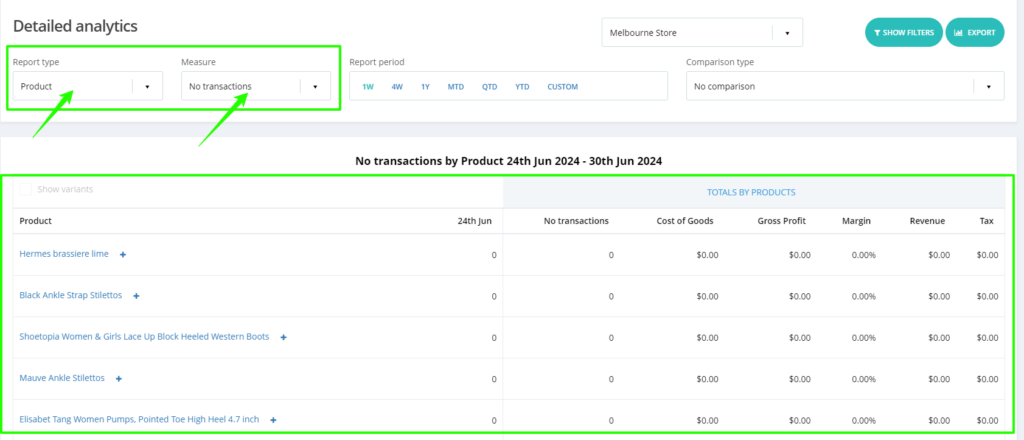
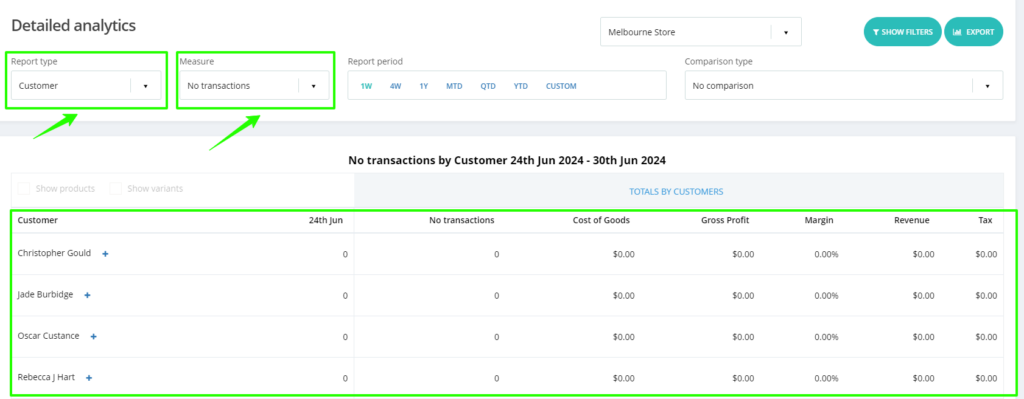
Based on customer feedback, we’ve introduced two new reporting filter options in the Detailed Analytics report:

  • Products with No Transactions: Easily view a list of products that have not been sold in your store during a specified period.
  • Customers with No Transactions: Identify customers who have not made any purchases from your store within a specified period.

This is required to clean up the product and customer data you can create your ordering and marketing strategy based on this report.

Show the total discount on the receipt

(Supported plan: Hike Plus)

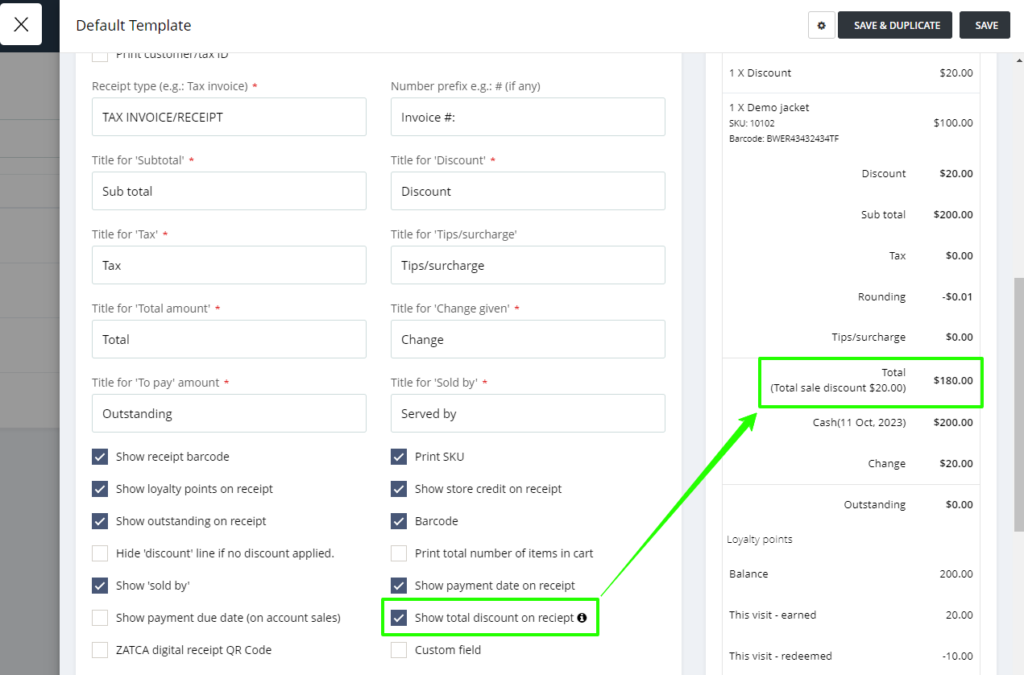
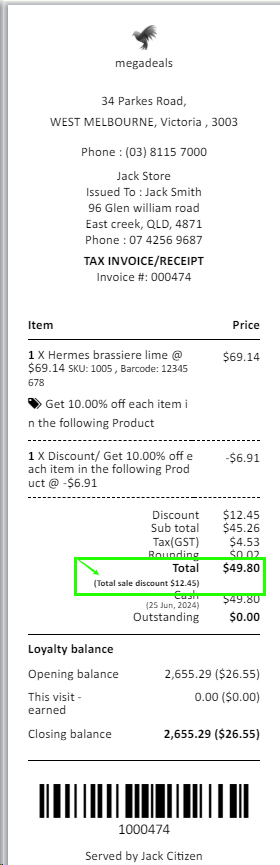
We have added a new option to show the total discount on the receipt. This total discount will include both: sales(order) levels discount and product level discount.

When this option is selected, you will be able to see the total discount on the receipt.

In case no discount is applied, this field will be hidden. Customers will be able to see all the discounts clearly on the receipt. This will create a positive impact on the customer experience.

Change the data for all variants with just one click

(Supported plan: All)

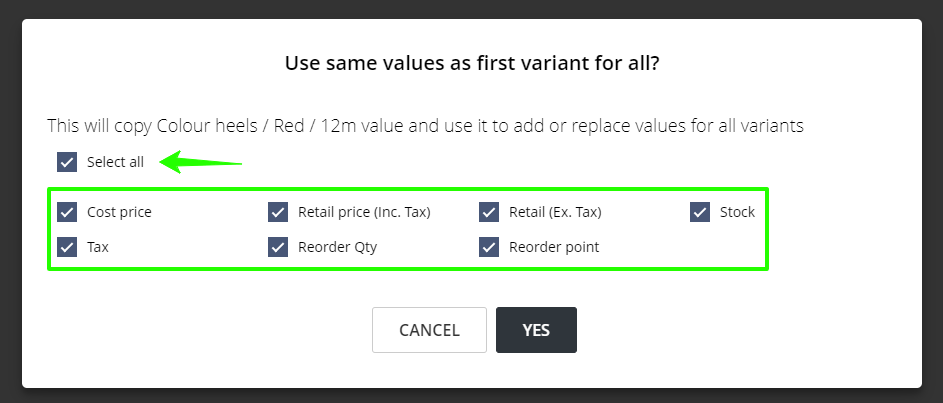
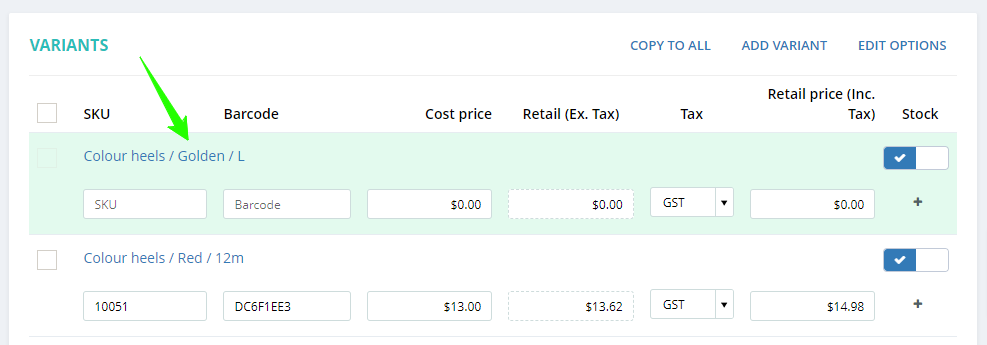
We’re excited to introduce a new feature in product variants: the Select All checkbox. With just one click of Select All, you can effortlessly copy all data from the first variant to all subsequent variants. This streamlined feature simplifies the process of managing product variants, ensuring consistency effortlessly.

With this Select All option, you will save time if you want to replicate data from the first variant to all variants.

Newly added variants are highlighted in green upon creation, providing clear visibility of newly added variants. This visual hint helps you easily distinguish between existing and newly created variants.

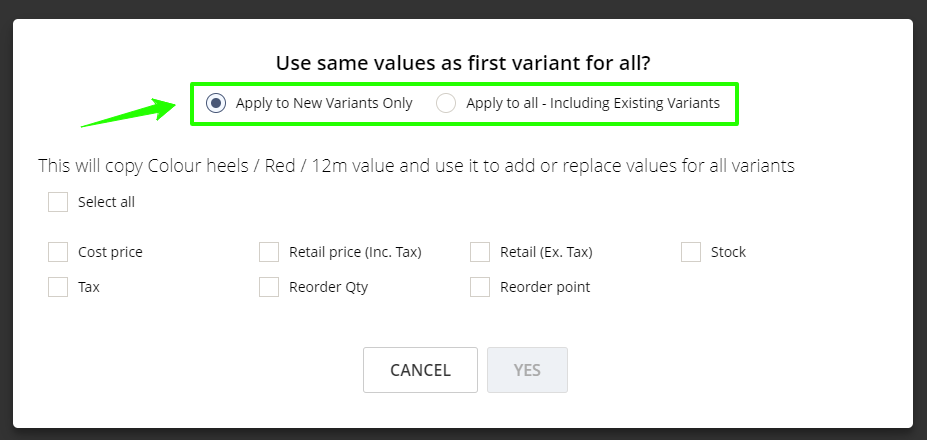
When adding a new variant to an existing variant product, you will get an additional option if you wish to copy this data for the newly created variant or for all existing variants.

New detailed analytics report filter: last sale of the customer

(Supported plan: Hike Plus)

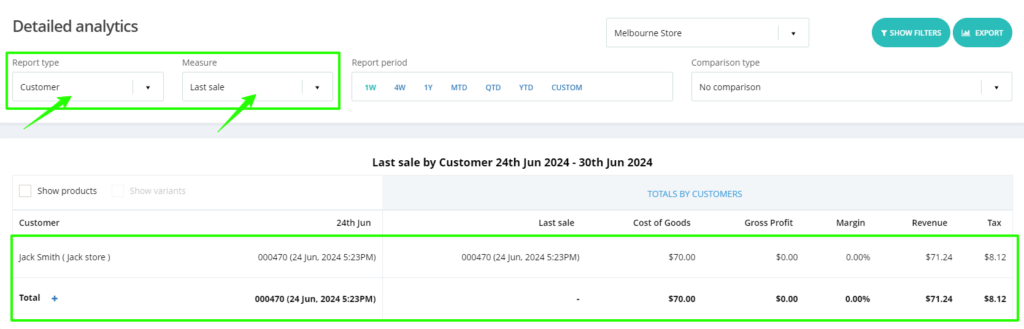
We are introducing a new feature. With this new filter, you can check the customer’s last purchase details. We have added this filter option in the Detailed Analytics report, where you can see the customer’s last sale number, time, and date of the sale.

With this report, clients can reach out to customers who haven’t shopped with them in the last 6-12 months with offers or promotions.

Display category name on the POS page if the image is not available

(Supported plan: All)

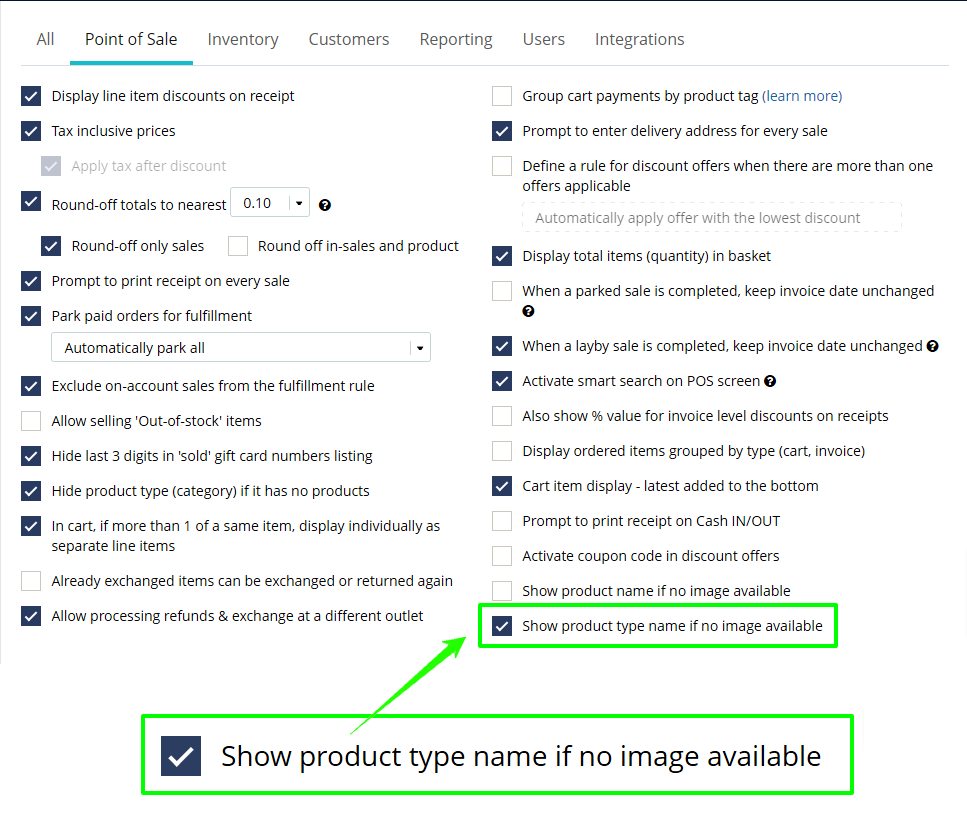
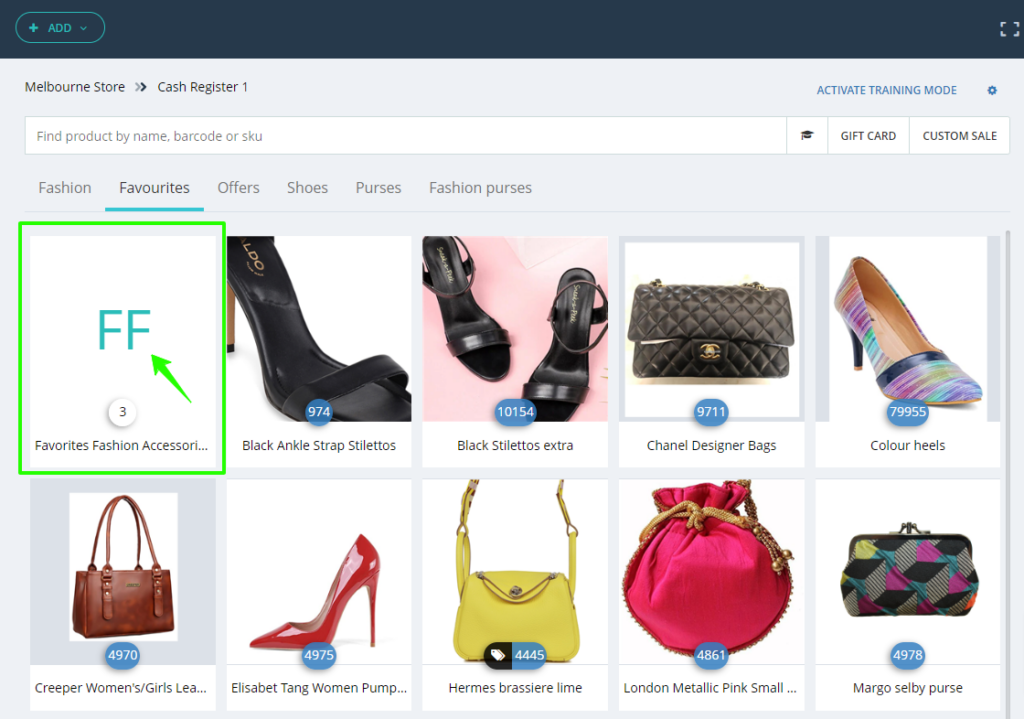
Just like products, we have now introduced a new feature where for Category and sub-categories, you can display the full product type name if the image is not available for the same.

You will need to select the following check box on General settings to make this feature active.

Once selected, you will be able to see the Product type name on the POS page if images are not available.

New payment integration: Zeller payment terminal

We are excited to announce that Hike now supports the integration of Zeller Payment terminals. This integration is available on PC, Mac, iPad, and Android tablets through Linkly Cloud.

Hike and Zeller payment terminals can be easily configured via Linkly Cloud, providing a seamless and efficient payment processing experience for your business.

For more details about Zeller Payment, please connect with your account manager.

We hope these features will help you with your ever-growing business!

We look forward to your continued success into the year and we will be in contact during the year with many additional features to help improve your experience with Hike!

If you want to share your positive experience with Hike with others, please consider leaving us a 5-star review on the platform of your choice. You can use the links below to access the review pages:

•  [Google]

• [Trustpilot]

Your review will help us to reach more customers and grow our community. It will also motivate us to keep working hard and delivering more value to you.

Thank you for your support and loyalty. We appreciate you being a part of our Hike family.

That’s a wrap for this month! Catch you again soon. 🚀

Get started today

Ready to get started with Hike?

Try Hike free for 14 days. Instant access, no credit card, no risk.

  • 14-day free trial
  • No credit card
  • Cancel anytime